
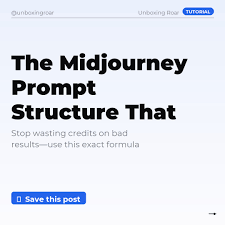
The best Midjourney prompt formula uses a clear structure. Start with the subject. Add descriptive details and actions. Define the style, lighting, and mood. Specify technical aspects like aspect ratio. Using this method helps Midjourney understand your vision precisely, leading to better results.
Understanding the Core of a Midjourney Prompt
A Midjourney prompt is like giving instructions to a very talented artist. This artist can create anything you imagine, but you need to tell them exactly what you want. If you’re vague, the artist might guess, and the result won’t be what you hoped for. The key is to be specific yet concise.
Midjourney interprets your text and turns it into a visual. Think of it as a conversation. You speak, and Midjourney shows you a picture. The better your “speaking” (your prompt), the better its “showing” (the image).
There are many things you can tell Midjourney. You can describe people, places, objects, and even feelings. You can also tell it about colors, textures, and the overall look you want. It’s a powerful tool that responds to a wide range of ideas.
My First “Oh No” Moment with Prompts
I remember my early days with AI art tools. I’d seen amazing images and thought, “I can do that!” I typed something like “a cat in a hat.” The results were okay, but they weren’t what I saw in my head. The cat might have been a dog. The hat might have been a crown. It was amusing but not helpful for a specific project.
One time, I was trying to create a dreamy forest scene for a book cover. I typed “magical forest.” I got a picture of a forest, yes, but it felt too bright, too ordinary. There was no magic, no sense of wonder. I felt a knot of disappointment. My vision was so clear, but the AI just couldn’t grasp it. I spent hours tweaking the words, adding “enchanted,” “glowing,” “mystical.” Some results got closer, but it felt like shooting in the dark. This struggle is what led me to really dig into how prompts work.
The Simple Midjourney Prompt Formula
Let’s break down a reliable way to build your prompts. This formula helps you organize your thoughts and ensure you cover all the important aspects. It’s not a rigid rule, but a helpful guide.
The basic structure looks like this:
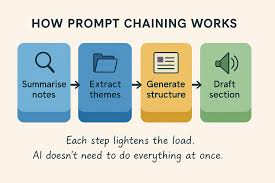
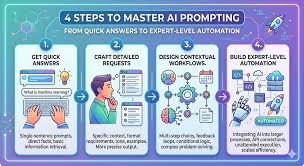
Subject + Description + Style + Lighting/Mood + Technical Details
Let’s go through each part.
1. Subject: What is the Main Thing?
This is the absolute core of your prompt. What is the central focus of your image? Be as clear as possible.
Examples:
A majestic dragon
A cozy bookstore
A futuristic city skyline
A single red rose
If you have multiple subjects, list them clearly. For instance, “A knight fighting a goblin” is better than just “fight.”
2. Description: Add Details and Actions
Now, tell Midjourney more about your subject. What is it doing? What does it look like? What are its key features? This is where you add personality and context.
Think about:
Appearance: Colors, textures, size, specific features (e.g., “with shimmering scales,” “worn leather bindings,” “gleaming chrome towers,” “dewdrops on petals”).
Actions: What is the subject doing? (e.g., “soaring through the clouds,” “filled with customers,” “bustling with flying cars,” “wilting slightly”).
Setting: Where is it? (e.g., “on a mountain peak,” “on a quiet street,” “at dawn,” “in a vase on a wooden table”).
Combining Subject and Description:
“A majestic dragon with emerald green scales, soaring through stormy clouds.”
“A cozy bookstore with warm, inviting light, stacked high with old books.”
“A futuristic city skyline at dawn, with towering chrome buildings and flying vehicles.”
“A single red rose, its petals unfurling, with a single dewdrop on one petal.”
3. Style: The Artistic Look
This is crucial for defining the aesthetic. Do you want a photograph, a painting, a sketch? What art movement should it resemble?
Consider:
Art Mediums: “oil painting,” “watercolor,” “pencil sketch,” “digital art,” “photography,” “3D render.”
Art Styles/Movements: “impressionism,” “surrealism,” “art nouveau,” “cyberpunk,” “steampunk,” “minimalist,” “baroque.”
Artist Inspiration: “in the style of Van Gogh,” “inspired by Hayao Miyazaki,” “like a Tim Burton film.” (Be mindful of copyright and ethical use here.)
Visual Qualities: “cinematic,” “flat design,” “pixel art,” “cartoonish,” “realistic.”
Examples of Style in Prompts:
“A majestic dragon with emerald green scales, soaring through stormy clouds, cinematic digital art.”
“A cozy bookstore with warm, inviting light, stacked high with old books, impressionist oil painting.”
“A futuristic city skyline at dawn, with towering chrome buildings and flying vehicles, cyberpunk aesthetic.”
“A single red rose, its petals unfurling, with a single dewdrop on one petal, macro photography.”
4. Lighting & Mood: Setting the Atmosphere
How do you want the image to feel? Lighting plays a huge role in this.
Think about:
Lighting Types: “golden hour light,” “dramatic spotlight,” “soft ambient glow,” “moonlit,” “neon lights,” “backlit,” “rim lighting.”
Mood: “peaceful,” “chaotic,” “melancholy,” “joyful,” “mysterious,” “eerie,” “vibrant,” “calm.”
Color Palettes: “monochromatic blue,” “vibrant rainbow colors,” “sepia tones.”
Adding Lighting and Mood:
“A majestic dragon with emerald green scales, soaring through stormy clouds, cinematic digital art, dramatic lightning illuminating the scene, epic and powerful mood.”
“A cozy bookstore with warm, inviting light, stacked high with old books, impressionist oil painting, soft window light, comforting and nostalgic atmosphere.”
“A futuristic city skyline at dawn, with towering chrome buildings and flying vehicles, cyberpunk aesthetic, neon glow from street level, energetic and bustling mood.”
“A single red rose, its petals unfurling, with a single dewdrop on one petal, macro photography, soft morning light, delicate and serene mood.”
5. Technical Details: The Finishing Touches
These are often added at the end using parameters. They control aspects like aspect ratio, version of Midjourney, and stylization.
Common Parameters:
`–ar 16:9` (Aspect Ratio: widescreen)
`–ar 1:1` (Aspect Ratio: square)
`–ar 9:16` (Aspect Ratio: vertical/phone screen)
`–v 6.0` (Midjourney Version 6)
`–style raw` (Less opinionated, more literal)
`–s 750` (Stylize value: 0-1000, higher means more artistic interpretation)
`–chaos 50` (Adds variety to initial grid)
Putting it all together with parameters:
“A majestic dragon with emerald green scales, soaring through stormy clouds, cinematic digital art, dramatic lightning illuminating the scene, epic and powerful mood –ar 16:9 –v 6.0”
“A cozy bookstore with warm, inviting light, stacked high with old books, impressionist oil painting, soft window light, comforting and nostalgic atmosphere –ar 3:2 –v 6.0”
“A futuristic city skyline at dawn, with towering chrome buildings and flying vehicles, cyberpunk aesthetic, neon glow from street level, energetic and bustling mood –ar 16:9 –v 6.0 –style raw”
“A single red rose, its petals unfurling, with a single dewdrop on one petal, macro photography, soft morning light, delicate and serene mood –ar 1:1 –v 6.0”
This structured approach ensures you don’t forget important elements. It moves from the general to the specific, guiding Midjourney effectively.
The Power of Negative Prompts
Sometimes, you know what you don’t want even more clearly than what you do want. This is where negative prompts shine. They tell Midjourney what to exclude from the image.
You use the `–no` parameter for this.
Examples:
`–no text` (to avoid random words appearing)
`–no blurry` (to ensure sharpness)
`–no duplicate` (if you don’t want multiple subjects when you only asked for one)
`–no people` (if you want an empty landscape)
`–no oversaturated colors` (if you want a muted palette)
Integrating negative prompts:
“A majestic dragon with emerald green scales, soaring through stormy clouds, cinematic digital art, dramatic lightning illuminating the scene, epic and powerful mood –ar 16:9 –v 6.0 –no text, blurry background”
“A cozy bookstore with warm, inviting light, stacked high with old books, impressionist oil painting, soft window light, comforting and nostalgic atmosphere –ar 3:2 –v 6.0 –no modern furniture, bright overhead lights”
Negative prompts are incredibly useful for refining your output and avoiding common AI artifacts.
A Personal Journey with Style and Detail
I was trying to create a specific type of portrait: an old wizard in his study. I wanted it to feel very rich and detailed, like a classic fantasy illustration. My first few attempts were too generic. The wizard looked okay, but the study was bland.
I realized I was missing the “style” and “description” elements for the environment. I went back and added details like “ancient scrolls scattered on a dark wooden desk,” “glowing runes on the wall,” and “a dusty, leather-bound tome open.” For style, I tried “classic fantasy illustration, richly detailed, inspired by Frank Frazetta.” Then, for mood, “warm candlelight casting long shadows, mysterious and wise atmosphere.”
The results were dramatically better. The wizard was now surrounded by the very essence of arcane knowledge. The lighting made the scene come alive. It showed me that every part of the prompt formula contributes to the final image. Even small details can make a world of difference in how Midjourney interprets your vision.
When Normal Is Not Enough: Exploring Variations
Midjourney often gives you four options for each prompt. You can then upscale one of these images to get a larger version or use the “V” buttons to create variations of a specific chosen image. This is where serendipity often happens.
Understanding Upscaling and Variations
Upscaling: Takes one of the four generated images and makes it bigger and more detailed.
Vary (Subtle): Creates new images that are very similar to the chosen one, with slight differences.
Vary (Strong): Creates new images that are more different from the chosen one, exploring a wider range of possibilities.
These options are powerful. If you like a general direction but want to see more options within that theme, the “Vary” buttons are your best friend. I often find that one of the variations will have a spark of brilliance that I hadn’t even thought of.
The ‘Cosmic Cat’ Experiment
I once made a prompt for “a cat floating in space.” I got decent results, but one of the variations had the cat wearing a tiny astronaut helmet. This wasn’t something I’d asked for, but it looked amazing! It made me realize that sometimes, the AI can surprise you with creative additions. This led me to explore adding specific accessories or outfits to subjects more often.
Infographic-Style Section: The Prompt Building Blocks
Key Prompt Components Explained
Subject: The main focus (e.g., ‘a bird’)
Description: What it looks like, does, or where it is (e.g., ‘a hummingbird hovering near a bright flower’)
Style: Artistic medium or genre (e.g., ‘digital painting, photorealistic’)
Lighting/Mood: Atmosphere and light quality (e.g., ‘golden hour light, serene’)
Parameters: Technical controls like –ar (aspect ratio) and –v (version)
Negative Prompts: What to exclude using –no
Real-World Context: When and Where to Use This Formula
This prompt formula isn’t just for art enthusiasts. It’s useful for anyone wanting to create visuals for:
Marketing: Eye-catching social media posts, website banners, or ad creatives.
Storytelling: Illustrations for books, comics, or personal projects.
Design: Concept art, mood boards, or unique textures.
Education: Visual aids to explain concepts.
Personal Enjoyment: Just for fun and creative exploration!
Consider the environment you want your image to inhabit. Is it an urban setting? A natural landscape? An abstract space? Describing the environment helps ground your subject.
For example, “A lonely robot sitting on a dusty alien planet” paints a different picture than “A cheerful robot helping a child in a bright park.” The context shapes everything.
What This Means for You: Refining Your Vision
Knowing this formula helps you take control. Instead of hoping for a good result, you’re guiding Midjourney towards your desired outcome.
When Is Your Prompt “Normal”?
A “normal” prompt gets you a decent, recognizable image. It might have the subject you asked for, but lack specific mood, style, or detail. This is where most beginners start.
When Should You Worry About Your Prompt?
You should worry if your prompts consistently produce images that are:
Completely unrelated to your request.
Full of unwanted artifacts (like extra limbs or distorted faces).
Lacking any sense of aesthetic or mood.
This often means your prompt is too vague, or you’re missing key descriptive words.
Simple Checks for Better Prompts
Read it aloud: Does it flow like a description?
Is your subject clear?
Have you specified a style or mood?
Are you using `–no` for things you definitely don’t want?
If you can answer yes to these, your prompt is likely on the right track.
Quick Fixes & Tips for Prompting
Here are some quick tips to improve your prompts on the fly:
Be Specific with Colors: Instead of “blue,” try “deep sapphire blue” or “sky blue.”
Use Adjectives Wisely: Words like “ancient,” “gleaming,” “ethereal,” “gritty” add a lot.
Experiment with Camera Angles: Try “low angle shot,” “overhead view,” “close-up,” “wide shot.”
Don’t Overload: While detail is good, too many conflicting ideas can confuse the AI. Start simpler and add complexity.
Use Reference Artists/Styles: If you admire a certain look, try mentioning it.
Frequent Questions About Midjourney Prompts
What is the most important part of a Midjourney prompt?
The subject is the most important part. Midjourney needs to know what the main focus of the image should be before anything else.
How do I make my Midjourney images look more realistic?
To get realistic images, use terms like “photorealistic,” “high detail,” “8k resolution,” and specify camera types like “DSLR photo” or “macro lens.” Also, describe natural lighting.
Can I use multiple styles in one prompt?
Yes, you can. For example, you could try “a portrait in the style of Art Nouveau and Cyberpunk.” Midjourney will try to blend these elements. Sometimes it works well, other times it might be a bit mixed.
What is the difference between –v 5.2 and –v 6.0?
Midjourney v6.0 is the latest version. It generally understands prompts more literally, allowing for more natural language. It also has improved coherence and detail compared to older versions like v5.2.
How can I create a specific mood in my image?
Use descriptive words for mood and lighting. For example, “eerie,” “suspenseful,” “joyful,” or “calm.” Combine this with lighting descriptions like “moonlit,” “sun-drenched,” or “shadowy” to enhance the mood.
Why does Midjourney add things I didn’t ask for?
Midjourney tries to be creative and fill in gaps. If your prompt is too brief or lacks detail, it might make its own interpretations. Using negative prompts (`–no`) can help prevent unwanted elements.
Conclusion
Mastering Midjourney prompts is an ongoing adventure. By using a structured formula—Subject, Description, Style, Lighting/Mood, and Technical Details—you can move from random attempts to intentional creations. Remember the power of negative prompts and the creative possibilities of variations. With practice, you’ll develop an intuitive feel for crafting prompts that truly bring your artistic visions to life. Happy prompting!





Leave a Reply