


Sometimes, getting an AI to do exactly what you want feels like trying to explain a complicated idea to someone who speaks a different language. You try one way, then another, and still, the result is just. off.
It’s frustrating, right? Especially when you know the AI could do better. That’s where understanding how to orchestrate your prompts comes in.
It’s like becoming the conductor of an orchestra, guiding each instrument to play its part perfectly. This guide will help you do just that.
Prompt orchestration is the art of combining multiple AI prompts into a single, coherent sequence. This process allows you to break down complex tasks, refine outputs, and guide AI models toward more specific, creative, and accurate results. It’s about building a conversation with the AI, step-by-step, to achieve your ultimate goal.
What is Prompt Orchestration?
Think of a complex task, like writing a short story or planning a detailed trip. You wouldn’t just ask for the whole thing at once. You’d likely break it down into smaller pieces.
Prompt orchestration does the same for AI. It involves designing a series of prompts that build upon each other. The output from one prompt often becomes the input or context for the next.
This creates a flow, guiding the AI through stages of thought or creation.
Why is this helpful? Because large language models (LLMs) are powerful but can get overwhelmed. A single, long, complicated prompt can lead to unfocused or generic answers.
By breaking it down, you give the AI clearer instructions at each step. This helps it to stay on track and deliver results that are much closer to what you envision. It’s about control and precision.
My First “Orchestration” Moment
I remember vividly working on a creative writing project. I wanted to describe a bustling medieval marketplace. I spent hours crafting one giant prompt, listing every detail I could think of: sights, sounds, smells, the types of people, the goods being sold.
I hit enter, eagerly awaiting my masterpiece. What I got back was a jumbled mess. It mentioned a blacksmith, a baker, and a farmer, but the descriptions were bland and disconnected.
It felt like the AI just picked a few keywords and threw them together randomly. I was so disappointed. I almost gave up on using AI for creative writing altogether.
That was until I realized I was asking for too much at once. The next day, I decided to try a different approach. I started with a simple prompt: “Describe the general atmosphere of a busy medieval marketplace.” The output was okay, but it lacked specific sensory details.
Then, I used the AI’s response to craft a second prompt: “Based on that atmosphere, describe the specific sounds you might hear, focusing on vendor calls and animal noises.” This gave me much richer detail. I continued this, adding prompts for smells, then for specific interactions. Each prompt was simpler, but by linking them, the final result was far more vivid and coherent than my first attempt.
It was a lightbulb moment for me. I saw how breaking down the task made the AI’s output so much better. This was the beginning of my journey into prompt orchestration.
Why Orchestrate Your Prompts?
Better Control: You guide the AI step-by-step. This means less guesswork and more predictable results.
Increased Accuracy: Complex requests are broken down, reducing errors. Each part gets focused attention.
Enhanced Creativity: You can steer the AI’s creative process. Think of it like sketching before painting.
Efficiency: While it seems like more work, it saves time by avoiding revisions of poor initial outputs.
The Building Blocks: Core Orchestration Techniques
At its heart, prompt orchestration is about building a conversation. You start with a broad idea and then refine it. There are a few key ways people do this.
One common method is iterative refinement. You start with a basic prompt. The AI gives you a response.
You then use that response, or parts of it, to create a new prompt that asks for more detail or a specific change. For example, if you ask for a recipe and it’s missing a key ingredient, your next prompt could be, “Add a source of protein to that recipe.”
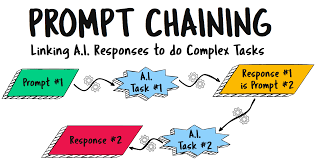
Another technique is chaining. This is where the output of one prompt directly feeds into the input of the next. You might ask the AI to summarize a document, and then immediately ask it to explain the summary in simpler terms, or to identify key action items from the summary.
The summary acts as the bridge between the two prompts.
Sometimes, you’ll use conditional prompting. This is more advanced. It means your prompt might include instructions like, “If the previous answer was too technical, explain it again more simply.” This requires the AI to evaluate its own previous output before generating the next.
Most modern LLMs can handle this to some degree.
Then there’s role-playing. You can tell the AI to act as a specific persona. For example, “Act as a marketing expert and review this product description.” You can then follow up with, “Now, act as a customer who is skeptical and tell me what concerns you have.” This layered approach helps explore different angles.
Finally, template-based orchestration is common for developers. They create pre-defined prompt structures where specific pieces of information can be slotted in. This ensures consistency and efficiency for recurring tasks.
Simple Chaining Example
Prompt 1: “List five popular fruits.”
AI Output 1: Apples, Bananas, Oranges, Grapes, Strawberries.
Prompt 2: “For each of those fruits, give one fun fact.”
AI Output 2:
- Apples: A single apple contains about 10,000 times more plant-based chemicals than your body’s cells.
- Bananas: Bananas are technically berries.
- Oranges: Oranges are not naturally occurring; they are a hybrid of two other fruits.
- Grapes: It takes about 70 grapes to make one pound of raisins.
- Strawberries: They are the only fruit with seeds on the outside.
This is a basic example of how the second prompt uses the information from the first to create a more detailed and interesting response.
When to Use Prompt Orchestration
You might wonder, “When is this actually needed?” It’s not for every simple question. If you want to know “What is the capital of France?”, a single prompt is perfect. But when your task involves multiple steps, requires specific nuance, or demands a structured output, orchestration shines.
Consider content creation. If you’re writing a blog post, you might first ask the AI to generate an outline. Then, you’d prompt it to write an introduction based on a specific point in the outline.
Next, you’d ask it to flesh out a particular section with supporting details or examples. You might even ask it to rewrite a paragraph in a more engaging tone. Each step builds on the last.
For coding, orchestration is also key. You might ask the AI to write a function for a specific purpose. Then, you could ask it to add error handling.
Following that, you might prompt it to write unit tests for the function. This layered approach ensures that your code is not only functional but also robust and well-tested.
Even for simple things like planning a meal, orchestration can help. First, “Suggest a healthy dinner recipe using chicken and broccoli.” Then, “Now, create a shopping list for that recipe.” Or, “Given that recipe, suggest a side salad that would pair well with it.”
The core idea is to match the complexity of your request to the complexity of your prompting strategy. If the task has distinct phases or requires different types of information, orchestration is your best friend.
Areas Where Orchestration Shines
Long-Form Content: Blog posts, articles, e-books, scripts.
Complex Data Analysis: Summarizing reports, identifying trends, extracting specific insights.
Creative Projects: Storytelling, poetry, song lyrics, character development.
Code Generation: Writing functions, debugging, creating tests.
Structured Planning: Travel itineraries, business plans, event schedules.
Learning & Understanding: Breaking down complex topics into digestible parts.
Deep Dive: Designing Your Orchestration Flow
Creating an effective prompt orchestration sequence involves careful thought. It’s not just about throwing prompts at the AI. It’s about designing a pathway.
First, define your ultimate goal. What is the final output you want? Be very specific.
“I want a short fantasy story about a dragon guarding a secret.”
Next, break down the goal into logical steps. What are the key stages of achieving this goal? For the story, it might be: 1.
Character introduction. 2. Setting the scene.
3. The dragon’s role. 4.
A conflict or discovery. 5. A resolution.
6. Polishing the language.
Now, design prompts for each step. Start with the first step. Your prompt for step 1 might be: “Generate a compelling introduction for a fantasy story.
Introduce a young, curious elf named Lyra who lives near an ancient, mysterious forest.” Make sure this prompt is clear and specific.
Consider how the output of one step will inform the next. For step 2, your prompt might be: “Using the description of Lyra from the previous output, describe the ancient forest she is about to enter. Focus on its eerie beauty and the sense of hidden magic.” You’re explicitly telling the AI to use the previous information.
Refine and iterate. After you get an output for a step, review it. Does it meet your needs for that stage?
If not, you might need to adjust the next prompt. Maybe the forest description was too dark. Your next prompt could be: “Soften the description of the forest slightly to make it more inviting for Lyra, while still retaining a sense of mystery.”
Manage context. LLMs have a limited memory or “context window.” If your chain of prompts gets very long, the AI might forget earlier parts. You might need to re-include key information from previous steps in later prompts.
For instance, if you’re 5 prompts in, and you want to refer back to Lyra’s initial curiosity, you might need to remind the AI: “Lyra, remember her initial curiosity, feels a pull towards the heart of the forest.”
Use s or variables if you’re automating this. This is more for developers. It’s like fill-in-the-blank prompts.
You might have a template: “Write a character description for a named . They are and .” Then you slot in the words.
Finally, test and optimize. Run your sequence. See where it works well and where it stumbles.
Adjust prompts, add or remove steps, or change the order based on the results. This is an ongoing process of learning and improvement.
Crafting Effective Orchestration Prompts: A Quick Guide
Be Specific: Avoid vague language. State exactly what you need.
Provide Context: Remind the AI of relevant previous information.
Define Roles: Tell the AI who to be (e.g., “Act as a historian”).
Specify Format: Ask for bullet points, tables, or paragraphs as needed.
Give Constraints: Set length limits, tone, or style requirements.
Ask for Action: Use strong verbs like “Generate,” “Summarize,” “Explain,” “Rewrite.”
Real-World Scenario: Building a Travel Itinerary
Let’s walk through a practical example: planning a week-long trip to Japan. This is a task with many variables, perfect for orchestration.
Ultimate Goal: A detailed, day-by-day itinerary for a 7-day trip to Japan, focusing on Tokyo and Kyoto, with a balance of cultural sites, food, and modern attractions. The traveler has a moderate budget.
Step 1: Destination Focus & Duration
Prompt: “Suggest two main cities in Japan for a 7-day trip that offer a good mix of traditional culture and modern life. Briefly explain why each city is a good choice for a first-time visitor.”
AI Output (Example): Tokyo (modern, bustling, diverse attractions) and Kyoto (traditional, temples, gardens). Good mix for first-timers.
Step 2: Initial Itinerary Draft
Prompt: “Based on Tokyo and Kyoto for a 7-day trip, create a preliminary day-by-day itinerary. Allocate 3 days to Tokyo and 4 days to Kyoto. Suggest major activities for each day, keeping in mind a moderate budget and first-time visitor interests.”
AI Output (Example): Day 1 (Tokyo arrival, Shinjuku), Day 2 (Tokyo – Asakusa, Ueno), Day 3 (Tokyo – Shibuya, Harajuku), Day 4 (Travel to Kyoto, Gion), Day 5 (Kyoto – Fushimi Inari, Kiyomizu-dera), Day 6 (Kyoto – Arashiyama Bamboo Grove, Kinkaku-ji), Day 7 (Kyoto departure).
Step 3: Adding Specifics & Budget Considerations
Prompt: “For Day 2 in Tokyo, suggest specific temples or museums in Asakusa and Ueno that are budget-friendly and historically significant. Also, recommend a type of local food to try in that area.”
AI Output (Example): Asakusa: Senso-ji Temple (free). Ueno: Tokyo National Museum (small entry fee). Food: Monjayaki (local savory pancake).
Step 4: Transportation & Logistics
Prompt: “How should one travel between Tokyo and Kyoto efficiently on a moderate budget? What are the pros and cons of the Shinkansen (bullet train) versus other options for this route?”
AI Output (Example): Shinkansen is fast and convenient but more expensive. Buses or domestic flights might be cheaper but take longer. For a 7-day trip, Shinkansen is recommended for time-saving.
Step 5: Refining Activities & Adding Detail
Prompt: “For Day 5 in Kyoto, suggest a specific, lesser-known garden or shrine near Fushimi Inari Shrine that offers a quieter experience. Describe its appeal.”
AI Output (Example): Tofuku-ji Temple, known for its beautiful Zen gardens, especially in autumn. It’s less crowded than Kiyomizu-dera and offers stunning views.
By following this chain, you move from a broad idea to a highly detailed plan. Each prompt hones in on a specific aspect, building a comprehensive itinerary that’s tailored to your needs.
Travel Itinerary Orchestration Checklist
Initial Scope: Duration, destinations, traveler type, budget.
Mode of Transport: Flights, trains, local transport.
Accommodation: Types of lodging, budget focus.
Daily Activities: Cultural, adventure, relaxation, food.
Specific Sites: Temples, museums, landmarks, natural beauty.
Food Recommendations: Local dishes, budget-friendly options, unique experiences.
Logistics: Travel times, booking advice, practical tips.
Advanced Techniques and Considerations
As you get more comfortable with prompt orchestration, you can explore more advanced methods. One significant aspect is managing the AI’s “memory” or context window. Modern LLMs can remember quite a bit, but for very long or complex chains, you might find the AI “forgetting” earlier instructions or context.
To combat this, you can use techniques like context summarization. Periodically, you might ask the AI to summarize the key points established so far. Then, in subsequent prompts, you include this summary as part of the context.
For instance, “Here’s a summary of our story so far: Lyra, a curious elf, is about to enter a mysterious, eerie forest.”
Another technique is prompt templating with external data. This is where developers might use scripts to dynamically generate prompts. Imagine a system that pulls product descriptions from a database and then uses those descriptions to generate marketing copy.
The template might be “Write a compelling social media post for highlighting and .” The script then fills in the bracketed information.
Conditional execution in a sequence can also be powerful. Some platforms or custom setups allow prompts to run only if a previous step met certain criteria. For example, “If the generated summary exceeds 100 words, prompt the AI to shorten it.
Otherwise, proceed to the next step.” This is more about automation and complex workflows.
Meta-prompts are also a thing. This is where you prompt the AI to help you design better prompts. You might say, “I’m trying to get an AI to write a poem about the ocean.
What kind of prompts would be most effective for this task? Suggest different angles and imagery.” The AI essentially helps you strategize your orchestration.
Finally, remember to experiment. The field of AI is constantly evolving. What works best today might be slightly different tomorrow.
Play around with different phrasing, different orderings, and different types of prompts to see what yields the best results for your specific needs.
Advanced Orchestration Tips
Context Management: Re-introduce key context in longer chains.
Modular Design: Break tasks into reusable prompt modules.
Error Handling: Design prompts that anticipate and correct common AI errors.
Feedback Loops: Allow the AI to critique its own output and suggest improvements.
Parameter Tuning: If the platform allows, experiment with temperature or creativity settings between prompts.
Mistakes to Avoid
While prompt orchestration is powerful, it’s easy to fall into common traps. One big one is over-complicating. You don’t need a complex chain for a simple question.
This just wastes time and can confuse the AI.
Another mistake is not providing enough context. If you’re chaining prompts, and you assume the AI remembers everything from five steps ago, you’ll likely be disappointed. Always try to give it the necessary background information for the current step.
Vague follow-up prompts are also a problem. If your first prompt gets you close but not perfect, your next prompt needs to be specific about what needs changing or adding. Instead of “Make it better,” try “Expand on the description of the dragon’s scales, focusing on their color and texture.”
Ignoring the AI’s limitations is crucial. Some tasks are just beyond current AI capabilities, or require a level of common sense or real-world understanding that the AI doesn’t possess. Orchestration can help mitigate this, but it won’t solve fundamental limitations.
Finally, lack of testing and iteration. You won’t get it perfect on the first try. Treat your prompt sequences like any other creative or technical project: they require refinement.
If a step doesn’t work, analyze why and adjust your prompts accordingly.
Common Prompt Orchestration Pitfalls
Too Many Steps: Over-engineering for simple tasks.
Insufficient Context: Assuming AI remembers too much.
Vague Next Steps: Not clearly stating desired changes.
Unrealistic Expectations: Overestimating AI capabilities.
Skipping Iteration: Not testing and refining prompts.
Ignoring Context Window Limits: Losing track in long sequences.
The Future of Prompt Orchestration
As AI models become more sophisticated, the way we orchestrate prompts will likely evolve. We might see AI systems that are much better at inferring context and user intent, requiring less explicit chaining. Tools and platforms will likely emerge that simplify the process, perhaps offering visual interfaces for designing prompt sequences.
We could also see AI agents that can autonomously orchestrate prompts to achieve complex goals. Imagine telling an AI, “Plan my next marketing campaign, including social media, email, and blog content,” and the AI then designs its own sequence of prompts to generate all of that. This is already starting to appear in more advanced AI research.
However, the fundamental principle of breaking down complex tasks into manageable steps will likely remain. Understanding how to guide AI effectively, even with more advanced tools, will be a crucial skill. Prompt orchestration isn’t just a technical trick; it’s a way of thinking about problem-solving with intelligent systems.
It’s about clarity, intent, and structured thinking.
Frequently Asked Questions
What is the main benefit of prompt orchestration?
The main benefit is achieving better control, accuracy, and creativity from AI models. By breaking down complex tasks into a series of smaller, sequential prompts, you guide the AI more effectively. This leads to outputs that are much closer to your intended goals, reducing errors and improving overall quality.
Is prompt orchestration only for developers?
No, absolutely not! While developers might use it for more complex automated workflows, anyone can use prompt orchestration for everyday tasks. If you’re writing a story, planning a trip, or trying to understand a complex topic, breaking your request into steps is a form of prompt orchestration. It’s a practical skill for anyone using AI.
How do I know if I need to orchestrate a prompt?
If your initial prompt doesn’t give you the specific or detailed result you want, or if the task itself has multiple distinct steps (like creating an outline, then writing sections, then editing), it’s a good sign that prompt orchestration will be beneficial. For simple factual questions, it’s usually not necessary.
What is the “context window” of an AI model?
The context window refers to the amount of information (text) that an AI model can “remember” or process at any given time. In prompt orchestration, if your sequence of prompts becomes very long, the AI might start to forget earlier parts of the conversation or instructions. You need to manage this by re-introducing key context.
Can prompt orchestration help with creative writing?
Yes, prompt orchestration is incredibly useful for creative writing! You can use it to build characters, develop plots, describe settings, and refine dialogue. For example, you might first ask the AI to brainstorm character traits, then ask it to write a character bio, and then ask it to create a scenario where that character is introduced.
What’s the difference between chaining and iterative refinement?
Chaining is when the output of one prompt directly becomes the input for the next, creating a linear flow. Iterative refinement is more about taking an output and then asking for specific changes or additions to it, essentially improving on what you already have. They are often used together.
How can I prevent AI from hallucinating or making up facts with orchestration?
Orchestration helps by allowing you to cross-reference information or ask for sources in later prompts. You can also break down a request for facts into smaller, verifiable pieces. If the AI makes a factual error in one step, you can use a subsequent prompt to correct it or ask for verification. Always fact-check critical information.
Conclusion
Learning to orchestrate your prompts is a key step in mastering AI. It transforms you from a passive asker into an active director. By understanding how to break down tasks and guide AI step-by-step, you unlock more precise, creative, and reliable results.
It takes a little practice, but the payoff in terms of better AI output is immense. Start small, experiment, and enjoy the process of creating with AI.






Leave a Reply