

ChatGPT project prompts are specific instructions you give to an AI like ChatGPT. They help the AI understand your goal. Good prompts lead to better project ideas, outlines, content, or code. They unlock the AI’s potential for your specific needs.
Understanding ChatGPT Project Prompts
Think of ChatGPT as a super-helpful assistant. It knows a lot about many things. But it needs you to guide it. A ChatGPT project prompt is your way of guiding it. It tells the AI what you want to achieve. The better your prompt, the better the result. It’s like giving directions to a driver. If you say “go to the store,” they might go to many stores. If you say “go to the nearest grocery store on Main Street,” they’ll get there much faster.
Why are good prompts so important? Because the AI doesn’t guess your thoughts. It works with the words you give it. A vague prompt gets a vague answer. A detailed, clear prompt gets a detailed, clear answer. This is key for any project. Whether you’re writing a book, building a website, or planning an event, the start matters. Getting the AI to give you exactly what you need saves time and frustration. It helps you focus on the big picture of your project.
The core idea is to be specific. What kind of project is it? What is its goal? Who is it for? What kind of output do you expect? Think about all the details. The more information you provide, the more the AI can help you. It’s a partnership. You bring the ideas and direction. The AI brings its vast knowledge and processing power. Together, you can create amazing things. This guide will show you how to build those powerful directions.
My Own Prompt Struggles
I remember when I first started using AI tools. I was so excited! I thought I could just ask anything and get perfect results. I was working on a blog post about healthy eating for busy families. I typed: “Give me ideas for healthy family meals.” ChatGPT gave me a list. It was okay. But it was generic. It wasn’t tailored to families with very little time. I felt a little let down.
The next day, I tried again. I thought, “Okay, what’s my real problem?” My problem was families who were super busy. They needed meals that were quick and easy to pack for lunches or make after a long day. So, I changed my prompt. I said: “I need quick, 15-minute healthy lunch and dinner ideas for busy parents. Focus on recipes that use few ingredients and can be packed for school or work.” This time, the results were much better! I got specific recipes, tips for batch cooking, and ideas for lunches that traveled well. It was a game-changer. That experience taught me the power of a focused prompt. It showed me that the AI could be incredibly powerful, but I had to learn its language.
Crafting Effective ChatGPT Project Prompts
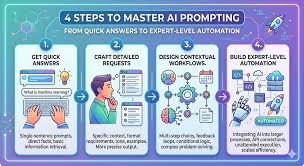
Good prompts are like building blocks. You start with a basic idea and add details. This makes your request clear and useful. Think about these parts when you write your prompt.
1. Define Your Goal Clearly
What do you want to achieve with this project? Are you brainstorming ideas? Do you need an outline? Do you need content written? Or maybe code? Knowing your end goal helps you tell the AI what to aim for.
Example: Instead of “Write about dogs,” try “Write a short, fun story for children about a lost puppy finding its way home.”
2. Provide Context and Background
Tell the AI about your project. Who is it for? What is the topic? What is the tone you want? Is it formal, casual, funny, or serious? The more context, the better the AI can match your needs.
Example: If you’re writing a website description, say “Write a website description for a small bakery. The tone should be warm and inviting. It should highlight our fresh ingredients and artisanal bread.”
3. Specify the Output Format
Do you need a list? An essay? A table? Code? A poem? Tell the AI exactly what kind of output you want. This helps it structure the information correctly.
Example: “Create a step-by-step guide on how to bake sourdough bread. Present it as a numbered list.”
4. Set Constraints and Requirements
Are there word limits? Specific keywords to include? Topics to avoid? Mentioning these helps the AI stay on track and meet all your requirements.
Example: “Write a product description for a new type of eco-friendly water bottle. It must be under 100 words. Include the words ‘sustainable’ and ‘durable’.”
5. Give Examples (If Possible)
If you have an example of what you like, share it. This gives the AI a concrete model to follow. You can describe the style, structure, or content of an example.
Example: “Write a social media post about a new book release. The style should be similar to this example: .”
Types of Prompts for Different Project Needs
Not all projects are the same. So, the prompts you use should change. Here are some common types of project needs and how to prompt for them.
Brainstorming and Idea Generation
When you’re at the very beginning, you just need ideas. You don’t have a clear path yet. Prompts here should be open-ended but focused on a topic.
Brainstorming Prompts
Goal: Get creative ideas.
- Topic-Based: “List 20 unique business ideas for sustainable fashion.”
- Problem-Based: “Suggest innovative solutions for reducing plastic waste in urban areas.”
- Creative Exploration: “What are 10 unusual story concepts that blend sci-fi and historical fiction?”
- For a Specific Audience: “Generate 15 engaging social media campaign ideas for a new vegan cafe targeting young adults.”
Outlining and Structuring Content
Once you have an idea, you need a plan. An outline helps organize your thoughts and content. Prompts here ask for structure.
Outlining Prompts
Goal: Create a project structure.
- Blog Post Outline: “Create a detailed outline for a blog post about the benefits of mindfulness meditation. Include an introduction, 3 main points with sub-points, and a conclusion.”
- Presentation Structure: “Outline a 30-minute presentation on cybersecurity for small businesses. Break it down into logical sections with estimated timings.”
- Book Chapter Plan: “Develop a chapter outline for a mystery novel. The first chapter should introduce the detective and the initial crime scene.”
- Website Structure: “Suggest a sitemap for a local community gardening website. Include main pages and sub-pages.”
Content Creation and Writing
This is where you ask the AI to write text for you. This could be articles, emails, scripts, or marketing copy. These prompts need to be very specific.
Content Creation Prompts
Goal: Generate written text.
- Article Draft: “Write a draft of an article explaining how solar panels work for a homeowner audience. Keep the language simple and avoid technical jargon.”
- Email Draft: “Draft a polite follow-up email to a potential client who has not responded to our proposal. Remind them of the key benefits.”
- Social Media Copy: “Write 3 engaging tweets promoting a new online course on digital photography. Each tweet should be under 280 characters and include a call to action.”
- Website Landing Page Copy: “Write compelling landing page copy for a productivity app. Highlight its key features: task management, calendar integration, and team collaboration.”
Code Generation and Debugging
If your project involves coding, ChatGPT can help. You can ask it to write code snippets or find errors in existing code.
Code Generation Prompts
Goal: Get or fix code.
- Function Creation: “Write a Python function that takes a list of numbers and returns the average.”
- HTML Snippet: “Create an HTML snippet for a responsive navigation bar with a logo on the left and links on the right.”
- Error Identification: “I’m getting an error in this JavaScript code: . The error message is: . What could be the cause?”
- Code Explanation: “Explain what this SQL query does: .”
Real-World Context: Choosing the Right Prompt Style
Let’s think about where and why you’re using ChatGPT for your project. This context really shapes the prompts you need.
For Students: Research and Assignments
Students often use AI for help with essays, reports, or understanding complex topics. The goal here is usually to learn and to produce accurate work. Prompts should focus on clarity and factual information.
Environment: School, university, libraries.
Habits: Students are often under deadlines. They need efficient ways to gather information and structure their writing. They might be learning a new subject.
User Behavior: Students may try to use AI to “write for them.” It’s better to use it as a learning tool, an editor, or a research assistant. Prompts like “Explain in simple terms for a high school student” are great. Or “Provide arguments for and against for a debate paper.”
For Entrepreneurs: Business Planning and Marketing
Business owners and aspiring entrepreneurs can leverage AI for many tasks. From writing business plans to crafting marketing copy, AI can be a valuable partner.
Environment: Offices, home offices, co-working spaces.
Habits: Entrepreneurs are focused on growth, efficiency, and innovation. They need to make quick decisions and reach customers effectively. They might be testing new ideas or optimizing existing processes.
User Behavior: They use AI to save time and money on tasks like market research, social media posting, and ad creation. Prompts should be business-oriented. “Draft a mission statement for a tech startup focusing on AI solutions.” or “Generate 10 taglines for a new artisanal coffee shop.”
For Content Creators: Writing and Media Production
Bloggers, YouTubers, podcasters, and other media creators can use AI to generate ideas, scripts, and promotional materials.
Environment: Home studios, creative spaces.
Habits: Content creators need a constant stream of fresh ideas and engaging content to keep their audience interested. They often work with tight schedules.
User Behavior: They use AI to overcome writer’s block, brainstorm video topics, write podcast outlines, or create catchy social media updates. Prompts could be: “Suggest 5 video ideas for a travel vlogger covering budget European trips.” or “Write a script for a 2-minute explainer video about cryptocurrency.”
What This Means for You: When to Worry About Your Prompts
Most of the time, if you’re not getting what you want, it’s the prompt. It’s not that the AI is broken. It’s just that it needs more specific guidance.
When it’s Normal: It’s totally normal for your first few prompts to be a bit off. You’re learning how to communicate with the AI. If you get an answer that’s not quite right, don’t get discouraged. Just tweak your prompt and try again. Think about what was missing. Was it too vague? Did it lack context?
When to Worry: You might worry if you’ve tried many different prompts, adding more and more detail, and the AI still gives irrelevant or unhelpful answers. This is rare, but it could mean:
The AI is having trouble understanding a very complex or niche topic.
Your request might be impossible or nonsensical.
You might be trying to get the AI to do something it’s not designed for.
Simple Checks:
Are you using clear, simple language?
Is your request specific enough?
Have you given enough context?
Are you asking for something that makes sense?
Quick Fixes and Tips for Better Prompts
Here are some simple tips to make your prompts work better.
- Be Direct: Start with an action verb. “Write,” “Create,” “Explain,” “List,” “Summarize.”
- Add Details: Instead of “Tell me about cats,” say “Tell me about the history of domesticated cats for a 5th-grade report.”
- Use Keywords: If there are specific terms important to your project, include them.
- Break Down Big Tasks: If your project is huge, ask for help in stages. First, get an outline. Then, ask for content for each section.
- Ask for Revisions: You can tell the AI “This is good, but can you make it sound more enthusiastic?” or “Can you shorten this by half?”
- Experiment: Try different ways of asking the same thing. You’ll find what works best for you and the AI.
Frequent Questions About ChatGPT Project Prompts
What is the best way to start a ChatGPT prompt for a project?
The best way is to start with a clear action verb and state your goal. For example, “Create an outline for a project proposal on renewable energy.” or “Brainstorm marketing slogans for a new app.”
How can I get ChatGPT to write in a specific tone?
You can specify the tone directly in your prompt. Say, “Write this in a friendly and casual tone,” or “Use a formal and professional tone.” You can also provide an example of the tone you like.
What if ChatGPT gives me generic answers?
Generic answers usually mean the prompt was too broad. Try adding more specific details about your project, its audience, and what you want to achieve. For instance, instead of “Write about fitness,” try “Write a 500-word article on interval training for beginner runners, focusing on safety and effectiveness.”
Can I ask ChatGPT to help me with my specific job project?
Yes, absolutely! Just describe your job project and what you need help with. Be as clear as possible about the tasks, goals, and any constraints. For example, “I need to create a presentation for my sales team about our new product features. Can you help me outline the key talking points?”
How do I make sure the information ChatGPT provides is accurate for my project?
Always double-check any factual information provided by ChatGPT, especially for academic or critical projects. Use it as a starting point for research. Compare its answers with trusted sources.
What is an LSI keyword and how does it relate to prompts?
LSI (Latent Semantic Indexing) keywords are words and phrases related to your main topic. In prompts, using LSI terms naturally helps ChatGPT understand the nuances of your request. For example, if your main topic is “gardening,” LSI terms like “organic,” “soil,” “vegetables,” or “seasonal planting” can refine the AI’s output.
Final Thoughts
Getting great results from ChatGPT for your projects is all about clear communication. Think of it as a conversation where you lead. The more precise you are with your instructions, the more the AI can help you. Don’t be afraid to experiment and refine your prompts. Each interaction is a chance to learn and get better. Happy prompting!







Leave a Reply