
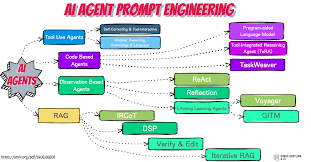
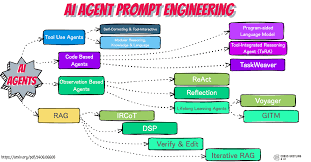
To get the best results from AI agents, use clear, specific, and detailed prompts. Structure your prompts to define the AI’s role, task, context, constraints, and desired output format. Effective prompting unlocks the AI’s full potential for various tasks.
Understanding AI Agent Prompts
An ai agent prompt is like a set of instructions for an AI. It tells the AI what to do. AI agents are programs that can perform tasks.
They might write text, answer questions, or even plan out steps to achieve a goal. Without good prompts, they can’t do their job well.
Think of an AI agent as a very capable but very literal assistant. It will do exactly what you ask. If you don’t ask clearly, you won’t get what you expect.
This is why understanding how to prompt them is so important. It’s not just about asking a question. It’s about crafting a command that guides the AI precisely.
The core idea is to bridge the gap between your intention and the AI’s understanding. AI models learn from vast amounts of data. They recognize patterns.
Your prompt activates these patterns. A well-designed prompt directs the AI to the specific patterns that lead to your desired outcome. This is especially true for more complex tasks where the AI needs to act like an agent, planning and executing steps.
When we talk about AI agents, we mean AI that can take action. This could be booking an appointment, researching a topic and summarizing it, or even managing a simple workflow. For these kinds of tasks, the prompts need to be even more detailed.
They need to define the agent’s persona, its goals, and the rules it must follow.
The goal of a good prompt is to get the AI to act in a certain way. It’s like setting a scene for an actor. You give them their character, their motivation, and the situation.
The actor then performs. An AI agent works similarly. Your prompt provides the script.
Why Prompting AI Agents Matters So Much
Getting prompts right is the key to unlocking AI’s power. It’s not just about efficiency. It’s about getting accurate, useful, and safe results.
A poorly written prompt can lead to misunderstandings, incorrect information, or even unintended actions.
Imagine asking an AI agent to help you plan a trip. If you just say, “Plan a trip,” the AI has no idea where you want to go, when, or for how long. It can’t make helpful suggestions.
But if you say, “Act as a travel agent. Plan a 7-day trip to Italy for two people in September, focusing on historical sites and good food. Budget is $5000.
Provide an itinerary with daily activities and estimated costs,” you’re giving it a clear mission.
This clarity is crucial. It prevents the AI from going off track. It ensures the output aligns with your specific needs.
For complex tasks, like analyzing data or generating creative content, precise prompts are non-negotiable. They guide the AI’s “thinking” process.
Also, the way you phrase a prompt can influence the AI’s tone and style. If you want a friendly, informal response, you can ask for it. If you need a formal, professional report, you specify that too.
This level of control is what makes AI agents so versatile.
In my own work, I’ve seen firsthand how a small change in a prompt can dramatically alter the output. One time, I was working with an AI to draft marketing copy. I initially asked it to “write a catchy ad.” The results were okay, but a bit generic.
When I refined the prompt to “Act as a marketing expert for a new eco-friendly soap brand. Write three short, benefit-driven ad taglines that emphasize natural ingredients and gentle skin care. Target audience is health-conscious millennials.
Use an upbeat and trustworthy tone,” the output was miles better. It was specific, targeted, and exactly what I needed.
The Building Blocks of an Effective AI Agent Prompt
A great prompt isn’t just a string of words. It has structure. Think of it as a recipe.
You need the right ingredients in the right order.
Here are the key parts:
Prompt Structure Essentials
Role: Tell the AI who it should be. (e.g., “Act as a.”)
Task: Clearly state what you want done. (e.g., “Write a summary.”)
Context: Provide background information. (e.g., “Based on the following text.”)
Constraints: Set limits or rules. (e.g., “Keep it under 100 words.”)
Format: Specify how the output should look. (e.g., “As a bulleted list.”)
Let’s break these down a bit more. The role is super important. It sets the perspective for the AI.
Asking an AI to “Act as a doctor” will get you a different response than asking it to “Act as a patient.”
The task must be unambiguous. Avoid vague verbs. Instead of “deal with this,” try “analyze,” “summarize,” “compare,” or “generate.” The more specific your verb, the better the AI can understand the action required.
Context gives the AI the information it needs to perform the task accurately. This might be a piece of text, a set of data, or a description of a situation. Without context, the AI is working blind.
I’ve found that the more relevant context I provide, the more tailored and useful the AI’s response becomes.
Constraints are the guardrails. They tell the AI what not to do, or how to limit its output. This could be word count, tone, specific keywords to avoid, or even the level of detail.
Setting constraints helps keep the AI focused and ensures the output meets your needs.
Finally, format tells the AI how to present the information. Do you want a paragraph? A list?
A table? Specifying this saves you a lot of editing time later. Many users forget this part, but it’s a game-changer for usability.
Examples of AI Agent Prompts in Action
Seeing is believing. Let’s look at some concrete examples of how these prompt building blocks come together for different tasks.
Example 1: Summarizing an Article
Role: Act as a research assistant.
Task: Summarize the following article.
Context:
Constraints: Keep the summary to three key bullet points. Focus on the main findings and implications.
Format: Bulleted list.
This prompt is clear. The AI knows it needs to act like an assistant. Its job is to summarize.
It’s given the text and told exactly how to present the summary and what to focus on. It’s efficient.
Example 2: Generating Email Copy
Role: Act as a marketing copywriter for a small business.
Task: Write a follow-up email to a potential client.
Context: The client inquired about our graphic design services last week. We sent them a proposal yesterday. They haven’t responded yet.
Constraints: The email should be polite, not pushy. Mention the proposal and offer to answer any questions. Keep it under 150 words.
Format: Standard email format with a clear subject line.
Here, the AI takes on a specific persona. It understands the history of the interaction and the goal of the email. The constraints ensure a professional and effective message.
This is much better than just asking “write a follow-up email.”
Example 3: Brainstorming Ideas
Role: Act as a creative consultant.
Task: Brainstorm ten unique blog post ideas.
Context: The blog is about sustainable living for young families.
Constraints: Ideas should be practical and actionable for busy parents. Avoid generic topics like “reduce waste.”
Format: Numbered list with a brief one-sentence description for each idea.
This prompt is designed to spark creativity. By setting the role and context, the AI can generate relevant and specific ideas. The constraints push it beyond the obvious.
I’ve used prompts like this to overcome writer’s block myself.
Advanced Prompting Techniques for AI Agents
Once you’ve mastered the basics, you can explore more advanced ways to prompt AI agents. These techniques can lead to even more nuanced and powerful results.
Few-Shot Prompting
Sometimes, showing is better than telling. Few-shot prompting involves giving the AI a few examples of the input and desired output before asking it to perform the actual task. This helps the AI understand the pattern you’re looking for.
Few-Shot Example: Sentiment Analysis
Task: Classify the sentiment of the following reviews as Positive, Negative, or Neutral.
Examples:
Review: “This product is amazing! I love it.” Sentiment: Positive
Review: “It broke after only a week. Very disappointing.” Sentiment: Negative
Review: “The package arrived on time.” Sentiment: Neutral
New Review: “The customer service was terrible, but the food was delicious.” Sentiment:
By showing the AI examples, you help it learn the specific criteria for each sentiment category. This is incredibly useful for tasks that require a specific judgment or classification.
Chain-of-Thought (CoT) Prompting
This technique encourages the AI to “think out loud.” You prompt it to break down a problem into intermediate steps before giving a final answer. This is especially useful for complex reasoning tasks.
Chain-of-Thought Example: Math Problem
Task: Solve the following problem and show your step-by-step thinking.
Problem: If John has 5 apples and gives 2 to Sarah, then buys 3 more, how many apples does John have?
Thinking Process:
When the AI is asked to show its thinking, it’s more likely to arrive at the correct answer. It also helps you understand how it got there, which builds trust in the results. This is a game-changer for accuracy in problem-solving.
Persona Prompting
We touched on this with roles, but persona prompting is about creating a richer character for the AI. You can define its personality, background, and even its quirks. This is great for creative writing or role-playing scenarios.
Persona Prompt Example: Fictional Character Interview
Role: You are a gruff, retired detective named Jack Riley. You’ve seen it all and don’t trust easily. You speak in short, direct sentences.
You’re being interviewed about your most famous case.
Task: Answer the following question as Jack Riley:
Interviewer: “Detective, can you tell us what it was like when you first discovered the clue that cracked the case?”
This level of detail helps the AI embody the persona much more effectively. The responses feel more authentic. It’s like casting an actor for a specific role.
Iterative Prompting: Refining Your Approach
Rarely is the first prompt perfect. Prompt engineering is often an iterative process. You try a prompt, see the result, and then refine the prompt based on that outcome.
This is a natural part of working with AI.
Don’t be afraid to experiment. If the AI’s response is too short, ask it to elaborate. If it’s too complex, ask it to simplify.
If it missed a key point, rephrase your instruction to include that point more explicitly.
I remember one project where we were trying to get an AI to generate product descriptions. Our first prompts were too general. The descriptions were bland.
We realized we needed to include specific product features, benefits, and target audience details. We also added constraints on the tone. Each iteration of the prompt brought us closer to the perfect description.
It took several tries, but the end result was worth the effort.
The key is to observe the AI’s output critically. What’s good? What’s missing?
What’s wrong? Then, translate those observations into clearer instructions for your next prompt. It’s a conversation, in a way.
You’re guiding the AI until it understands exactly what you need.
This iterative approach is also how you discover the nuances of a specific AI model. Some models might be better at creative writing, while others excel at logical reasoning. Your prompts will need to be adjusted based on the AI’s strengths and weaknesses.
Common Pitfalls in Prompting AI Agents
Even with the best intentions, it’s easy to fall into common prompting traps. Being aware of these can save you a lot of frustration.
Common Prompting Mistakes
Vagueness: Not being specific enough about the task or desired outcome.
Ambiguity: Using words or phrases that can have multiple meanings.
Lack of Context: Assuming the AI knows background information it hasn’t been given.
Overloading: Asking the AI to do too many unrelated things in one prompt.
Unrealistic Expectations: Expecting the AI to read minds or perform tasks it’s not designed for.
Vagueness is probably the most common issue. People often think their instructions are clear, but to the AI, they might be too broad. For example, “Tell me about dogs” is incredibly vague.
A better prompt would specify what aspect of dogs the user is interested in.
Ambiguity is another killer. Words like “it,” “they,” or “that” can be confusing if it’s not clear what they refer to. Always try to use specific nouns and clear references.
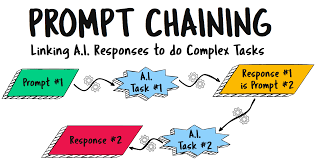
Overloading a prompt can also backfire. If you ask an AI to write a poem, a song, and a short story all at once, it might get confused or only perform one part well. It’s usually better to break down complex requests into a series of simpler prompts.
And finally, we sometimes expect AI to be more than it is. AI is a tool. It has limitations.
Understanding those limitations and setting realistic expectations is key to successful prompting.
AI Agents for Specific Use Cases
The power of AI agents and effective prompting becomes even clearer when we look at specific applications. Whether you’re a student, a professional, or a creative, there’s an AI agent prompt that can help.
Use Case Spotlight: Content Creation
Prompt Example: “Act as a content strategist. Generate five compelling social media post ideas for a new vegan bakery. Each post should highlight a different product and include a call to action.
Target audience is foodies aged 25-45. Use a friendly and exciting tone.”
This prompt is specific about the role, the goal, the products, and the audience. It helps generate targeted and engaging content.
Use Case Spotlight: Coding Assistance
Prompt Example: “Act as a Python developer. I’m trying to write a function that sorts a list of dictionaries by a specific key. Provide me with the Python code and a brief explanation of how it works.
Assume the input is a list of dictionaries with at least a ‘name’ and ‘age’ key.”
Here, the AI is asked to act as a developer and provide code. The context about the function’s purpose and expected input helps it generate accurate and relevant code. I’ve used prompts like this to debug my own code or learn new programming concepts.
Use Case Spotlight: Learning and Education
Prompt Example: “Act as a history tutor. Explain the main causes of the French Revolution in simple terms, suitable for a high school student. Focus on the economic, social, and political factors.
Keep the explanation to about 200 words.”
This prompt targets an educational goal. The AI is instructed to simplify complex information for a specific audience, making it easier to understand. This is how AI can truly democratize knowledge.
The Future of AI Agent Prompting
As AI technology advances, prompting will likely become even more sophisticated. We might see AI agents that can understand context more deeply, adapt to user preferences automatically, or even help users craft better prompts.
The trend is towards more natural and intuitive interaction. Imagine having a conversation with an AI agent where it anticipates your needs based on your previous interactions. Prompting might feel less like writing commands and more like collaborating.
Tools are also emerging that can help users refine their prompts. These might suggest clearer wording, identify ambiguities, or even offer pre-built prompt templates for common tasks. This makes AI more accessible to everyone, not just those who have mastered prompt engineering.
However, the fundamental principles will likely remain the same: clarity, specificity, and context. Even with advanced AI, the better you can communicate your needs, the better the AI will serve you. The ability to craft effective prompts will remain a valuable skill.
When Is an AI Agent Prompt “Good Enough”?
So, how do you know when your prompt is working well? It’s a combination of factors. First, the AI consistently delivers output that is relevant to your request.
You’re not constantly having to re-prompt or heavily edit the results.
Second, the output meets your specific requirements for format, tone, and content. If you asked for bullet points, you get bullet points. If you asked for a professional tone, you get a professional tone.
Third, you feel like you have control over the AI’s behavior. You can nudge it in the right direction with minor adjustments to your prompt. This means the prompt is effectively guiding the AI’s actions.
Finally, and perhaps most importantly, the AI agent’s output helps you achieve your goal. Whether that’s saving time, generating ideas, or completing a task, a good prompt leads to a good outcome. It’s the satisfaction of getting exactly what you asked for, efficiently.
Tips for Mastering AI Agent Prompts
Here are some practical tips to help you become a better AI prompt engineer:
Prompting Mastery Tips
Be Clear and Concise: Use simple language. Get straight to the point.
Provide Context: Give the AI all necessary background information.
Define the Role: Tell the AI who it should be.
Specify the Task: What exactly do you want the AI to do?
Set Constraints: Limits on length, tone, or content are crucial.
Describe the Desired Format: How should the output look?
Use Examples (Few-Shot): Show the AI what you want.
Encourage Step-by-Step Thinking (CoT): For complex problems.
Iterate and Refine: Don’t be afraid to adjust your prompts.
Experiment: Try different phrasing and techniques.
One thing I always tell people is to read their prompt out loud. If it sounds awkward or confusing when you say it, it will probably be confusing for the AI too. This simple check can reveal areas where your prompt might be unclear.
Also, learn from others. Look at examples of prompts that get great results. Many communities and forums share effective prompt strategies.
This is how we all learn and grow together in this field.
Remember, the goal is to communicate effectively with a powerful tool. The better you communicate, the more useful the tool becomes.
Conclusion: Your Prompt, Your AI’s Performance
The performance of an AI agent is directly linked to the quality of the prompts you provide. By understanding the elements of effective prompting—role, task, context, constraints, and format—you can guide AI agents to produce exceptional results.
Mastering AI agent prompts is an ongoing journey. It involves practice, experimentation, and a willingness to learn. As you refine your skills, you’ll unlock new levels of productivity and creativity.
Start applying these principles today and see how much better your AI interactions become.
Frequently Asked Questions about AI Agent Prompts
What is the most important part of an AI agent prompt?
While all parts are important, clarity and specificity in defining the task are often the most critical. You need to be absolutely clear about what you want the AI to do.
Can I use an AI agent prompt for creative writing?
Yes! You can use prompts to define characters, settings, plot points, and even writing styles. For example: “Act as a fantasy novelist.
Describe a mysterious ancient forest, focusing on sights and sounds. The tone should be enchanting but slightly eerie.”
How long should an AI agent prompt be?
There’s no single answer. A good prompt is as long as it needs to be to convey all necessary information clearly. Sometimes a short, direct prompt works.
Other times, a more detailed prompt with context and examples is required.
What happens if my prompt is too vague?
If your prompt is too vague, the AI agent will likely produce a generic or irrelevant response. It might guess at your intent, but it’s unlikely to be exactly what you’re looking for. This often leads to disappointment and wasted time.
How can I make an AI agent sound more human?
You can ask the AI to adopt a specific persona, use conversational language, or even include common human expressions in its response. For example: “Act as a friendly barista. Explain how to make a latte, using simple words and a cheerful tone.”
What are LSI keywords and how do they relate to AI prompts?
LSI (Latent Semantic Indexing) keywords are terms related to the main topic. In the context of AI prompts, using LSI keywords within your prompt helps the AI understand the broader subject matter more deeply, leading to more relevant and comprehensive responses. For instance, if your main topic is “gardening,” LSI terms might include “soil,” “plants,” “watering,” “sunlight,” and “pests.”






Leave a Reply