
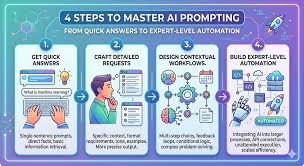
AI automation prompts are specific instructions you give to an AI. They guide the AI’s actions and responses. Well-crafted prompts lead to more accurate, relevant, and useful AI-generated content or task completions. Mastering them is key to leveraging AI effectively for tasks.
What Are AI Automation Prompts?
Think of AI like a very smart, very eager assistant. But this assistant needs clear directions. It doesn’t know what you want unless you tell it.
An AI automation prompt is that clear direction. It’s the text or command you give the AI.
This prompt tells the AI what task to perform. It also guides how the AI should do it. It can set the tone, specify the format, and define the scope of the output.
Without good prompts, AI can be like a car without a steering wheel. It has power, but it’s going nowhere specific.
The goal of an AI automation prompt is to make the AI perform a task reliably. This task could be writing an email, creating a summary, coding a script, or even generating an image. When a prompt is good, the AI understands the intent.
It can then use its knowledge to deliver exactly what you asked for.
This is especially true for automation. Automation means getting AI to do repetitive tasks for you. You want these tasks done the same way, every time.
Good prompts ensure this consistency. They are the backbone of efficient AI automation.
Why Do Good Prompts Matter So Much?
Imagine asking a chef to “make food.” You’d get… well, food. But what kind? For whom?
With what ingredients? It’s too vague. Now, imagine asking a chef to “make a vegan, gluten-free lasagna for two, ready in one hour, with a slightly spicy tomato sauce.” That’s much better.
This is the difference a good prompt makes for AI. AI tools are trained on vast amounts of data. They have incredible capabilities.
But they need context. They need you to be specific. A well-written prompt provides this context.
It narrows down the infinite possibilities into a manageable, targeted output.
For AI automation, this is critical. You’re not just asking for a one-off answer. You’re setting up a system.
You want the AI to perform a specific function repeatedly. If the prompt is unclear, the AI might perform the task differently each time. This defeats the purpose of automation.
It can lead to errors. It can waste time.
My own experience highlights this. I once tried to automate blog post outlines using an AI. My first prompts were simple: “Give me a blog post outline about healthy eating.” I got generic lists.
They lacked depth and focus. It took many tries to refine the prompt. I had to specify the target audience, the desired tone, the key selling points, and the structure I wanted.
Only then did the AI start producing outlines that were actually useful and saved me time.
Types of AI Automation Prompts
Prompts can be simple or complex. They can be direct commands or detailed requests. Understanding the different types helps you choose the right approach for your task.
Direct Command Prompts
These are straightforward. You tell the AI exactly what to do. They work best for simple, well-defined tasks.
Direct Command Example
Task: Summarize text.
Prompt: “Summarize the following article in three bullet points: “
Contextual Prompts
These prompts provide background information. They help the AI understand the situation or the user’s needs better. This is vital for tasks that require nuance.
Contextual Prompt Example
Task: Write a marketing email.
Prompt: “You are a marketing expert. Write a promotional email for our new smart home device, the ‘Glow Lamp’. The target audience is busy professionals aged 30-50.
Highlight its ease of use and mood-setting capabilities. The email should have a friendly, persuasive tone and include a call to action to visit our website.”
Role-Playing Prompts
You instruct the AI to act as a specific persona. This is great for generating content from a particular viewpoint.
Role-Playing Prompt Example
Task: Explain a complex topic simply.
Prompt: “Act as a science teacher explaining photosynthesis to a 5th grader. Use simple words and analogies. Keep it under 150 words.”
Few-Shot Prompts
You provide a few examples of the desired input and output. The AI learns from these examples to perform the task.
Few-Shot Prompt Example
Task: Classify customer feedback.
Prompt:
“Classify the sentiment of these customer comments. Comment: ‘I love this product, it works perfectly!’ Sentiment: Positive
Comment: ‘The app keeps crashing, very annoying.’ Sentiment: Negative
Comment: ‘It’s okay, does the job but nothing special.’ Sentiment: Neutral
Comment: ‘This is the worst experience I’ve ever had.’ Sentiment: “
Elements of an Effective Prompt
Crafting a great prompt involves several key elements. When you include these, your AI assistant gets a much clearer picture of what you need. It’s like giving it a detailed map instead of just a direction.
Clarity and Specificity
This is the most important part. Vague prompts lead to vague results. Be precise about what you want.
Use clear language.
Instead of: “Write about dogs.”
Try: “Write a short, cheerful paragraph about the benefits of owning a golden retriever for families with young children.”
Context and Background
Provide relevant information. Tell the AI who the audience is. What is the purpose of the output?
What is the desired tone?
For example, if you want an email, tell the AI who it’s for and why you’re sending it. If you want a story, give it a setting and characters.
Desired Format
Specify how you want the output structured. Do you need bullet points? A table?
A paragraph? A poem? A code snippet?
Clearly stating the format helps the AI organize its response. This saves you the trouble of reformatting later. It makes the AI’s output immediately usable.
Constraints and Limitations
Set boundaries. Tell the AI what not to do. Specify length limits, forbidden topics, or required keywords.
For instance, you might say, “Write a review of this movie, but do not reveal the ending.” Or, “Create a recipe using only five ingredients.”
Examples (Few-Shot Learning)
As we saw, showing the AI what you want can be very effective. Providing a couple of examples of desired input/output pairs can guide the AI powerfully. This is especially useful for complex or unique tasks.
Crafting Prompts for Specific AI Tools
Different AI tools have different strengths. A prompt that works well for a text generator might not work for an image generator.
Text Generation (e.g., ChatGPT, Bard)
For these tools, focus on clear instructions for content creation. Specify the topic, audience, tone, and format. Think about the purpose of the text.
Example Prompt: “Generate three social media posts announcing a new vegan bakery opening next month. Each post should be under 100 characters, include the bakery name ‘Sweet Greens’, and use the hashtag #VeganBakery. Target audience is local foodies.”
Image Generation (e.g., Midjourney, DALL-E)
Image prompts need descriptive language. Think about style, subject, colors, lighting, and mood. Use adjectives liberally.
Example Prompt: “A photorealistic image of a cozy, dimly lit library at dusk, with warm light spilling from lamps. A tabby cat is sleeping on an antique armchair. Cinematic lighting, soft focus.”
Code Generation (e.g., GitHub Copilot, CodeWhisperer)
Here, clarity on the programming language, desired function, and expected input/output is key. Provide context about the existing code if possible.
Example Prompt: “Write a Python function that takes a list of numbers and returns the average. Handle the case where the list is empty by returning 0.”
My Own Prompt Engineering Journey
When I first started using AI for writing, I was amazed by its ability to generate text. But I quickly hit a wall. The output was often generic.
It lacked personality. It didn’t capture the nuances I was trying to convey.
I remember trying to get an AI to write a compelling product description for a handcrafted soap. My initial prompt was simple: “Write a product description for lavender soap.” The AI gave me something like: “This is a lavender soap. It smells nice.
It cleans your skin.” It was factually correct but utterly uninspiring.
This felt like a huge missed opportunity. I knew the soap was special. It was made with organic ingredients, had a soothing scent, and was perfect for sensitive skin.
I needed the AI to reflect that. So, I started experimenting. I added details about the ingredients, the benefits, the artisanal process, and the target customer.
I began to understand that the AI was a tool, and I was the craftsman. My prompt was the chisel. A blunt chisel makes a rough cut; a sharp one makes a fine detail.
I learned to treat prompts like a conversation. I’d start with a broad request, then refine it based on the AI’s response. If it wasn’t quite right, I’d add more context or constraints.
I began to see patterns. Specificity was king. Including examples worked wonders.
Defining the persona of the output was also incredibly helpful.
This process of “prompt engineering” felt like learning a new language. It was frustrating at times, but incredibly rewarding. When I finally got an AI to produce a description that perfectly captured the essence of the soap, it felt like a breakthrough.
It showed me that with the right guidance, AI could be a powerful creative partner, not just a text generator.
Prompt Refinement: A Quick Checklist
- Is it specific? What exactly do you want?
- Is it clear? Are there any ambiguous words?
- Does it have context? Who is it for? Why?
- Is the format defined? Bullet points? Paragraphs?
- Are there any limits? Word count? Exclusions?
- Would an example help? Can you show the AI?
Advanced Prompting Techniques
Once you’ve mastered the basics, you can explore more advanced ways to interact with AI.
Chain-of-Thought Prompting
This technique encourages the AI to show its reasoning. You ask it to “think step-by-step.” This helps in complex problem-solving.
Example: “Solve this math problem: If John has 5 apples and gives 2 to Mary, how many does he have left? Think step-by-step.”
Zero-Shot vs. Few-Shot
We’ve touched on this. Zero-shot is asking the AI to perform a task it hasn’t seen specific examples of in the prompt. Few-shot provides examples.
Few-shot often yields better results for complex tasks.
Iterative Prompting
This is the process of refining prompts. You start with a basic prompt, get a result, analyze it, and then modify the prompt to improve the output. It’s a back-and-forth process.
This is how I learned to write better prompts. I would get an output, see what was missing or wrong, and then adjust my next prompt. This could involve adding more detail, changing the phrasing, or providing a different example.
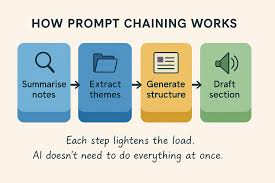
Prompt Chaining
This involves using the output of one prompt as the input for another. You can break down a large task into smaller, manageable steps.
Example:
1. Prompt 1: “Generate a list of 10 popular vacation destinations in Europe.”
2. Prompt 2 (using output from Prompt 1): “For each destination in this list: , suggest one unique activity.”
Common Pitfalls to Avoid
Even with the best intentions, it’s easy to fall into prompt traps. Being aware of these can save a lot of frustration.
Vagueness
As mentioned, being too general is the biggest mistake. AI can’t read your mind. It needs concrete details.
Ambiguity
Using words with multiple meanings can confuse the AI. Ensure your language is precise.
Overly Complex Prompts
While detail is good, a prompt that is too long or has too many conflicting instructions can overwhelm the AI. Try to keep prompts focused.
Not Testing and Refining
Don’t expect perfection on the first try. Always be prepared to adjust your prompts. What works for one AI might not work for another.
Assuming AI Understands Nuance
AI is getting better, but it still struggles with sarcasm, subtle humor, or deep emotional context without explicit guidance. You often need to guide these elements.
Myth vs. Reality: AI Prompts
| Myth: AI understands what I mean. | Reality: AI understands what you type. Specificity is crucial. |
| Myth: One prompt will do everything. | Reality: Iterative prompting and prompt chaining are often needed. |
| Myth: I need to be a technical expert. | Reality: Clear, simple language often works best. Focus on clarity. |
| Myth: AI prompts are secret codes. | Reality: They are just instructions. Think of them as detailed requests. |
AI Automation Prompts in Action: Real-World Scenarios
Let’s look at how good prompts can revolutionize everyday tasks.
Content Creation Automation
Businesses often need a constant stream of content. This could be blog posts, social media updates, or product descriptions. Well-designed prompts can automate much of this.
Scenario: A small e-commerce store needs to announce daily flash sales on Instagram. Prompt: “Generate an Instagram caption for a 24-hour flash sale on our handmade pottery mugs. The discount is 20%.
The caption should be exciting, include emojis, and urge immediate purchase. Mention the sale ends tomorrow. Use #PotterySale #FlashSale #Handmade.”
This prompt is specific about the product, the discount, the platform, the tone, and the required elements. The AI can then reliably generate daily captions with minor variations if needed.
Customer Service Enhancement
AI can draft responses to common customer inquiries. This speeds up response times and frees up human agents for complex issues.
Scenario: A customer asks about a return policy. Prompt: “Draft a polite customer service email response to an inquiry about our return policy. State that customers have 30 days to return items in their original condition with a receipt.
Mention that personalized items are non-refundable. Include a link to the full policy page on our website: .”
The AI can generate a consistent, professional response every time, ensuring policy adherence.
Data Analysis and Reporting
AI can help analyze data and generate reports. Prompts guide the AI on what data to look at and what insights to extract.
Scenario: Analyzing website traffic data. Prompt: “Analyze the provided website traffic data for the last month. Identify the top three traffic sources and the average session duration for each.
Summarize findings in a bulleted list. Data: .”
This prompt directs the AI to focus on specific metrics and present them in a usable format.
Personal Productivity Tools
Even for personal use, prompts can save time. Think about managing schedules, drafting emails, or learning new skills.
Scenario: Planning a week’s meals. Prompt: “Create a simple, healthy meal plan for one person for the next 7 days. Include breakfast, lunch, and dinner.
Focus on quick preparation and affordable ingredients. I prefer chicken, fish, and plenty of vegetables. Avoid red meat.”
The AI can quickly generate a personalized plan, reducing mental load.
The Future of AI Automation Prompts
As AI technology advances, our interaction with it will continue to evolve. We’re likely to see even more intuitive ways to prompt AI.
More Natural Language: AI will likely understand more complex and nuanced human language. We might not need to be as rigidly structured with our prompts.
Contextual Awareness: AI may develop better built-in contextual awareness. It might infer more about your needs based on past interactions or the task at hand.
Visual and Auditory Prompts: Beyond text, we might see more sophisticated use of voice and even image-based prompts for automation tasks.
AI Assisting Prompt Creation: It’s possible that AI itself will become a powerful tool for helping us craft better prompts. Imagine an AI suggesting improvements to your prompt in real-time.
However, the core principle will likely remain the same: clear communication. The better you can articulate your needs, the better the AI can serve you.
When is it Normal and When to Worry?
It’s normal for AI to sometimes produce outputs that are not quite right. This often means your prompt needs adjustment. It’s a sign to refine your instructions.
You might need to add more context, be more specific, or provide an example.
You should worry if the AI consistently fails to grasp your intent even after multiple attempts at prompt refinement. This could indicate a limitation of the AI model itself for that specific task, or that the task is too complex for current AI capabilities. Also, if the AI generates harmful, biased, or incorrect information that is difficult to steer away from, that’s a concern requiring careful oversight or a different tool.
For automation, inconsistency in results from the same prompt is a red flag. It means the automation isn’t reliable. This usually points back to an inadequately defined prompt that allows for too much interpretation by the AI.
Quick Tips for Better AI Prompts
Here are some easy things you can do right now to improve your prompts:
- Start Simple, Then Add: Begin with a basic request and build from there.
- Use Strong Verbs: Words like “Generate,” “Summarize,” “Explain,” “Compare,” “List” are very effective.
- Be Polite, But Direct: You don’t need to beg. Clear, direct instructions work best.
- Review AI Output Critically: Always check the AI’s work. Does it meet your needs?
- Experiment Constantly: Try different phrasing. See what works for your AI and your tasks.
- Save Successful Prompts: Keep a record of prompts that give you excellent results. You can reuse or adapt them.
Frequently Asked Questions about AI Automation Prompts
What is the most important part of an AI automation prompt?
The most important part is clarity and specificity. You need to tell the AI exactly what you want, who it’s for, and what format you need it in. Vague prompts lead to vague or incorrect results.
Can I use the same prompt for different AI models?
Sometimes, yes. Simple prompts might work across models. However, different AI models are trained differently and respond best to specific phrasing or structures.
It’s often best to test and adapt your prompts for each AI.
How do I make an AI sound more human?
To make AI sound more human, specify a persona or tone in your prompt. For example, “Write this as if you are a friendly blogger” or “Use a casual, conversational tone.” Providing examples of human-like writing can also help.
What if the AI gives me a biased response?
If an AI gives a biased response, it’s usually because the data it was trained on contained biases. You can try to counter this by explicitly asking for an unbiased perspective in your prompt. For example, “Provide a balanced view on this topic, considering different perspectives.” If the bias persists, you may need to use a different AI tool or report the issue.
How often should I update my prompts for automation?
You should update your prompts if the AI’s performance changes, if your own needs evolve, or if the AI model itself is updated. For stable automation, a well-tested prompt should work for a long time. Regularly check the output for consistency.
Are there tools to help me write better prompts?
Yes, there are emerging tools and platforms that offer prompt templates, suggestions, and even AI assistants to help you craft more effective prompts. Searching for “prompt engineering tools” can lead you to these resources.
Final Thoughts
Mastering AI automation prompts is an ongoing skill. It’s about clear communication. It’s about understanding the AI’s capabilities and limitations.
The more effort you put into your prompts, the more powerful and useful your AI interactions will become. Keep practicing, keep refining, and you’ll unlock amazing new ways to automate tasks and boost your productivity.








Leave a Reply