
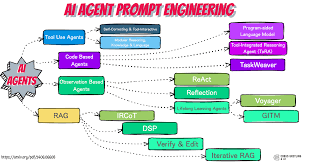
A multi-step prompt workflow is a way to break down complex AI tasks into smaller, manageable instructions. This helps the AI understand your needs better and gives you more control over the final output. It’s about building a conversation, not just asking one question.
Understanding Prompt Workflows
Think of AI like a very smart, very literal assistant. It does exactly what you tell it. If you’re not clear, it can get lost.
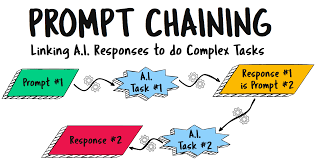
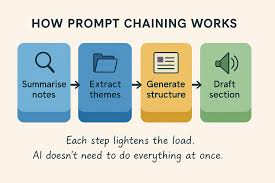
A multi step prompt workflow is like giving that assistant a detailed to-do list, broken down into clear steps. Each step builds on the last one. This helps the AI grasp the bigger goal without getting confused.
Why is this so important? Because AI models, while powerful, don’t read minds. They rely on the input you give them.
When you give them a single, long, complicated prompt, they might miss crucial details. Or they might focus on the wrong part. Breaking it down means each part of your request gets the AI’s full attention.
This method is especially useful for tasks that have many parts. Imagine writing a story, planning an event, or even debugging code. These aren’t single actions.
They require a sequence of thoughts and actions. A multi-step approach lets you guide the AI through each phase.
The goal is to move from general ideas to specific outcomes. You start broad and then narrow down. This is how humans plan too.
We don’t usually think of a whole project at once. We think, “What’s the first thing I need to do?” Then, “What comes after that?” A multi step prompt workflow mimics this natural process.
My Own Journey with Prompts
I remember when I first started using AI tools more seriously. I’d spend hours crafting what I thought was a perfect single prompt. I’d pour all my ideas into it, hoping for magic.
Most times, I’d get something that was almost right. It was frustrating. I’d see the potential, but the AI just wouldn’t quite nail it.
It was like having a chef who knows all the ingredients but doesn’t follow the recipe steps.
One late night, I was trying to get an AI to help me draft a tricky business proposal. I had a lot of data points and specific requirements. My single prompt was pages long.
The AI gave me a response that was full of buzzwords but missed the core message entirely. I felt a wave of annoyance. I had spent so much time on that prompt, and it felt like a waste.
The digital paper on my screen just stared back at me, unhelpful.
That was the turning point. I realized I was treating the AI like a mind reader, not a tool. I started experimenting.
What if I asked it to outline the proposal first? Then, what if I asked it to flesh out each section? I tried asking it to identify key selling points based on the data.
Slowly, the responses got better. Each step added a layer of understanding for the AI. It was like building with blocks.
The final proposal wasn’t perfect from one go, but it was so much closer. I learned that guiding the AI through stages was the key. It wasn’t about one perfect prompt, but a smart sequence of them.
Why Multi-Step Prompts Shine
For complex tasks: AI handles intricate projects better when broken down. Each step focuses the AI’s attention. This prevents it from getting overwhelmed.
For specific outputs: When you need precise results, a workflow guides the AI exactly where you want it to go. It reduces guesswork.
For learning and iterating: Each step gives you a chance to review and adjust. You can steer the AI if it heads off track. This makes AI a more collaborative partner.
For creative endeavors: Building a story or artwork can be guided step-by-step. You can develop characters, plot points, or artistic styles gradually.
The Core Elements of a Workflow
A good multi step prompt workflow has a few key parts. You don’t always need all of them, but they are good to know. They help you plan your approach.
First, there’s setting the stage. This is where you give the AI context. What is the overall goal?
Who is the audience? What is the desired tone? You might tell the AI, “You are a helpful assistant writing a travel blog post.” This sets its role.
Next is defining the structure. For a long piece of writing, you might ask the AI to create an outline. For a data analysis, you might ask it to list the types of charts it will create.
This gives the AI a roadmap.
Then comes information gathering or analysis. This could involve asking the AI to research a topic, summarize a document, or analyze a set of data. You might say, “Based on this article, what are the three main challenges?”
Following that is content generation or refinement. This is where the AI starts creating the actual output. Based on the outline and gathered information, you might ask it to write a specific paragraph or revise a sentence.
“Now, write an introduction for the blog post using the outline and main points.”
Crucially, there’s review and iteration. After the AI gives you an output, you look at it. Is it good?
Does it need changes? You then give it feedback. “This sounds good, but can you make the tone more excited?” This is a vital part of the process.
Finally, finalization. This is the last step where you might ask the AI to proofread, format, or give a final polish. “Proofread the entire blog post for grammar errors and suggest a catchy title.”
These steps aren’t always rigid. You can mix and match them. You can repeat steps.
The key is that each prompt builds logically on the previous ones.
Quick Scan: Prompt Workflow Stages
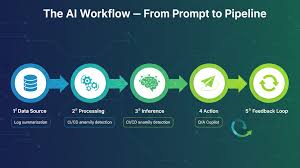
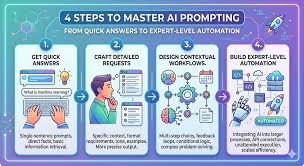
- Context Setting: Define AI’s role and overall goal.
- Structural Planning: Create outlines or roadmaps.
- Information Processing: Research, summarize, or analyze.
- Output Creation: Generate content or perform tasks.
- Feedback Loop: Review, revise, and refine.
- Final Touches: Polish and format the output.
Structuring Your Multi-Step Prompts
How do you actually write these prompts? It’s about being clear and concise at each stage. Don’t try to cram too much into one prompt.
Start with a clear instruction. For example, instead of asking the AI to “write about dogs,” try: “Step 1: Create an outline for a short article about the benefits of owning a dog.” This tells the AI exactly what you want it to do first.
When the AI responds with the outline, you can then move to the next step. Your next prompt might be: “Step 2: Write the introduction section based on the first point of the outline. Make it engaging for new pet owners.” Notice how I’m referencing the previous output (“first point of the outline”) and giving new, specific instructions (“engaging for new pet owners”).
It’s also helpful to use clear numbering or labels for each step. This keeps you organized and helps the AI track the progress. You can use phrases like “Prompt 1:”, “Prompt 2:”, or “Next, I want you to.”
Consider the AI’s memory. Most AI models have a context window. This means they remember a certain amount of the recent conversation.
If your workflow becomes very long, the AI might forget earlier instructions. In such cases, you might need to remind it of key details or re-state important context at later stages.
Don’t be afraid to be explicit. If you want a list, say “Provide a bulleted list.” If you want a table, say “Create a table with two columns: ‘Pro’ and ‘Con’.” The more precise you are, the better the AI can serve you.
Here’s a quick comparison:
| Ineffective Prompt | Effective Multi-Step Prompt |
|---|---|
| “Tell me about healthy eating.” | Step 1: Outline the key food groups for a balanced diet. |
| (After AI responds) “Write about it.” | Step 2: Based on the outline, write a paragraph explaining the importance of fruits and vegetables. Use simple terms for a general audience. |
| “Give me a recipe.” | Step 3: Suggest a healthy and easy-to-make breakfast recipe that includes at least one fruit and one grain. List the ingredients clearly. |
When to Use a Multi-Step Prompt Workflow
So, when is this approach really the best choice? It’s not for every single AI interaction. If you just need a quick fact or a definition, a single prompt is fine.
But for more involved tasks, a workflow becomes essential.
Complex Writing Projects: This is huge. Think blog posts, articles, reports, scripts, or even chapters of a book. You can guide the AI through outlining, drafting sections, developing characters, and refining prose.
I’ve used it to write entire articles, starting with a vague idea and ending with a polished piece. The AI helped me brainstorm topics, structure the argument, and even find better ways to phrase tricky sentences.
Content Planning and Strategy: If you’re a marketer or content creator, this is a lifesaver. You can ask the AI to brainstorm content ideas based on a theme. Then, you can ask it to create a content calendar.
Next, you might ask it to draft social media posts for each piece. It’s a full content creation cycle.
Data Analysis and Interpretation: For anyone working with data, a multi-step approach can unlock insights. You could ask the AI to first identify trends in a dataset. Then, ask it to explain those trends in simple terms.
You might even ask it to suggest visual representations of the data. This helps turn raw numbers into understandable stories.
Coding and Development Assistance: Developers can use this to build code incrementally. Ask the AI to suggest a function for a specific task. Then, ask it to explain that function.
You can then ask it to integrate that function into a larger script. This helps ensure the code is logical and correct.
Learning and Education: If you’re trying to learn a new topic, you can use the AI as a tutor. Ask it to explain a concept. Then, ask for an example.
Next, ask it to compare it to something else you already know. This spaced repetition and guided explanation can be very effective for learning.
Creative Brainstorming: Need ideas for a story, a product name, or an art project? You can start broad and then narrow down. “Give me 10 fantasy story ideas.” Then, “For idea number 3, suggest a plot twist.” Then, “What kind of character would fit this plot twist?”
I often use it for planning my own blog content. I’ll ask it to brainstorm topics related to AI and SEO. Then, I’ll ask it to generate potential titles.
After that, I’ll ask it to create an outline for the chosen title. Each step gets me closer to a finished, high-quality piece. It’s like having a dedicated research assistant and editor all rolled into one.
Myth vs. Reality: Single Prompt vs. Multi-Step
Myth: A single, very long prompt is the best way to get detailed AI output.
Reality: Long prompts can overwhelm AI, leading to missed instructions or inaccurate results. Multi-step prompts allow for focused instruction and better control.
Myth: AI can figure out complex tasks on its own if you give it enough context in one go.
Reality: AI benefits from clear, sequential guidance. Breaking down tasks makes them more understandable and manageable for the AI.
Myth: Multi-step prompts are only for expert AI users.
Reality: Anyone can benefit from multi-step prompts. The basic principle is to communicate in stages, which is intuitive for humans.
Tips for Crafting Effective Multi-Step Prompts
Here are some practical tips to make your multi step prompt workflow even better. These are things I’ve picked up through trial and error. They help me get the most out of AI tools.
Be Specific at Each Step: Don’t assume the AI remembers everything perfectly. Reiterate key details if needed. For example, if you’re asking it to write a marketing email, remind it of the target audience and the product’s unique selling proposition in each relevant step.
Use Clear Action Verbs: Start your prompts with strong verbs that tell the AI exactly what to do. Words like “Create,” “Analyze,” “Summarize,” “Compare,” “Explain,” “Rewrite,” or “Generate” are very effective.
Provide Examples: If you have a specific style or format in mind, show the AI an example. You can say, “Write this in a tone similar to this example: .” This is much clearer than just describing the tone.
Break Down Complexity Further: If a single step still feels too complex, break it down into even smaller steps. For instance, instead of “Analyze the sales data and create a report,” try: “Step 1: Identify the top 3 best-selling products. Step 2: For each product, identify the month with the highest sales.
Step 3: Summarize these findings in a short paragraph.”
Define Constraints: Tell the AI what not to do. For example, “Do not use technical jargon.” or “Keep the response under 200 words.” This helps steer the AI away from unwanted outcomes.
Ask for Explanations: If the AI provides information or code, ask it to explain its reasoning. “Explain why you chose that approach,” or “Explain what this code snippet does.” This is crucial for learning and verifying the AI’s output.
Use Role-Playing: Assigning a role to the AI can significantly improve results. “Act as a senior copywriter,” “You are a history professor,” or “Imagine you are a chef.” This helps the AI adopt the right perspective and tone.
Iterate Based on Feedback: Treat the AI’s response as a draft. Provide constructive feedback. If a sentence is awkward, point it out.
If the information is incomplete, ask for more. “That’s good, but can you elaborate on the marketing strategy part?”
Keep Track of Your Prompts: For longer projects, save your prompts and the AI’s responses. This creates a log of your workflow, which is helpful for reference and for understanding what worked best. It also helps if you need to pause and come back to a task later.
I find that using bold text for key instructions within my prompts helps me stay organized. For example: “Task: Outline the main sections for a blog post about sustainable gardening. Audience: Beginner gardeners.
Tone: Encouraging and simple.”
The Art of the Follow-Up Prompt
Build on the Previous Output: Reference what the AI just said. “Based on your previous answer.” or “Regarding the points you just made.”
Ask for Clarification: If something is unclear, ask for more detail. “Could you explain that further?” or “What did you mean by ?”
Request Refinement: Ask for changes. “Make this paragraph shorter,” or “Can you rephrase this in a more casual tone?”
Add New Constraints: Introduce new rules for the next step. “Now, for the next section, focus on cost-effectiveness.”
Real-World Scenario: Planning a Community Garden Project
Let’s walk through a scenario where a multi step prompt workflow would be super helpful. Imagine you want to start a community garden in your neighborhood. This isn’t something you can just ask an AI to do in one go.
It involves many layers.
Initial Idea: You want to start a community garden.
Prompt 1 (Setting the Stage): “I want to plan a community garden project for my neighborhood. Act as a project manager. What are the main phases involved in starting a community garden from scratch?”
AI Response: Might list phases like: Planning & Design, Securing Land, Forming a Committee, Fundraising, Site Preparation, Planting & Maintenance, Community Engagement.
Prompt 2 (Deep Dive into a Phase): “That’s a great overview. Let’s focus on the ‘Planning & Design’ phase. What specific steps should be taken here?
Consider things like gathering community input, choosing a location, and what to grow.”
AI Response: Might detail steps like: holding introductory meetings, surveying residents about preferences, researching local zoning laws, identifying potential plots, deciding on initial crops based on climate and interest.
Prompt 3 (Actionable Task within a Step): “Okay, for ‘gathering community input,’ can you help me draft a simple survey for residents? It should ask about their interest, preferred types of produce, and availability to volunteer. Provide it as a list of questions.”
AI Response: Provides a list of survey questions.
Prompt 4 (Problem Solving): “We’ve identified a potential plot, but it’s mostly shade. What types of vegetables grow well in shady conditions? List 5-7 options.”
AI Response: Lists vegetables like lettuce, spinach, kale, carrots, radishes, etc.
Prompt 5 (Summarizing and Planning Next Steps): “Based on our conversation so far, can you summarize the next three most critical actions we need to take in the ‘Planning & Design’ phase, and briefly explain why each is important?”
AI Response: Summarizes key actions, e.g., “1. Finalize survey distribution. 2.
Research local water access. 3. Begin drafting a budget based on initial crop ideas.”
This workflow allows you to tackle a big, complex project piece by piece. The AI helps you think through each stage, generate necessary documents (like surveys), and find specific information. It’s much more effective than asking, “How do I start a community garden?”
Quick-Scan Table: Community Garden Workflow
| Prompt Goal | AI Task | Example Output |
|---|---|---|
| Understand Project Scope | List major project phases. | Phase list (Planning, Execution, etc.) |
| Detail a Phase | List steps within a phase. | Detailed steps for Planning. |
| Generate Tools | Draft survey questions. | List of survey questions. |
| Solve Specific Issues | List suitable items for a condition. | List of shade-tolerant plants. |
What This Means For You
Adopting a multi step prompt workflow changes how you interact with AI. It moves you from being a passive asker to an active director. This means you get results that are much closer to your actual needs.
You gain more control. Instead of hoping for the best with one prompt, you guide the AI through the process. You can stop it if it goes wrong and correct its course. This is powerful for important tasks.
Your output quality improves. When the AI understands each step and builds on previous work, the final result is usually more coherent, accurate, and relevant. It avoids the superficial answers you sometimes get from broad prompts.
You learn more. By breaking down tasks and asking for explanations, you can learn a lot from the AI. It can teach you how to structure projects, analyze data, or even write better. It becomes an educational tool, not just a content generator.
It saves time in the long run. While it might seem like more work upfront, a structured workflow reduces the need for extensive editing and revisions later. You’re less likely to get a completely wrong output that you have to scrap.
When is it normal? It’s normal and highly beneficial for any task that requires multiple considerations or stages. This includes writing, planning, problem-solving, and learning. It’s the default for anything beyond a simple Q&A.
When to worry? You might worry if your workflow is becoming so complex that you can’t track it, or if the AI consistently misunderstands even with clear steps. This could indicate limitations of the AI model or a need to simplify your approach further.
Simple checks: Always review each AI output at every step. Does it logically follow your instruction? Is it what you expected?
If not, adjust your next prompt. Don’t just accept the output blindly.
Your Prompt Power-Up Checklist
- Clear Objective: Know what you want to achieve overall.
- Break It Down: Divide the task into logical, smaller steps.
- One Idea Per Prompt: Focus each prompt on a single instruction or question.
- Context is Key: Remind the AI of important details when needed.
- Feedback Loop: Review and refine at each stage.
- Be Patient: Complex tasks take time, even with AI.
Quick Fixes and Tips
Sometimes, even with a workflow, things don’t go perfectly. Here are a few quick tips for when your AI interaction hits a snag:
Restart the Conversation: If the AI seems stuck or is giving nonsensical answers, simply start a new chat. Sometimes, a fresh start clears up confusion.
Simplify Your Last Prompt: If the AI is struggling with your latest instruction, try making it even simpler. Remove any jargon or complex phrasing. Focus on one core action.
Re-state the Goal: Remind the AI of the overall objective. “Remember, we are trying to plan a community garden. What is the next logical step for securing funding?”
Ask for Alternatives: If the AI gives you an answer you don’t like, ask for other options. “Can you suggest three alternative ways to phrase this sentence?” or “Give me five different ideas for the garden’s layout.”
Use Different AI Models: If you have access to multiple AI tools, try the same workflow with a different model. Some models are better at certain tasks than others.
Check Your Own Understanding: Sometimes, the AI is right, and your expectations were a bit off. Does the AI’s response make sense in a different light? Could you be misunderstanding something?
The key is to be adaptable. Think of it as a collaborative problem-solving session. The AI is your partner, and you’re guiding it toward the best possible outcome.
Frequently Asked Questions
What is the main benefit of using a multi-step prompt workflow?
The main benefit is that it allows you to break down complex AI tasks into smaller, more manageable parts. This leads to more precise, accurate, and relevant AI outputs by giving the AI focused instructions at each stage.
How do I know when to use a multi-step prompt versus a single prompt?
Use a multi-step prompt for tasks that have several components, require detailed planning, or involve creative development. For simple questions or requests for basic facts, a single prompt is usually sufficient.
Can I reuse a multi-step prompt workflow for different tasks?
Yes, you can adapt the structure of a multi-step workflow. The general principles of setting context, breaking down tasks, generating output, and refining apply to many different projects. You’ll just change the specific instructions for each step.
What if the AI forgets the earlier steps in a long workflow?
AI models have a context window. If your workflow becomes very long, you may need to gently remind the AI of previous instructions or context at later stages. You can do this by referencing earlier points or re-stating key requirements.
How do I provide feedback to the AI in a multi-step workflow?
Provide feedback clearly and concisely in your follow-up prompts. For example: “This paragraph is good, but please make it more formal,” or “The data summary is helpful, but could you also include a forecast?” Be specific about what needs changing.
Are there specific tools or platforms that are better for multi-step prompting?
Most advanced AI chat interfaces (like ChatGPT, Claude, Gemini) support multi-step prompting by maintaining conversation history. The effectiveness depends more on your prompting skill than the specific platform, though some offer features to manage longer conversations better.
Conclusion
Mastering the multi step prompt workflow is a game-changer. It transforms your AI interactions from a shot in the dark to a guided journey. By breaking down tasks and communicating clearly, you unlock the AI’s true potential.
This method ensures you get more precise, useful, and creative results every time.







Leave a Reply