
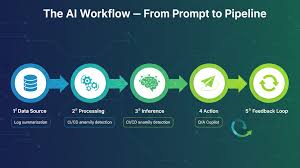
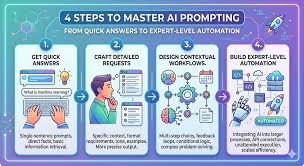
Building AI workflows with prompts involves giving clear, detailed instructions to AI models. This process, often called prompt engineering, helps control AI output for specific tasks. Effective prompting saves time and improves AI results for many uses.
Understanding AI Workflows and Prompts
An AI workflow is a set of steps. These steps use AI tools to finish a job. Imagine writing a report.
You might use AI to find facts. Then, you might use another AI to help write parts of it. Each AI needs instructions.
These instructions are prompts.
Prompts tell the AI what to do. They also tell it how to do it. A good prompt is like a clear map.
It leads the AI exactly where you want it to go. A bad prompt is confusing. It can make the AI go off course.
The goal of a prompt is to get a specific output. This output should be useful for your workflow. Think about asking a friend for help.
You wouldn’t just say “help.” You’d say, “Please help me find recipes for chicken.” That’s a prompt.
AI models, like large language models (LLMs), are very powerful. But they need direction. Prompts provide that direction.
They unlock the AI’s potential for your tasks. It’s about making the AI a useful tool for you.
Why Prompt Engineering Matters
Prompt engineering is the art of crafting good prompts. It’s a skill that helps you get the most from AI. Why is this so important for building workflows?
First, efficiency. A well-engineered prompt saves time. It means you get the right answer faster.
You don’t have to ask the AI over and over. You don’t have to fix bad results.
Second, accuracy. Good prompts lead to accurate information. This is vital for reports, data analysis, or any task where correctness matters.
The AI understands your needs better.
Third, creativity. You can use prompts to spark new ideas. You can ask the AI to write in a certain style.
Or you can ask it to come up with new concepts. This makes AI a creative partner.
Fourth, control. Prompts give you control over the AI’s behavior. You can set limits.
You can specify formats. You can ensure the output fits your exact needs.
Many people use AI but don’t think much about prompts. They get okay results. But with a little effort, you can get amazing results.
It’s the difference between a basic tool and a power tool.
The Prompting Power-Up
Goal: To make AI do exactly what you want.
How: By giving it clear, detailed instructions.
Result: Faster work, better answers, more ideas.
Think of it like: A conductor leading an orchestra.
Building Blocks of an Effective Prompt
What makes a prompt truly effective? It’s not just one thing. It’s a combination of elements.
Let’s look at the core parts.
1. The Task
Be very clear about what you want the AI to do. Is it to summarize? To write?
To explain? To brainstorm?
Instead of: “Write about dogs.”
Try: “Write a short blog post about the benefits of owning a dog.”
2. Context
Give the AI background information. This helps it understand the situation. Who is the audience?
What is the purpose?
Example: “Imagine you are writing for new pet owners. The goal is to encourage them to adopt.”
3. Constraints and Format
Tell the AI how you want the output to look. What length? What tone?
What style?
Example: “Keep the post under 300 words. Use a friendly and encouraging tone. Do not use complex jargon.”
4. Examples (Few-Shot Prompting)
Sometimes, showing is better than telling. Provide examples of the input and desired output.
Example:
Input: “Cat”
Output: “Feline, purrs, independent.”
Input: “Dog”
Output: “Canine, loyal, playful.”
Input: “Fish”
Output: “
This helps the AI learn the pattern you want.
5. Role-Playing
Ask the AI to act as a specific persona. This shapes its response.
Example: “Act as a seasoned travel agent. Recommend the best beaches in Hawaii for families.”
By combining these building blocks, your prompts become much stronger. They act like precise instructions.
My Own Prompting Struggles
I remember when I first started using AI for writing. I’d type in a simple question and get back something that was… okay. It was factual, but it felt generic.
It lacked personality. It didn’t quite hit the mark.
One time, I needed to write a product description for a new kind of coffee mug. It was insulated and had a special spill-proof lid. My first prompt was just: “Write a description for a coffee mug.” The AI gave me something about ceramic and holding hot liquids.
Very basic.
I felt a little frustrated. I knew the mug was special. How could I make the AI understand that?
I thought about what made it special to me. It kept my coffee hot for hours. I could throw it in my bag without worry.
That’s when I realized I wasn’t giving the AI enough of my perspective. I wasn’t giving it the experience.
So, I tried again. I added more detail. “Write a product description for an insulated coffee mug.
It keeps drinks hot for 8 hours. It has a leak-proof lid. Target audience is busy professionals who commute.
Tone should be exciting and highlight convenience.”
This time, the output was much better. It talked about morning commutes made easier. It mentioned enjoying hot coffee all day.
It felt more like something I would write. This taught me a big lesson: the more specific and descriptive you are, the better the AI can perform for you.
Putting Prompts into an AI Workflow
Let’s imagine a common workflow: researching a topic and then writing a report.
Step 1: Research Assistant Prompt
You need facts. You might use a prompt like this:
“As a research assistant, find three recent studies about the impact of remote work on employee well-being. Provide a brief summary of each study’s main findings. Cite the sources if possible.
Output this as a bulleted list.”
This prompt is clear about the task (find studies), the topic (remote work, well-being), the desired output (three studies, summaries, citations, bulleted list), and the role (research assistant).
Step 2: Content Generation Prompt
Now you have the research. You need to write a report section. You might prompt the AI again:
“Using the following information about remote work and employee well-being, write an introductory paragraph for a report. Focus on the key benefits identified in the research. Aim for a professional and informative tone.
Keep it to two short paragraphs.”
You would then paste the summaries from Step 1.
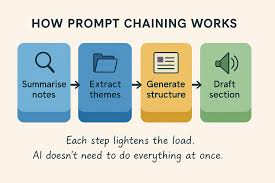
This workflow uses AI for two distinct tasks. Each task has its own prompt tailored to its specific needs.
Workflow Snapshot: Research & Report
Research Stage
Prompt Goal: Gather factual data.
Example Prompt: “Find stats on.”
AI Role: Data Gatherer.
Writing Stage
Prompt Goal: Draft content.
Example Prompt: “Write a summary of.”
AI Role: Content Creator.
Advanced Prompting Techniques
Once you have the basics down, you can explore more advanced ways to prompt.
1. Chain-of-Thought Prompting
This technique asks the AI to show its thinking process. It’s like asking it to work through a problem step-by-step.
Example: “Solve this math problem and explain each step: 2 + (3 * 4) – 1.”
This helps catch errors and understand the AI’s logic.
2. Zero-Shot Prompting
This is when you ask the AI to do something it hasn’t been specifically trained for, without giving it examples. It relies on the AI’s general knowledge.
Example: “Classify this movie review as positive or negative: ‘The acting was superb, and the story kept me on the edge of my seat.'”
3. Few-Shot Prompting (Revisited)
As shown before, giving examples can greatly improve accuracy. It guides the AI’s understanding of the desired output format and style.
4. Temperature and Top-P Settings
Some AI tools let you adjust these settings. Temperature controls randomness. Higher temperature means more creative but potentially less focused output.
Lower temperature means more predictable and focused output.
Top-P is similar. It controls the range of words the AI can choose from. Lower Top-P makes the output more focused.
These advanced methods help fine-tune the AI’s output. They are especially useful for complex tasks within a workflow.
Common Pitfalls to Avoid
Even with good intentions, prompt engineering can go wrong. Here are some common mistakes:
- Vagueness: Not being clear about what you want.
- Ambiguity: Using words that have multiple meanings.
- Too Much Information: Overwhelming the AI with too many unrelated requests.
- Not Enough Context: Assuming the AI knows background details.
- Incorrect Assumptions: Thinking the AI understands nuances like humans do.
- Ignoring AI Limitations: Asking for things the AI simply cannot do (e.g., predicting the future with certainty).
I’ve made every one of these mistakes! For instance, I once asked an AI to “make this sound better.” That’s extremely vague. The AI just rephrased my sentences slightly.
It didn’t understand my goal of making it sound more professional. I had to go back and add specific instructions about tone and audience.
Prompt Pitfall Checklist
- Is my request clear?
- Have I provided enough context?
- Are there any words that could be misunderstood?
- Am I asking for too much at once?
- Am I expecting too much from the AI?
Real-World Workflow Example: Customer Service Bot
Imagine a company wants to build an AI workflow for customer service. This isn’t just one prompt. It’s a series of prompts and rules.
1. Initial Greeting Prompt
When a customer starts a chat, the AI needs to greet them. A prompt might set this up:
“Act as a friendly and helpful customer service agent. Greet the customer and ask how you can assist them today. Keep the greeting short and welcoming.”
2. Intent Recognition Prompt
The AI needs to figure out why the customer is contacting them. This might involve analyzing the customer’s message and using another prompt to categorize it.
“Analyze the following customer message and identify the main reason for contact. Possible categories include ‘Billing Inquiry,’ ‘Technical Support,’ ‘Product Information,’ or ‘Other.’ Output only the category.”
3. Information Retrieval Prompt
Based on the category, the AI needs to find relevant information. If the category is ‘Billing Inquiry,’ it might prompt a knowledge base system or another AI:
“Search our internal knowledge base for common questions and answers related to ‘Billing Inquiry.’ Provide a concise summary of potential solutions or information the customer might need.”
4. Response Generation Prompt
Finally, the AI uses the retrieved information to craft a response to the customer.
“Based on the customer’s message and the following retrieved information , draft a helpful and clear response. Address the customer’s specific issue. Maintain a polite and professional tone.”
This multi-step process is a true AI workflow. Each step is powered by a specific prompt. The prompts build upon each other to solve a customer’s problem.
The Importance of Iteration and Testing
Building AI workflows with prompts isn’t a one-and-done deal. It requires continuous improvement. This is where iteration and testing come in.
1. Test Your Prompts
Run your prompts many times. See what kind of output you get. Are there common errors?
Are the results consistent?
2. Analyze the Output
Don’t just glance at the AI’s response. Read it carefully. Does it meet all your requirements?
Is it accurate? Is the tone correct?
3. Refine Your Prompts
Based on your testing, adjust your prompts. Add more detail. Clarify instructions.
Remove confusing parts. Sometimes, a small change can make a big difference.
I often find myself tweaking prompts several times. I might add a sentence like, “Ensure the output is easy for a non-expert to understand.” Or I might add, “Avoid using any technical terms related to X.” These small additions refine the AI’s focus.
Iteration Cycle
1. Prompt: Write the instruction.
2. Test: Run the prompt.
3. Analyze: Check the results.
4. Refine: Improve the prompt.
5. Repeat!
Ethical Considerations in Prompting
As we build these AI workflows, it’s crucial to think about ethics. Prompts can influence AI behavior in ways that have real-world consequences.
- Bias: Prompts can inadvertently embed biases. If you ask an AI to describe a “successful CEO,” and your prompt implies gender or race, the AI might reflect that bias.
- Misinformation: Poorly crafted prompts can lead AI to generate false or misleading information.
- Fairness: Ensure your prompts don’t lead to unfair outcomes for certain groups of people.
- Transparency: Be clear when AI is being used, especially in sensitive areas.
For example, if building an AI for hiring, a prompt like “find candidates who are like our current top performers” could perpetuate existing biases if the “top performers” were not a diverse group. A better prompt would focus on skills and objective criteria.
It’s our responsibility as users and creators to design prompts that are fair, accurate, and ethical. This is a vital part of building trustworthy AI workflows.
The Future of AI Workflows and Prompts
The field of AI is moving incredibly fast. Prompt engineering is becoming a more sophisticated skill. We’re seeing more specialized AI models designed for specific tasks.
Tools are also emerging to help manage complex prompts. Imagine AI workflows that can self-correct or learn from feedback without constant manual prompt adjustments. This might involve more natural language interfaces where you can “talk” to your workflow.
The ability to build effective AI workflows with well-crafted prompts will be increasingly valuable. It’s not just for developers anymore. It’s for anyone who wants to leverage AI to be more productive and creative.
The core principles will likely remain: clarity, context, and specificity. But the tools and techniques will evolve. Staying curious and willing to learn is key.
When Is an AI Workflow with Prompts a Good Idea?
Not every task needs a complex AI workflow. But here’s when they really shine:
- Repetitive Tasks: When you do the same thing over and over, AI can automate it. Think of sorting emails or generating standard reports.
- Information Synthesis: When you need to gather and make sense of a lot of data. AI can help find patterns and summarize insights.
- Content Creation: For drafting emails, blog posts, social media updates, or marketing copy.
- Brainstorming and Ideation: When you need new ideas or creative angles.
- Customer Support: Automating responses to common questions.
- Data Analysis: Helping to interpret datasets or identify trends.
If you find yourself spending too much time on tasks that could be done by a machine with clear instructions, it’s time to explore building an AI workflow. It’s about freeing up your time for more strategic or creative work.
Quick Tips for Building Better AI Workflows
Here are some practical tips to keep in mind:
- Start Simple: Don’t try to build a super-complex workflow from day one. Start with one or two AI steps.
- Be Specific: The more detail you give the AI, the better the outcome.
- Use Examples: Show the AI what you want. Few-shot prompting is very effective.
- Iterate: Test and refine your prompts. Don’t expect perfection on the first try.
- Understand Your AI Tool: Different AI models have different strengths and weaknesses. Know what yours can do.
- Keep Notes: Document your prompts and what worked. This builds your knowledge base.
- Focus on the Goal: Always remember what you are trying to achieve with the workflow.
Key Prompting Principles
Clarity: What is the exact task?
Context: What background info does AI need?
Format: How should the output look?
Examples: Show, don’t just tell.
Iteration: Keep testing and improving.
Frequently Asked Questions About AI Workflows and Prompts
What is the easiest way to start building an AI workflow?
The easiest way is to start with a single, repetitive task you perform often. Identify the exact steps you take. Then, try to use an AI tool for one of those steps with a clear, specific prompt. For example, if you often summarize articles, try prompting an AI to “Summarize the key points of the following article.”
How do I know if my prompt is good?
A good prompt produces consistent, relevant, and accurate output that meets your specific needs. If you’re getting confusing, irrelevant, or incorrect results, your prompt likely needs improvement. Testing it multiple times with different inputs can reveal its effectiveness.
Can I use AI to write prompts for other AI?
Yes, you can! This is a form of meta-prompting. You can ask an AI to help you create prompts for another AI. For instance, you could say, “Help me write a prompt for an AI to generate social media posts about sustainable fashion. The posts should be engaging and target young adults.”
What are the main differences between zero-shot and few-shot prompting?
In zero-shot prompting, you ask the AI to perform a task without providing any examples. It relies on the AI’s existing knowledge. In few-shot prompting, you give the AI a few examples of the input and desired output to guide its understanding of the task. Few-shot prompting often leads to more accurate results for specific or complex tasks.
How important is the tone and persona in a prompt?
Very important! Tone and persona significantly shape the AI’s output. Asking the AI to act as a “friendly tutor” will result in a different response than asking it to act as a “formal academic researcher.” Specifying tone (e.g., “optimistic,” “neutral,” “urgent”) and persona (e.g., “expert,” “beginner,” “tourist”) helps the AI tailor its language and style to your needs.
Can AI workflows replace human jobs?
AI workflows can automate many tasks, which may change the nature of some jobs. However, they often augment human capabilities rather than replace them entirely. Humans are still needed for complex decision-making, creativity, emotional intelligence, and overseeing AI systems. The focus is often on shifting human roles to higher-level tasks.
Conclusion
Building AI workflows with prompts is an exciting and practical skill. It’s about clear communication with powerful tools. By understanding how to craft effective prompts, you can make AI work smarter for you.
This leads to greater efficiency and better results. Start experimenting, keep learning, and you’ll unlock new possibilities.







Leave a Reply