
What Are ChatGPT Prompts for Developers?
Think of ChatGPT as a super-smart intern. It knows a lot about programming. But it needs clear directions.
A prompt is simply a set of instructions you give to ChatGPT. For developers, these prompts are special. They are tailored to coding tasks.
They help ChatGPT understand what you need it to do with your code. This can be anything from writing a small function to explaining a complex algorithm.
The goal is to get ChatGPT to act like a helpful colleague. It should offer useful suggestions. It should provide accurate code.
It should help you solve problems quickly. Good prompts are the key to unlocking this power. They save you time.
They make your work easier. They can even help you learn new things about programming.
My Own Brush With Prompt Frustration
I remember one late night. I was stuck on a tricky bug. It was a small piece of Python code.
It kept giving me weird errors. I tried explaining the problem to ChatGPT. I pasted my code.
I asked it to “fix my code.” It gave me a bunch of random suggestions. Some didn’t even apply. I felt a wave of annoyance.
I thought, “This thing is supposed to be smart! Why can’t it help me?”
That’s when I realized the problem wasn’t ChatGPT. It was my prompt. I wasn’t giving it enough information.
I wasn’t telling it what kind of fix I needed. I was just asking it to “fix it.” It was like telling a chef to “make food.” You need to be more specific! That night, I learned a valuable lesson.
Better prompts lead to better answers. It changed how I use AI tools forever.
Why Better Prompts Matter for Developers
Clearer Output: You get exactly what you need.
Faster Debugging: AI spots issues quicker.
Code Generation: Get functional code snippets.
Learning Aid: Understand complex topics easily.
Brainstorming: Generate new project ideas.
The Core Elements of a Great Developer Prompt
So, what makes a prompt great? It’s all about giving ChatGPT the right context. You need to tell it who it is, what it should do, and how you want the answer.
Let’s break this down.
First, define the role. You can tell ChatGPT to act like a senior Python developer. Or a frontend expert.
This helps it understand the perspective it should take.
Second, provide context. This is super important. Share your code.
Explain the problem you’re facing. Mention the programming language. What have you tried already?
The more details, the better.
Third, specify the task. What exactly do you want ChatGPT to do? Do you need a code example?
Do you want an explanation? Or do you need help finding a bug?
Fourth, set the output format. How should the answer look? Do you want it as a code block?
A step-by-step list? Just plain text?
Finally, add constraints or goals. For example, “Make this code as efficient as possible.” Or, “Ensure this solution is secure.” This guides the AI’s thinking.
Essential Prompt Structures for Coding Tasks
Let’s look at some common coding tasks and how to prompt for them.
Generating Code Snippets
This is one of the most popular uses. You need a function. You need a class.
You need a small script. You can tell ChatGPT to write it for you.
Prompt Example:
“Act as a JavaScript developer. Write a JavaScript function that takes an array of numbers. The function should return the sum of all even numbers in the array.
Make sure the function handles empty arrays gracefully by returning 0.”
In this prompt, we defined the role (JavaScript developer). We clearly stated the task (write a function). We specified the input (array of numbers) and the output (sum of even numbers).
We also added a constraint (handle empty arrays).
Code Generation Prompts: Key Takeaways
Role: Specify the programming language and skill level (e.g., “Senior Python Developer”).
Task: Clearly state what code you need (e.g., “Create a function,” “Build a class”).
Input/Output: Describe what the code will receive and what it should produce.
Constraints: Add any specific requirements (e.g., “efficiency,” “security,” “error handling”).
Debugging and Error Analysis
When you hit a bug, it can be maddening. ChatGPT can be a great debugger. But you have to show it the problem.
Prompt Example:
“I am getting an error in my Python script. The error message is ‘TypeError: unsupported operand type(s) for +: ‘int’ and ‘str”. Here is the relevant code snippet: “`python\ndef calculate_total(price, quantity):\n total = price * quantity\n return str(total)\n\nprint(calculate_total(10, 5))\n“`\nExplain why this error is happening and provide a corrected version of the code.
Focus on the data types involved.”
Here, we provided the exact error message. We shared the specific code causing the issue. We asked for an explanation and a fix.
We even added a hint (focus on data types) to guide its analysis.
Debugging Prompts: What to Include
Problem Description: What is the issue you are facing?
Error Message: Paste the exact error message.
Code Snippet: Provide the code that triggers the error.
Context: Briefly explain what the code is supposed to do.
What You Need: Ask for an explanation, a fix, or both.
Understanding Concepts and Explanations
Sometimes, you just need to understand a programming concept. ChatGPT can break down complex ideas into simpler terms.
Prompt Example:
“Explain the concept of ‘asynchronous programming’ in JavaScript. Assume I have some basic knowledge of JavaScript but find async concepts confusing. Use a simple analogy if possible.
Break down the explanation into small paragraphs, and highlight the benefits of using async programming.”
This prompt sets the audience (developer with basic JS knowledge). It asks for an analogy for easier understanding. It also specifies the output structure (small paragraphs, highlighted benefits).
Concept Explanation Prompts: Tips
Target Audience: Who are you trying to understand this for?
Concept Name: Clearly state the topic.
Desired Simplicity: Ask for simple terms or analogies.
Structure: Request a specific format (e.g., bullet points, step-by-step).
Key Aspects: Ask it to cover specific parts of the concept (e.g., “benefits,” “drawbacks”).
Refactoring and Improving Code
You have code that works, but it’s messy. Or maybe it’s slow. Refactoring means cleaning it up.
ChatGPT can help you do this.
Prompt Example:
“Review the following Python code. My goal is to make it more readable and efficient. Please identify areas for improvement and suggest refactored code.
Focus on reducing redundancy and improving variable names. Here is the code: “`python\ndef process_data(d):\n results = \n for item in d:\n if item == True:\n new_item = \n new_item = item\n new_item = item.upper()\n results.append(new_item)\n return results\n“`”
We told it the language (Python). We stated the goals (readability, efficiency). We gave specific areas to focus on (redundancy, variable names).
Then we provided the code.
Best Practices for Writing Developer Prompts
Beyond the structure, there are some general rules that make prompts work better.
Be Specific, Not Vague
This is the most crucial rule. Instead of “Write some code,” say “Write a Python function to validate an email address using regex.” The more specific you are, the better the AI can target its response.
Provide Enough Context
Imagine asking a coworker for help without showing them your screen. You wouldn’t do that! Similarly, give ChatGPT all the necessary background.
This includes code snippets, error messages, and what you’ve already attempted.
Use Clear and Simple Language
Even though ChatGPT understands complex topics, it’s best to use straightforward words in your prompts. Avoid jargon where possible, or explain it if you must use it. This ensures there’s no misinterpretation.
Iterate and Refine
Don’t expect the perfect answer on the first try. Often, you’ll need to have a conversation with ChatGPT. If the first answer isn’t quite right, ask follow-up questions.
Tell it what was missing or what needs changing. For instance, “Can you make that function also check for valid domain names?”
Iterative Prompting Example
User: “Write a Python script to sort a list of numbers.”
ChatGPT: (Provides a basic sorting script)
User: “Okay, that works. Now, can you modify it to sort in descending order instead of ascending? Also, ensure it handles non-numeric values by ignoring them.”
ChatGPT: (Provides the updated script)
Specify the Output Format
Tell ChatGPT how you want the information presented. Do you want a code block? A markdown table?
A JSON object? For example, “Please output the results as a JSON array.”
Break Down Complex Requests
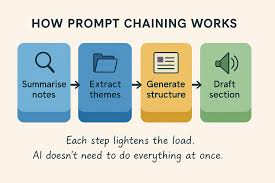
If you have a very large or complicated task, don’t try to cram it all into one prompt. Break it into smaller, manageable steps. Solve one part, then use the output of that to inform the next prompt.
Advanced Prompting Techniques for Developers
Once you’ve mastered the basics, you can try these more advanced methods.
Few-Shot Prompting
This involves giving ChatGPT a few examples of what you want before asking it to perform the task. This helps it understand the pattern.
Prompt Example:
“Here are some examples of how to convert a natural language request into a SQL query:\n\n1. Natural Language: ‘Show me all users from California.’\n SQL Query: SELECT FROM users WHERE state = ‘California’;\n\n2. Natural Language: ‘List all orders placed in the last week.’\n SQL Query: SELECT FROM orders WHERE order_date >= DATE(‘now’, ‘-7 days’);\n\nNow, convert this request: ‘Find all products with a price greater than $50’ into a SQL query.”
By providing examples, you guide ChatGPT toward the desired output structure and style.
Chain-of-Thought Prompting
This technique encourages ChatGPT to explain its reasoning step-by-step. This is especially useful for complex logic or debugging.
Prompt Example:
“Let’s think step by step. I have a list of customer orders. Each order has an ‘amount’ and a ‘date’.
I want to find the average order amount for orders placed in January. Explain your thought process to arrive at the correct calculation and formula, considering potential edge cases like no orders in January.”
The phrase “Let’s think step by step” or “Explain your reasoning” signals the AI to provide a detailed breakdown.
Advanced Techniques Explained
Few-Shot: Provide examples to guide the AI’s response style and format.
Chain-of-Thought: Ask the AI to explain its reasoning process step-by-step for complex problems.
Role-Playing: Instruct the AI to act as a specific expert (e.g., “Act as a security auditor”).
Output Structuring: Clearly define the desired output format (JSON, XML, markdown table, etc.).
Leveraging Specific AI Models and Features
ChatGPT is part of a larger ecosystem. Some platforms offer specialized models or features.
For instance, some versions of ChatGPT are better at code completion. Others excel at generating creative text. Knowing what your chosen AI tool is good at can help you tailor your prompts.
Always check the documentation or guides for your specific AI service.
Common Pitfalls to Avoid
While powerful, it’s easy to fall into common traps with AI prompts. Knowing these can save you frustration.
Overly Broad Prompts
As mentioned, asking “Write code” is too general. It will lead to generic or irrelevant answers. Always narrow down your request.
Assuming Prior Knowledge
Don’t assume ChatGPT “knows” what you’re thinking. If a piece of context is important, include it. This is especially true for specific project setups or custom libraries.
Not Verifying the Output
ChatGPT can make mistakes. Code it generates might have subtle bugs. Explanations might be slightly off.
Always review and test the AI’s output. Treat it as a helpful suggestion, not a final solution.
Pitfall vs. Solution
Pitfall: Vague request (“Make this better”).
Solution: Specific request (“Improve the performance of this sorting algorithm”).
Pitfall: Missing context (Not providing code when debugging).
Solution: Include all relevant code and error messages.
Pitfall: Blindly trusting output (Copy-pasting without testing).
Solution: Always test and verify code and explanations.
Ignoring Output Formatting Requests
If you ask for JSON output and get plain text, that’s a problem. Ensure you are clear about the format you need. If the AI doesn’t deliver, ask it to reformat.
Using ChatGPT for Learning and Skill Development
It’s not just about getting code written. ChatGPT is an incredible learning tool for developers.
Understanding New Languages or Frameworks
New to React? Trying out Go? You can ask ChatGPT to explain core concepts, provide basic project structures, or even help you write your first “hello world” application in that new technology.
You can ask it to compare two different frameworks, highlighting their strengths and weaknesses.
Learning Design Patterns
Design patterns are crucial for writing maintainable code. You can ask ChatGPT to explain patterns like the Singleton, Factory, or Observer. You can even ask it to show you examples of these patterns in your preferred programming language.
Prompt Example:
“Explain the Singleton design pattern in Java. Provide a simple code example that illustrates its use. Also, explain a common scenario where the Singleton pattern is beneficial.”
Practicing Algorithms and Data Structures
Need to practice implementing a binary search tree? Or understanding how a hash map works? Ask ChatGPT to provide an implementation in your language of choice.
You can also ask it to explain the time and space complexity of different algorithms.
Prompt Example:
“Show me an implementation of a binary search tree in C++. Explain how to perform insertion and deletion operations. What is the average time complexity for these operations?”
Learning with AI: Your Toolkit
Concept Explanations: Get complex ideas broken down simply.
Code Examples: See how concepts are applied in real code.
Language/Framework Guides: Quick starts for new technologies.
Algorithm Practice: Implement and understand algorithms.
Pattern Identification: Learn and apply design patterns.
Building a Personal Prompt Library
As you start using ChatGPT more, you’ll find yourself writing similar prompts repeatedly. Save these! Build a personal library of effective prompts for common tasks.
You can store these in a document, a note-taking app, or even a dedicated prompt management tool. When you need to generate a function, debug an error, or explain a concept, you can pull out your saved prompt and tweak it slightly. This saves you a lot of time and ensures consistency.
For example, you might have a template prompt for explaining API errors, a template for writing unit tests, or a template for generating database queries. This library is like your personal cheat sheet for getting the most out of AI.
Real-World Scenarios: Putting Prompts to Use
Let’s imagine a few scenarios where well-crafted prompts make a difference.
Scenario 1: Building a new feature
You’re a frontend developer tasked with adding a search bar with autocomplete to a website. Instead of starting from scratch, you can prompt ChatGPT.
Prompt: “Act as a React developer. Write a reusable React component for an autocomplete search bar. It should accept a prop for a list of suggestions (strings) and an onChange handler.
When the user types, it should filter the suggestions and display them in a dropdown. Include basic styling suggestions and keyboard navigation support.”
This prompt will give you a solid starting point, saving hours of initial development. You can then refine the component further.
Scenario 2: Optimizing database queries
You’re a backend developer noticing that a specific database query is running slowly. You have the SQL query and the database schema.
Prompt: “I have the following SQL query that is performing slowly: “`sql\nSELECT o.order_id, c.customer_name, o.order_date\nFROM orders o\nJOIN customers c ON o.customer_id = c.customer_id\nWHERE o.order_date BETWEEN ‘2023-01-01’ AND ‘2023-12-31’\nORDER BY o.order_date DESC;\n“`\nMy database schema includes `orders` (order_id, customer_id, order_date) and `customers` (customer_id, customer_name).\nExplain potential reasons for this query being slow and suggest optimizations. Consider indexing strategies or alternative query structures. Assume a large dataset.”
This prompt will help you identify bottlenecks and get expert advice on improving database performance.
Scenario Spotlight: Code Generation
User Goal: Need a small utility function.
Prompt Type: Code Generation.
Key Elements: Language, function name, input/output types, specific logic, error handling.
AI Benefit: Provides a working snippet quickly.
What This Means for the Future of Development
Tools like ChatGPT are changing how we develop software. They are not here to replace developers, but to augment our abilities.
Think of AI as a powerful pair programmer. It can handle the repetitive tasks. It can offer suggestions you might not have considered.
This frees you up to focus on more creative, complex, and strategic aspects of software engineering. It allows us to build better software, faster.
Learning to prompt effectively is becoming a core skill. It’s as important as knowing your programming languages. It’s about efficiently communicating your needs to these intelligent tools.
The developers who master this will have a significant advantage.
When is it Normal to Use AI for Coding Tasks?
It’s perfectly normal and often beneficial to use AI tools like ChatGPT for a wide range of coding tasks. This includes:
- Generating Boilerplate Code: Creating repetitive code structures.
- Writing Unit Tests: Developing tests for your functions and modules.
- Understanding Syntax: Getting quick examples for language features.
- Debugging Simple Errors: Identifying common mistakes.
- Learning New Concepts: Breaking down complex topics.
- Brainstorming Solutions: Exploring different approaches to a problem.
The key is to use it as a tool to enhance your productivity and understanding, not as a replacement for critical thinking and validation.
When Should You Be More Cautious?
There are times when you need to be extra careful and rely more on your own expertise:
- Sensitive Data Handling: Never paste confidential or proprietary code or data into public AI models.
- Security-Critical Code: While AI can suggest secure practices, complex security logic should always be thoroughly reviewed by a human expert.
- Complex System Architecture: AI is great for components, but high-level system design requires human judgment and experience.
- Highly Specialized Domains: For very niche or cutting-edge fields, AI knowledge might be limited or outdated.
Always remember that AI is a tool. You are the developer. Your judgment and experience are paramount.
Quick Tips for Prompt Mastery
Here’s a quick rundown to keep in mind:
- Be Polite: While not strictly necessary, a “please” and “thank you” can make your prompts feel more natural.
- Experiment: Try different phrasing. See what yields the best results.
- Focus on One Task Per Prompt: Avoid asking for too many unrelated things at once.
- Use Code Blocks: Always use ` “` ` for code snippets in your prompts.
- Specify the Version: If you’re using a specific version of a language or framework, mention it.
Frequently Asked Questions about ChatGPT for Developers
What is the best way to ask ChatGPT to write code?
The best way is to be very specific. Tell it the programming language, what the code should do, what inputs it will receive, and what output you expect. Also, mention any specific requirements like efficiency or error handling.
Can ChatGPT generate code that is bug-free?
No, ChatGPT can generate code that appears correct, but it can still contain bugs. It’s essential to always test and review any code provided by AI before using it in production. Treat it as a draft.
How can I use ChatGPT to debug my code effectively?
Provide the exact error message, the relevant code snippet, and a brief description of what the code is supposed to do. Ask ChatGPT to explain the error and suggest corrections.
Is it safe to share my company’s code with ChatGPT?
Generally, no. Public AI models are not designed for handling sensitive or proprietary code. Always check the terms of service and consider using enterprise-grade or self-hosted AI solutions if security is a concern.
Can ChatGPT help me learn a new programming language quickly?
Yes, it can be a great learning aid. You can ask it to explain concepts, provide syntax examples, and help you write simple programs in the new language. However, it should supplement, not replace, traditional learning resources.
What are some common mistakes developers make when prompting ChatGPT?
Common mistakes include being too vague, not providing enough context (like code snippets or error messages), and expecting perfect results on the first try without iteration.
Should I use ChatGPT for complex architectural decisions?
While ChatGPT can offer insights and suggestions about architectural patterns, major architectural decisions should be made by experienced human developers who understand the full scope of the project’s needs, constraints, and long-term implications.
Final Thoughts on Prompting for Developers
Mastering ChatGPT prompts is an ongoing journey. It’s about clear communication and understanding the AI’s capabilities. By being specific, providing context, and iterating, you can turn ChatGPT into an indispensable coding partner.
It helps you code smarter, learn faster, and solve problems more effectively. Happy prompting!








Leave a Reply