
Understanding the Midjourney Prompt
Midjourney works by interpreting your text. Think of yourself as a director and Midjourney as an incredibly talented, but very literal, artist. It needs clear instructions. The basic idea is to describe what you want to see. This can be anything from a simple object to a complex scene with specific moods, styles, and lighting. The AI then uses its vast training data to piece together an image that matches your description.
The most important thing to remember is that Midjourney doesn’t “understand” in the human sense. It matches patterns. So, if you describe a “sad robot,” it looks for visual elements associated with sadness and robots in its training. The more detailed and descriptive you are, the more clues you give the AI. This helps it avoid generic results and get closer to your unique idea. It’s like painting a picture with words, guiding the AI’s brush stroke by stroke.
There’s a lot of power in the words you choose. Small changes can lead to big differences in the final image. For instance, saying “a cat” will give you a very different result than “a fluffy ginger cat curled up on a velvet cushion in a sunbeam.” We’ll explore how to build these descriptive layers into your prompts to achieve precisely what you envision.
The Anatomy of a Good Midjourney Prompt
A strong Midjourney prompt usually has a few key components. You don’t need to use all of them every time, but knowing they exist gives you more control. It’s like having a toolbox. You pick the right tool for the job.
First, there’s the subject. This is the main thing you want in your image. It could be a person, an animal, an object, or a creature. Be as specific as you can. Instead of “dog,” try “golden retriever puppy.”
Next, you have actions and context. What is your subject doing? Where are they? “A golden retriever puppy playing in a park” is better than just “golden retriever puppy.” Add details like “chasing a red ball” or “sitting by a flower bed.”
Then come style and aesthetics. This is where you tell Midjourney how you want the image to look. Do you want it to look like a photograph, a painting, a sketch, or something else? You can specify artistic movements (Impressionism, Surrealism), artists (Van Gogh, H.R. Giger), or rendering styles (cinematic lighting, watercolor, pixel art).
Lighting and atmosphere are also crucial. Is it a bright sunny day? A moody, foggy evening? Is there dramatic spotlighting? Describing the light (golden hour, neon glow, volumetric lighting) can dramatically change the mood. Atmosphere (mysterious, cheerful, serene) adds another layer.
Finally, there are technical parameters. These are commands that tell Midjourney about the image’s size, aspect ratio, or version. For example, `–ar 16:9` sets the aspect ratio to widescreen. You’ll often see these at the end of a prompt, starting with two hyphens.
Prompt Building Blocks
- Subject: The core element (e.g., “majestic dragon,” “cyberpunk city street”).
- Action/Setting: What the subject is doing and where (e.g., “soaring over mountains,” “bustling with flying cars”).
- Style: Artistic look and feel (e.g., “digital painting,” “photorealistic,” “anime style”).
- Artist Influence: Mimic a specific artist (e.g., “in the style of Salvador Dalí,” “by Studio Ghibli”).
- Lighting: How light affects the scene (e.g., “soft dawn light,” “harsh studio lighting”).
- Mood/Atmosphere: The feeling of the image (e.g., “dreamy,” “intense,” “peaceful”).
- Color Palette: Specific colors or color schemes (e.g., “monochromatic blue,” “vibrant autumn colors”).
- Composition: Camera angle or layout (e.g., “wide shot,” “close-up,” “from below”).
- Parameters: Technical controls (e.g., `–ar 3:2` for aspect ratio, `–v 6` for model version).
The Power of Detail: Subject Specificity
Let’s dive deeper into the subject. Vague subjects lead to vague images. The more precise you are, the better Midjourney can interpret your intent. Imagine you want a “flower.” This could be anything from a daisy to a rare orchid. If you want a “rose,” that’s better, but what kind of rose? A “deep red velvet rose” is much more descriptive.
Consider the material, texture, and specific features. Instead of “car,” try “sleek, vintage red sports car with chrome accents.” For a creature, “a furry, six-legged alien creature with bioluminescent spots” gives the AI a lot more to work with than just “alien.”
I remember trying to create a character for a story. I started with “knight.” The images were okay, but generic. Then I added details: “a medieval knight clad in gleaming black plate armor, with a tattered blue cape, holding a greatsword.” Suddenly, the images had personality and presence. It was like the AI finally understood the kind of knight I had in mind.
This principle applies to everything. For landscapes, “a forest” becomes “an ancient, misty redwood forest with sunlight filtering through the dense canopy.” For objects, “a sword” becomes “a mystical elven sword with an glowing emerald embedded in its hilt.” The key is to paint a vivid picture with your words.
Setting the Scene: Context and Environment
Once you have your subject, where does it exist? The environment provides context and can drastically change the mood and storytelling of your image. Simply saying “a wizard” is one thing. Saying “a wizard conjuring a spell in a dimly lit, ancient library filled with dusty tomes and floating magical runes” is an entirely different experience.
Think about the location, the time of day, and the overall atmosphere. Is it an “urban cyberpunk city at night,” a “serene Japanese garden at dawn,” or a “treacherous volcanic landscape under a stormy sky”? Each of these phrases sets a very different stage.
Consider the elements that make up that environment. For a beach scene, you might include “crashing waves,” “salty air,” “white sand,” and “distant seagulls.” For a mountain scene, “snow-capped peaks,” “jagged rocks,” “thin, cold air,” and “a vast, clear sky.”
In real homes, you see how the surroundings impact objects and people. A cozy armchair looks different in a cluttered attic than in a sunlit living room. Midjourney’s AI works similarly. The surrounding details give weight and realism to your subject. My own struggles often come from not giving the AI enough environmental cues. I might want a “peaceful scene,” but without specifying “gentle rolling hills” or “calm lake,” the AI might put it in an unexpected or jarring setting.
Environment Ideas
Nature:
- Forest (enchanted, dark, sunlit)
- Desert (sandy, rocky, alien)
- Mountains (snowy, volcanic, green)
- Ocean (deep sea, tropical beach, stormy)
- Sky (starry night, cloudy, aurora borealis)
Man-made:
- City (futuristic, ancient, bustling, abandoned)
- Room (cozy study, grand hall, sterile lab)
- Street (cobblestone, neon-lit, dusty road)
- Building (castle, spaceship, humble cottage)
The Art of Style: Visual Aesthetics and Influences
This is where you tell Midjourney how you want the image to look and feel. Style can encompass everything from the medium (painting, photography) to the mood to the overall artistic movement.
You can specify artistic styles like “Impressionism,” “Surrealism,” “Art Nouveau,” or “Cyberpunk.” You can also mention specific artists. Asking for “in the style of Van Gogh” will evoke his distinctive brushstrokes and color palettes. “In the style of H.R. Giger” will bring you biomechanical nightmares.
Think about the medium. Do you want a “photorealistic” image? A “digital painting”? A “pencil sketch”? A “watercolor”? “3D render”? Each of these keywords directs the AI to mimic a specific artistic process or output.
For example, if you want a character, “a fantasy knight” could become “a gritty, hand-drawn fantasy knight illustration, with bold linework and hatching, reminiscent of Frank Frazetta.” The difference in outcome is massive.
I often experiment with combining styles. What happens when you mix “Art Deco” with “Sci-Fi”? Or “Baroque” with “Gothic”? Sometimes the most interesting results come from unexpected fusions. It’s like saying, “Make me a storybook illustration, but with the gritty detail of a documentary photograph.”
A common mistake is not specifying style at all, letting Midjourney default to a general look. If you have a specific aesthetic in mind, you must put it in the prompt. What looks good to you might be very different from what the AI assumes is the default “good look.”
Style Keywords Quick List
- Art Movements: Impressionism, Surrealism, Cubism, Art Nouveau, Renaissance, Baroque, Pop Art, Abstract Expressionism.
- Mediums: Photography, Oil Painting, Watercolor, Pencil Sketch, Charcoal Drawing, Digital Art, 3D Render, Pixel Art, Linocut, Collage.
- Rendering Styles: Photorealistic, Cinematic, Matte Painting, Concept Art, Anime, Cartoon, Comic Book Art, Vector Art.
- Artist Influences: (e.g., “in the style of Van Gogh,” “by Alphonse Mucha,” “inspired by Moebius”).
The Impact of Lighting and Color
Lighting is one of the most powerful tools for setting a mood. A scene can be completely transformed by how it’s lit. Think about how different lighting affects your perception of a room. Dim, warm light feels cozy. Harsh, bright light can feel clinical or dramatic.
Keywords like “golden hour,” “dramatic chiaroscuro,” “soft ambient light,” “neon glow,” or “moonlight” all guide the AI. “Golden hour” suggests warm, soft light, perfect for serene or romantic scenes. “Chiaroscuro” implies strong contrasts between light and dark, great for dramatic portraits or gothic settings.
I once wanted to create a mysterious scene. I started with a forest, but it looked too ordinary. When I added “foggy morning with shafts of light breaking through the trees,” the mood instantly shifted. The light and atmosphere worked together to create the exact feeling I was after.
Color is just as important. You can specify a general mood (“warm colors,” “cool tones”) or a specific palette (“monochromatic blue,” “vibrant autumn hues,” “pastel palette”). Sometimes, limiting the colors can create a stronger, more cohesive image. A black and white image can be incredibly impactful. A single accent color can draw the viewer’s eye.
Consider the psychological impact of colors. Red often signifies passion or danger. Blue can mean calm or sadness. Green is often associated with nature or growth. Use these associations to your advantage.
Lighting & Color Ideas
Lighting Types:
- Golden Hour
- Blue Hour
- Dusk / Dawn
- Moonlight
- Starlight
- Studio Lighting
- Dramatic Spotlight
- Cinematic Lighting
- Ambient Light
- Volumetric Lighting
- Backlighting
Color Palettes:
- Monochromatic (e.g., “all shades of purple”)
- Complementary (e.g., “blue and orange contrast”)
- Analogous (e.g., “blues and greens”)
- Warm Tones
- Cool Tones
- Pastel Colors
- Vibrant / Neon
- Muted / Desaturated
- Black and White
Composition and Camera Angles
How the scene is framed is vital for storytelling. Composition refers to the arrangement of elements within the image. Midjourney can be directed to use specific camera angles or shot types.
Common camera terms include:
- Wide Shot / Long Shot: Shows the subject from a distance, emphasizing the environment.
- Medium Shot: Shows the subject from the waist up, good for interaction.
- Close-Up: Focuses on a specific part of the subject, revealing detail and emotion.
- Extreme Close-Up: Magnifies a very small detail.
- Bird’s-Eye View: Shot from directly above.
- Worm’s-Eye View / Low Angle: Shot from directly below, making the subject appear powerful.
- Eye-Level Shot: A neutral perspective.
You can also think about the rule of thirds, leading lines, or symmetry. While you can’t directly tell Midjourney “use the rule of thirds,” you can describe a composition that implies it. For example, “a lone tree centered on a vast plain” creates a different feel than “a lone tree placed off-center on a vast plain, with a winding path leading towards it.”
In my own work, I found that specifying angles makes a huge difference. A portrait shot from a low angle can make a character seem heroic. A high-angle shot can make them seem vulnerable. It’s about controlling the viewer’s perspective and emotions.
Composition Quick-Scan Table
| Shot Type | Description | Effect |
| Wide Shot | Subject appears small in vast surroundings. | Emphasizes environment, isolation, scale. |
| Medium Shot | Subject from waist up. | Good for interaction and showing some body language. |
| Close-Up | Focus on face or specific object. | Reveals emotion, detail; creates intimacy. |
| Low Angle | Camera looks up at the subject. | Makes subject look powerful, imposing, heroic. |
| High Angle | Camera looks down at the subject. | Makes subject look small, vulnerable, insignificant. |
Using Parameters: The Technical Side
Parameters are special commands that start with two hyphens (--) and come at the end of your prompt. They give you fine-tuned control over the image generation process. They are essential for getting precise results and fitting images into specific formats.
One of the most common is the aspect ratio parameter: `–ar`. This tells Midjourney the width-to-height ratio of your image. For example:
- `–ar 16:9` for widescreen (like a TV or movie screen).
- `–ar 3:2` for standard photography.
- `–ar 1:1` for a square image.
- `–ar 9:16` for a vertical image (like a phone wallpaper).
Another important one is the model version: `–v`. Midjourney is constantly updated with new models that have different strengths and styles. Specifying the version ensures you’re using a model you’re familiar with or one that’s best suited for your needs. For example, `–v 6` uses the latest primary model (as of my last update). Different versions can interpret prompts differently and produce vastly different aesthetics. Always check the latest Midjourney documentation for available versions and their features.
There are many other parameters, such as `–chaos` (introduces more variation and unexpected results), `–stylize` (controls how strongly Midjourney’s artistic style is applied), and `–no` (which lets you specify things you don’t want in the image, like `–no text` to avoid words appearing randomly). Experimenting with these parameters can unlock new creative possibilities and help you refine your images.
I recall struggling to get a clean image without random text elements. Adding `–no text` at the end of the prompt immediately solved the problem. It’s a simple but powerful way to refine the output and avoid unwanted artifacts.
Key Parameters
Aspect Ratio:
--ar 16:9(Widescreen)--ar 3:2(Standard Photo)--ar 1:1(Square)--ar 9:16(Vertical)
Model Version:
--v 6(Latest Primary Model)--v 5.2(Previous Model)
Other Useful Parameters:
--chaos <0-100>(More variety in initial grid)--stylize <0-1000>(How artistic the image is)--no(Exclude unwanted elements)
Putting It All Together: Prompt Engineering in Practice
Now that you know the parts, let’s see how they fit together. Prompt engineering is the art of crafting these text instructions to get the best possible results. It’s an iterative process. You write a prompt, see what Midjourney generates, and then refine your prompt based on the output.
Let’s take an idea: “a lone astronaut exploring an alien planet.”
A very basic prompt:
a lone astronaut exploring an alien planet
This will likely give you a generic image. Let’s add detail.
Improved prompt:
a lone astronaut in a white and gold futuristic suit, standing on a rocky, purple alien planet with two moons in a swirling green sky, cinematic lighting, photorealistic, wide shot --ar 16:9
Here’s what changed:
- Subject: “lone astronaut” is now “lone astronaut in a white and gold futuristic suit.”
- Environment: “alien planet” is now “rocky, purple alien planet with two moons in a swirling green sky.”
- Lighting/Style: Added “cinematic lighting, photorealistic.”
- Composition: Added “wide shot.”
- Parameter: Specified `–ar 16:9`.
This second prompt gives Midjourney much more specific information to work with, leading to a more unique and controlled image. When I first started, I’d get frustrated because the AI kept giving me images that felt generic. The turning point was realizing I needed to be as descriptive as possible, as if I were describing it to someone who had never seen anything before. Every adjective matters.
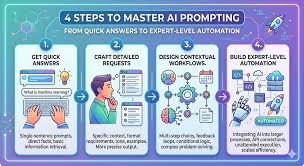
Prompt Refinement Flow
Start Basic: Describe your main subject.
Add Detail: Flesh out the subject with attributes (color, texture, material).
Define Setting: Describe the environment, time of day, and atmosphere.
Specify Style: Choose artistic style, medium, or artist influence.
Control Lighting & Color: Add keywords for mood and visual feel.
Guide Composition: Use camera angles or framing descriptions.
Apply Parameters: Use `–ar`, `–v`, `–no`, etc., for technical control.
Iterate: Generate, observe, and refine your prompt based on results.
Advanced Prompting Techniques
Beyond the basics, there are ways to get even more precise. One such technique is using weights, though Midjourney’s direct weight system is less prominent than in some other AI models. However, you can achieve similar effects by repeating keywords or placing them strategically.
For example, if you want a dragon to be the dominant element, you might say “a fierce dragon, a fierce dragon breathing fire, over a small village.” The repetition reinforces the importance of “dragon” and “fierce.”
Negative prompting is also powerful. Using the `–no` parameter allows you to tell Midjourney what to avoid. If you consistently get images with watermarks, you can add `–no watermark`. If you want a specific object removed, like “no hats,” you can add `–no hats`.
You can also use image prompts. This involves uploading an image to Discord and using its URL at the beginning of your prompt. This tells Midjourney to draw inspiration from the style, composition, or subject of that image. This is incredibly useful for guiding the AI toward a very specific aesthetic that’s hard to describe with words alone.
I often find that combining descriptive text with an image prompt works wonders. For instance, I might upload a mood board image that has the lighting and color palette I want, and then describe the subject and scene in text. This layered approach gives the AI a very strong reference point.
Another advanced tip is understanding prompt order. While Midjourney generally tries to honor all parts of a prompt, putting more important elements earlier in the sentence can sometimes give them more weight. This isn’t a hard rule, but it’s a good practice to consider.
Advanced Tips
Image Prompts: Use the URL of an image to guide style and content.
Negative Prompting: Use --no to exclude elements.
Keyword Repetition: Gently emphasize elements by repeating them (use sparingly).
Prompt Order: Place critical elements earlier in your prompt.
Seed Values: If you find an image you like, you can use its seed value to generate similar images later.
Common Pitfalls and How to Avoid Them
Even with the best intentions, it’s easy to fall into traps when writing Midjourney prompts. One of the most common is being too generic. As we’ve discussed, “dog” will never produce as interesting a result as “fluffy corgi puppy wearing a tiny party hat.” Always ask yourself: “Can I be more specific?”
Another pitfall is using too many conflicting ideas. If you ask for a “bright, cheerful sunny beach” and then add “dark, stormy, gothic castle,” Midjourney will struggle to reconcile these opposites, often leading to muddled or nonsensical results. Focus your prompt around a cohesive theme.
Overly complex sentences can also be an issue. While you want detail, don’t string together so many clauses that the prompt becomes hard for the AI (and you!) to parse. Break down complex ideas into simpler phrases.
Forgetting parameters is another common one. If you need a specific aspect ratio for your project, you must include `–ar`. Otherwise, you’ll get a square image and have to re-generate or crop, which can lose detail. I learned this the hard way when preparing images for a website that needed a specific banner size.
Finally, not iterating is a missed opportunity. Your first prompt is rarely perfect. Midjourney is a tool for exploration. Embrace the process of generating, reviewing, and tweaking. If you get something close but not quite right, analyze what’s missing or what’s wrong and adjust your prompt. This iterative cycle is the core of effective prompt engineering.
Avoid These Mistakes
Problem: Being too vague. Solution: Add descriptive adjectives and specific nouns.
Problem: Conflicting styles/moods. Solution: Focus on a single, cohesive theme.
Problem: Overly long, complex sentences. Solution: Use shorter phrases and clear subject-verb-object structures.
Problem: Forgetting parameters. Solution: Always add `–ar` and consider other relevant parameters.
Problem: Not iterating. Solution: Treat generation as a process; refine prompts based on results.
When is it a Good Prompt?
How do you know when you’ve hit on a good Midjourney prompt? It’s a combination of factors. Firstly, the output should closely align with your initial vision. If you imagined a whimsical forest and got a realistic city, your prompt needs work. Secondly, the image should have aesthetic appeal. It should look good, with good composition, lighting, and coherence.
A good prompt also leads to consistent results. If you generate variations and they all share the core elements you intended, that’s a sign of a well-crafted prompt. It’s not producing random noise; it’s producing variations on a theme you defined.
I find that when I can look at the generated image and point to specific parts of my prompt and say, “Ah, that’s where the `cinematic lighting` comes in,” or “That’s the `Art Nouveau` style I asked for,” then I know the prompt was effective. It means the AI understood and executed the instructions well.
Ultimately, a good prompt is one that saves you time and frustration by guiding the AI efficiently towards your creative goals. It’s a bridge between your imagination and the AI’s capabilities.
FAQs About Midjourney Prompts
What is the best way to start writing a Midjourney prompt?
Start by describing the main subject of your image. Be as specific as possible. For example, instead of “a house,” try “a cozy cottage with a thatched roof and a smoking chimney.” Then, add details about the setting, style, lighting, and any other elements you want.
Can I use real-world names of objects or places?
Yes, absolutely! Midjourney’s AI is trained on a massive dataset that includes information about real-world objects, places, and even specific artists. Using specific names often leads to more accurate and recognizable results.
How do I make my Midjourney images look like paintings?
To achieve a painterly look, use keywords related to painting mediums and styles. Examples include “oil painting,” “watercolor,” “acrylic,” “Impressionist,” “Surrealist painting,” or “digital painting.” You can also mention specific artists known for their painting styles.
What does the –ar parameter do?
The --ar parameter stands for “aspect ratio.” It sets the width-to-height ratio of the generated image. Common values are --ar 16:9 for widescreen, --ar 1:1 for square, and --ar 3:2 for standard photo prints.
How can I avoid unwanted elements in my generated images?
The --no parameter is your best friend here. If you don’t want text in your image, add --no text. If you want to avoid a certain color, add --no red.
This helps you steer the AI away from undesirable outputs.
Is it better to use short prompts or long prompts?
Generally, longer, more descriptive prompts tend to produce more specific and nuanced results. However, clarity is key. A long, rambling prompt can be less effective than a concise, well-structured one.
Aim for detailed descriptions rather than just length.
How do I create different artistic styles like anime or pixel art?
Use specific keywords in your prompt. For anime style, include “anime style,” “manga,” or mention specific anime studios like “Studio Ghibli.” For pixel art, use “pixel art,” “8-bit,” or “16-bit.” The more specific you are with style keywords, the better Midjourney can match your vision.
Conclusion
Crafting effective Midjourney prompts is a rewarding skill that opens up a world of creative possibilities. By understanding the anatomy of a prompt, focusing on descriptive details, and leveraging styles, lighting, and parameters, you can move from generic images to stunning, personalized artwork. Don’t be afraid to experiment, iterate, and explore. The more you practice, the more intuitive it will become. Happy prompting, and enjoy creating!





Leave a Reply