
It feels like everyone is talking about AI lately. You might be trying out tools like ChatGPT yourself. Maybe you’re asking questions, trying to get it to write something, or even asking for help with a tricky task.
But sometimes, the answers you get aren’t quite what you hoped for. It can be frustrating when the AI doesn’t seem to understand what you really want.
You’re not alone. Many people struggle to get the best results from AI models. The way you ask matters a lot.
Think of it like talking to a very smart, but very literal, assistant. If you give unclear directions, you won’t get the best outcome. This guide is here to help.
We’ll break down how to talk to AI so it truly helps you. We’ll cover simple ways to make your requests clearer. This will lead to better answers, less confusion, and more useful results.
Effective ChatGPT prompts involve being clear, specific, and providing context. They guide the AI by stating the desired format, tone, and task, ensuring the output aligns with your needs. Good prompts make AI interaction smooth and productive.
What Makes a Good ChatGPT Prompt?
At its heart, a good prompt for ChatGPT is like a clear set of instructions. It tells the AI exactly what you want it to do. It also gives it the background information it needs to do it well.
Imagine you’re asking someone to bake a cake. You wouldn’t just say “bake a cake.” You’d say “bake a chocolate cake for a birthday party, with vanilla frosting.” You’d also mention if there are any allergies.
ChatGPT works similarly. It needs details. It needs to know the topic.
It needs to know the job. It needs to know the style. The more information you give, the better it can match your expectations.
This is not about tricky words. It’s about being direct and helpful in your request.
Why does this matter so much? Because ChatGPT doesn’t know you. It doesn’t know your thoughts or your day.
It only knows the words you type. So, your words are its entire world. They are the map it uses to create its answer.
A fuzzy map leads to a fuzzy destination. A clear map leads you right where you want to go.
Think about different kinds of tasks you might ask AI to do. You might want it to explain a difficult topic. You might want it to write a poem.
You might want it to summarize a long article. Each of these needs a different kind of prompt. A prompt for explaining needs a clear subject.
A prompt for writing a poem needs style and theme. A prompt for summarizing needs the text itself.
The basic structure of a good prompt often includes a few key parts, even if they are just implied. These are:
- The task: What do you want the AI to do? (e.g., write, explain, summarize, compare)
- The topic: What is the subject matter? (e.g., photosynthesis, local history, marketing strategy)
- The context: Any background information needed? (e.g., for a 5th-grade class, for a business report)
- The format: How should the answer look? (e.g., bullet points, a paragraph, a table)
- The tone: What feeling should it have? (e.g., friendly, formal, excited, serious)
Sometimes you won’t need all of these. But thinking about them helps you build better prompts. Even simple prompts benefit from a bit of this structure.
For example, instead of “Tell me about dogs,” try “Explain the main differences between Golden Retrievers and Labrador Retrievers for someone who wants a family pet.” See how much more specific that is?
The goal is to reduce guesswork for the AI. When you reduce guesswork, you get more reliable and useful results. This applies to all sorts of AI models, not just ChatGPT.
Learning to prompt well is a skill that gets easier with practice.
My Own Prompting Journey: From Confusion to Clarity
I remember when I first started using AI tools like ChatGPT. It felt like magic, but also a bit like banging my head against a wall. I’d ask a question, and the AI would give me something that was technically correct but completely unhelpful.
Or it would go off on a tangent I didn’t care about.
One time, I was working on a blog post about sustainable gardening. I wanted to explain composting to beginners. I typed, “Explain composting.” The AI gave me a very technical, scientific explanation.
It used terms like “aerobic decomposition” and “microbial activity.” It was accurate, but absolutely not what a beginner gardener needed. It felt like it was talking to a scientist, not to someone who just wanted to know how to turn kitchen scraps into dirt.
I felt frustrated. I knew the AI could do better. I just didn’t know how to ask.
I remember sitting there, staring at the screen, feeling a little foolish. I was an expert in writing, but felt like a novice at talking to this new technology. I even remember thinking, “Maybe this AI thing isn’t for me.” That feeling of being stuck, of not getting the results you know are possible, is tough.
So, I decided to experiment. I started looking at examples of good prompts. I tried adding more details to my own requests.
Instead of “Explain composting,” I tried: “Explain how to start composting for beginners. Use simple words and give practical tips for a small backyard. Imagine you’re talking to a friend who has never composted before.”
The difference was astounding. The AI gave me a friendly explanation. It talked about different bin types.
It listed common kitchen scraps that are good for composting. It even warned about things to avoid. It was exactly what I needed.
It wasn’t just about adding words; it was about adding direction. It was about shaping the AI’s response by giving it a persona and a clear audience.
This experience taught me a huge lesson. The AI is a tool. Like any tool, you need to learn how to use it effectively.
The prompt is your control panel. The better you understand how to adjust the controls, the better the output will be. It took a few more tries and some conscious effort to change my habits.
But now, I can confidently say that crafting a good prompt is a skill worth developing. It saves time, reduces frustration, and unlocks the true power of AI.
Crafting Your First AI Assistant Prompt
Goal: Get a summary of a short news article.
Basic Prompt: “Summarize this article.”
Better Prompt: “Summarize the following news article in three simple bullet points. Focus on the main event and its impact. Article: “
Why it’s better: It specifies the format (bullet points), the quantity (three), and the key information to focus on (main event, impact).
The Core Principles of Prompt Engineering
Prompt engineering is the fancy term for figuring out how to talk to AI. But really, it’s just about being a good communicator. There are a few key ideas that make any prompt work better.
First, clarity is king. This means using simple, direct language. Avoid jargon or slang unless it’s relevant to the task.
If you’re asking about a technical topic, use clear terms. Don’t assume the AI knows what you mean by a shorthand term.
Second, specificity helps a lot. Instead of “Write about cats,” try “Write a short, funny story about a cat that tries to catch a laser pointer dot.” The more specific you are, the less room there is for the AI to misunderstand.
Third, context is your friend. Giving the AI background information helps it tailor its response. This can include who the audience is, what the purpose of the text is, or any relevant background facts.
For instance, if you’re asking for advice, tell it about your situation.
Fourth, tell the AI what you don’t want. Sometimes, telling it what to avoid is just as important. If you’re asking for a recipe and you hate spicy food, say “Provide a recipe for chicken soup, and make sure it is not spicy.”
Finally, iterate. This means trying a prompt, seeing the result, and then tweaking your prompt. If the first answer isn’t right, don’t give up.
Think about how you could ask the question differently. Did you need to be more specific? Did you forget to mention the tone?
These principles are not rigid rules. They are guidelines. Think of them as tools in your toolbox.
You’ll use them differently depending on the job.
Contrast Matrix: Vague vs. Specific Prompts
Vague Prompt
Write about the weather.
Potential Output: A general discussion of weather patterns.
Specific Prompt
Describe the current weather in New York City, focusing on temperature and wind speed. Mention if it’s good for outdoor activities.
Likely Output: Detailed weather for NYC, including current temp, wind, and outdoor suitability.
Understanding Your Audience and Purpose
When you’re talking to ChatGPT, it’s like preparing a speech. You wouldn’t give the same speech to a group of scientists as you would to a group of kindergartners. The language changes.
The focus changes. The AI needs this same guidance.
Audience: Who is the AI writing for? Is it for experts? For children?
For someone new to a topic? You should tell the AI this. For example, “Explain quantum physics as if you’re talking to a 10-year-old.” Or, “Write a professional email to a potential client about our services.” The AI will adjust its vocabulary and sentence structure accordingly.
Purpose: What do you want the text to achieve? Do you want to inform? To persuade?
To entertain? To summarize? Stating the purpose helps the AI focus its energy.
If you want to persuade someone, the AI will use different language and arguments than if it just needs to inform.
Let’s look at an example. Suppose you want information about adopting a pet.
Prompt 1 (No audience/purpose): “Tell me about adopting pets.”
Result 1: Might be a general overview of pet adoption, covering many animal types and general processes.
Prompt 2 (With audience/purpose): “I’m thinking about adopting a dog from a shelter for the first time. Explain the main steps involved and what I should consider to ensure a good fit for my family. Use a friendly and encouraging tone.”
Result 2: Will likely be more focused on dogs, walk through the process step-by-step, offer practical advice for a first-time owner, and adopt a helpful, warm tone.
This shift from generic to tailored response is powerful. It means the AI isn’t just spitting out facts. It’s trying to fulfill a specific need you have.
This is where the real value of AI interaction comes in.
Consider the tone. Should the AI sound excited? Serious?
Humorous? Casual? Professional?
You can often specify this. “Write a short, enthusiastic thank-you note to a teacher.” Or “Draft a formal apology letter to a customer.” The tone sets the mood and guides the AI’s word choice and sentence structure.
Thinking about these elements—audience, purpose, and tone—before you even type your prompt can save a lot of back-and-forth. It’s about being intentional with your requests.
Specifying Format and Structure
How the AI presents its information is just as important as the information itself. If you need a list of ideas, asking for a long paragraph won’t be very helpful. Being clear about the format ensures you get the information in a usable way.
Here are some common formats you can ask for:
- Bullet points: Great for lists, steps, or key takeaways.
- Numbered lists: Perfect for step-by-step instructions or ordered items.
- Paragraphs: For explanations or narrative text. You can specify the number of paragraphs or length.
- Tables: Useful for comparing items, showing data, or organizing information with clear columns and rows.
- Headings and subheadings: Helps to break up longer text and make it easier to read.
- Code snippets: If you’re working with programming.
- Q&A format: Like this FAQ section.
Let’s imagine you need to plan a small party.
Vague Prompt: “Party ideas.”
Result: Might be a jumble of suggestions without organization.
Specific Prompt: “Create a checklist for planning a child’s birthday party. Include categories like decorations, food, activities, and invitations. Use numbered lists for each category.”
Result: You get a structured checklist that’s easy to follow and use for planning.
You can also specify the length. For example, “Write a 100-word summary” or “Provide three short paragraphs.” This helps control the output size.
Tables are particularly useful. If you want to compare different types of fruits, you could ask:
“Create a table comparing apples, bananas, and oranges. Include columns for ‘Type,’ ‘Sweetness (Scale 1-5),’ ‘Vitamin C Content (High/Medium/Low),’ and ‘Common Uses.'”
The AI will then generate a neat table that makes comparison easy. This saves you from having to extract and organize the information yourself. It’s a huge time-saver.
Don’t be afraid to ask for structure. If you get a wall of text and you needed points, just ask the AI to “reformat this as bullet points.” It can usually do that. It’s all part of the iterative process.
Quick-Scan Table: Common Prompt Formats
| Format | When to Use |
|---|---|
| Bullet Points | Lists, key ideas, features |
| Numbered Lists | Steps, instructions, sequences |
| Paragraphs | Explanations, stories, detailed descriptions |
| Tables | Comparisons, data, organized facts |
Handling Complex Topics and Nuance
Sometimes you need the AI to tackle something tricky. This could be a subject with a lot of jargon, a topic with many different opinions, or a situation with subtle details.
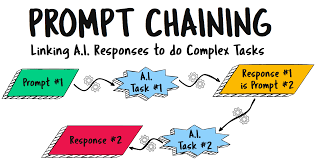
For complex topics, breaking them down is key. Instead of asking for a complete explanation of astrophysics in one go, you might ask for a series of prompts:
- “Explain the concept of gravity in simple terms, suitable for a 10-year-old.”
- “Now, explain the difference between mass and weight using the gravity concept.”
- “Describe Newton’s law of universal gravitation in a way that’s easy to understand.”
This step-by-step approach allows the AI to build understanding and allows you to guide it precisely. You can check each step before moving to the next.
When dealing with nuanced subjects, such as ethical dilemmas or differing viewpoints, it’s important to ask the AI to present multiple sides. You can say, “Present the arguments for and against .” Or “Discuss the different perspectives on , citing common viewpoints from each side.”
It’s also crucial to remember that AI models are trained on vast amounts of text. They don’t have personal beliefs or experiences. So, when asking about opinions or sensitive topics, the AI will likely provide a balanced overview of common human opinions, not a personal stance.
Here’s a scenario: You’re trying to understand a historical event with conflicting accounts.
Bad Prompt: “What happened during the XYZ event?”
Good Prompt: “Describe the XYZ historical event. Present the commonly accepted timeline of events. Then, discuss at least two significant differing interpretations or controversies surrounding the event, and who typically holds those views.”
This prompt acknowledges that there might not be one single, agreed-upon truth. It asks for the standard narrative first, then probes for the complexities. This is how you get a more complete and insightful answer.
Always consider the AI’s limitations. It’s a pattern-matching machine, not a thinking being. It can synthesize information incredibly well, but it can also generate plausible-sounding but incorrect information (called “hallucinations”).
If a topic is critical or highly sensitive, always cross-reference the AI’s output with trusted human sources.
Using Examples to Guide the AI
One of the most powerful ways to get the AI to do exactly what you want is to show it. This is called providing “few-shot” examples. You give it a few examples of the input and the desired output, and it learns the pattern.
Let’s say you want to extract specific information from customer feedback. You want to categorize feedback into “Positive,” “Negative,” or “Neutral.”
Prompt without example: “Categorize the following feedback: ‘The app is okay, but it crashes sometimes.'”
Result: Might be “Neutral” or “Negative,” depending on how it weighs the phrases.
Prompt with examples:
“Categorize the following customer feedback as Positive, Negative, or Neutral. Feedback: ‘I love this product! It works perfectly!’
Category: Positive
Feedback: ‘The service was slow and unhelpful.’
Category: Negative
Feedback: ‘It’s an alright product, nothing special.’
Category: Neutral
Feedback: ‘The app is okay, but it crashes sometimes.’
Category:”
The AI will see the pattern from the examples and correctly categorize the last piece of feedback as “Negative” or “Neutral” (depending on its internal logic for ‘crashes sometimes’, but it’s guided). You’ve shown it exactly what you mean by each category.
This technique is incredibly useful for tasks like:
- Extracting specific data points from text.
- Translating text into a very specific style.
- Rewriting text to match a particular tone.
- Classifying items into custom categories.
The more examples you provide (within reason, as long chains can be confusing), the better the AI will understand the desired output. However, you don’t always need many. Sometimes, just one good example is enough to set the right direction.
When creating your examples, make sure they are:
- Consistent: The format and style of your examples should be the same.
- Representative: The examples should cover the typical range of inputs you expect.
- Clear: The desired output for each example should be unambiguous.
This method takes a bit more effort upfront, but it often leads to the most precise and satisfying results. It’s like giving the AI a mini-training session on your specific task.
Observational Flow: How Examples Help
Step 1: Initial Request (No Example)
You: “Rewrite this sentence to be more formal: ‘He was really happy about the news.'”
AI: “He was pleased by the news.” (Good, but maybe not formal enough)
Step 2: Request with Example
You: “Rewrite this sentence to be more formal, like the example: ‘He was really happy about the news.’ Example: ‘The committee expressed its satisfaction with the report.'”
AI: “He expressed considerable satisfaction with the news.” (Much more formal and aligns with the example style)
Putting It All Together: A Real-World Scenario
Let’s imagine you’re a small business owner. You need to write a social media post announcing a new product launch. You’re busy and want to get this done quickly and effectively.
Your Goal: Create an Instagram post to announce a new line of handmade soaps.
Key Information: New organic soaps, natural ingredients, available online next Monday, special launch discount.
Target Audience: Eco-conscious consumers, people interested in natural skincare.
Desired Tone: Exciting, fresh, natural, inviting.
Here’s how you might craft your prompt:
Initial Thought (Too Simple): “Write an Instagram post about new soaps.”
This will get you something, but it won’t be compelling.
Adding Detail (Better): “Write an Instagram post announcing our new line of organic handmade soaps. Mention they are made with natural ingredients and will be available online next Monday. Add a call to action.”
This is better, but we can improve the tone and specificity.
The Master Prompt:
“Draft an exciting Instagram post announcing the launch of our brand new line of organic handmade soaps. Emphasize that they are made with only natural, high-quality ingredients. State that the soaps will be available on our website starting next Monday.
Include a special launch discount code for 15% off for the first week. Use a fresh, natural, and inviting tone. Add relevant hashtags and a clear call to action to visit our website.”
Let’s break down why this prompt works:
- Clear Task: “Draft an exciting Instagram post.”
- Specific Product: “brand new line of organic handmade soaps.”
- Key Features: “only natural, high-quality ingredients.”
- Launch Details: “available on our website starting next Monday.”
- Incentive: “special launch discount code for 15% off for the first week.”
- Desired Tone: “fresh, natural, and inviting tone.”
- Format/Extras: “relevant hashtags and a clear call to action to visit our website.”
The AI will now have all the pieces to create a post that fits your needs. It will likely suggest a catchy opening, describe the soap’s benefits, give the launch date, mention the discount, and provide a website link and suggested hashtags like #organicskincare #handmadesoap #naturalliving #newproductlaunch.
This process of starting simple and adding layers of detail—audience, purpose, tone, specific features, calls to action—is the essence of effective prompting. It’s about a conversation where you guide the AI towards your desired outcome.
Stacked Micro-Sections: Prompt Checklist
1. Task Definition: What do you want? (Write, explain, summarize)
2. Subject: What is it about? (Be precise)
3. Audience: Who is it for? (Kids, experts, customers)
4. Purpose: What should it achieve? (Inform, persuade, entertain)
5. Tone: How should it sound? (Friendly, formal, funny)
6. Format: How should it look? (List, table, paragraph)
7. Key Details: Any must-have info? (Dates, names, facts)
8. What to Avoid: Any restrictions? (Jargon, certain topics)
Common Pitfalls and How to Avoid Them
Even with the best intentions, it’s easy to fall into a few common traps when prompting AI.
Pitfall 1: Assuming the AI “Knows” Common Sense
AI doesn’t have life experience. If you ask it to “write a friendly email,” it doesn’t know what’s “friendly” in your specific context. Always define what you mean by common terms.
For example, instead of “Write a friendly reminder,” try “Write a friendly reminder email about the upcoming meeting, asking attendees to bring their notes.”
Pitfall 2: Overly Complex Sentences in Your Prompt
The AI is best when your prompt is as clear as possible. If your prompt has long, winding sentences with multiple clauses, the AI might get confused. Break down your thoughts into shorter, direct sentences.
This mirrors the advice for the AI’s output!
Pitfall 3: Not Specifying the Output Length
You might ask for an explanation and get a book chapter when you only needed a paragraph. Or you might ask for a summary and get one sentence when you needed more detail. Always try to specify length.
“Summarize this in 3 sentences,” or “Write a short paragraph (about 50 words).”
Pitfall 4: Not Iterating and Refining
The first answer is rarely perfect. If it’s not what you wanted, don’t just stop. Think about why it wasn’t right.
Did you forget to mention something? Was your language too vague? Use that feedback to adjust your prompt.
“Can you make that explanation simpler?” or “Can you focus more on X aspect?” are great follow-up prompts.
Pitfall 5: Prompting for Opinions or Subjective Truths
AI models are trained on data that reflects human opinions. They can tell you what people generally believe, but they don’t have their own beliefs. If you ask “What’s the best movie ever?”, the AI will give you a summary of popular opinions or critical reviews, not a definitive answer.
For subjective topics, it’s better to ask for a range of views or common arguments.
By being aware of these common mistakes, you can proactively write prompts that are more effective from the start. It’s all about continuous learning and refining your approach.
Advanced Prompting Techniques (When You Need More)
Once you’ve mastered the basics, there are a few more advanced techniques that can unlock even greater power from AI models.
1. Role-Playing:
This is where you tell the AI to act as a specific persona. We touched on this with audience and tone, but you can be more direct. “Act as a seasoned travel agent specializing in budget European trips.
Plan a 7-day itinerary for Paris.” Or “You are a kindergarten teacher. Explain why it’s important to share toys.”
2. Chain-of-Thought Prompting:
This encourages the AI to “think aloud” by showing its reasoning process. It’s particularly useful for problem-solving or complex logical tasks. You can prompt it with something like: “Solve this math problem and show your work step-by-step: .” The AI will then try to break down its solution, making it easier to follow and check.
It’s also called “step-by-step” prompting.
3. Few-Shot Learning (with more complex examples):
As discussed earlier, providing examples is powerful. For advanced use, you can create more detailed example pairs to guide the AI on very specific tasks. This is like creating a mini-dataset for your current need.
4. Constraints and Negative Prompts:
While we’ve mentioned what to avoid, you can be very explicit. “Write a product description for a new coffee maker. Do NOT mention the price.
Do NOT use the word ‘revolutionary’.” This helps steer the AI away from unwanted elements.
5. Iterative Refinement with Specific Feedback:
Instead of “Make it better,” try “Can you rewrite that paragraph to sound more enthusiastic and add a sentence about customer testimonials?” This targeted feedback is much more useful for the AI.
These techniques are not always necessary for simple tasks, but they are invaluable when you need precise control or are tackling complex challenges. Think of them as advanced tools for when the standard approach isn’t quite enough.
The Future of AI Interaction
The way we interact with AI is constantly evolving. As AI models become more sophisticated, they’ll get better at understanding our intentions, even with less detailed prompts. However, the core principles of clear communication will likely remain important.
We’re moving towards more natural, conversational interactions. Imagine being able to discuss your needs with an AI as you would with a human colleague. The AI will ask clarifying questions if it’s unsure, and you’ll be able to refine your requests in real-time.
The development of better “prompt understanding” in AI models means that simple, direct language will continue to be effective. However, for complex or highly specific tasks, the ability to provide context, examples, and constraints will likely remain a valuable skill. It’s about building a partnership with the AI, where you bring the goals and the nuanced understanding, and the AI brings its vast processing power.
The key takeaway is that prompting is not a static skill. It’s a dynamic one. As AI tools change, so will the best ways to use them.
Staying curious, experimenting, and paying attention to the results you get will always be the best way to learn and improve.
Frequently Asked Questions about ChatGPT Prompts
What is the most important part of a prompt?
The most important part is usually clarity. The AI needs to understand exactly what you are asking it to do. Being specific and direct helps it deliver the best results.
Do I need to use special keywords?
No, you don’t need “special keywords” in the way you might think for SEO. Instead, focus on using clear, descriptive words that accurately represent your task and topic. Think about what you would say to a person to get your request across.
Can I ask the AI to be creative?
Yes, you can! You can ask the AI to “be creative,” “write a story,” “come up with new ideas,” or “write a poem.” You can also specify the style of creativity, like “write a whimsical story” or “create a surreal poem.”
What if the AI’s answer is wrong?
AI can sometimes make mistakes or “hallucinate” information. If the answer is wrong, you should first check your prompt for any vagueness. Then, you can provide feedback to the AI by asking it to correct itself or by rephrasing your original request with more specific details. It’s also wise to cross-reference critical information.
How long should a prompt be?
Prompts can vary greatly in length. A simple question might be only a few words. A complex task might require a longer prompt with several sentences, context, and examples. The key is to include enough information for the AI to understand your request, but avoid unnecessary jargon or overly complex sentences.
Can I ask for a specific writing style?
Absolutely! You can ask the AI to write in various styles, such as “formal,” “casual,” “humorous,” “academic,” “like a news report,” or “like a friendly blogger.” Providing examples can also help the AI match a style very precisely.
Final Thoughts on Effective AI Communication
Mastering how to prompt an AI like ChatGPT is like learning a new language. It’s the language of clear instruction. The more practice you get, the more natural it becomes.
Remember that the AI is a tool designed to help you. By investing a little time in learning how to ask your questions well, you unlock its true potential.
Start with simple requests and gradually add more detail. Pay attention to the results and adjust your approach. You’ll find that better prompts lead to better answers, saving you time and frustration.
Happy prompting!










Leave a Reply