
Prompt engineering is the art and science of crafting precise instructions, called prompts, to guide artificial intelligence models to produce desired outputs. It involves understanding how AI processes information and structuring your requests to maximize accuracy, relevance, and creativity. Mastering prompt engineering allows you to unlock the full potential of AI tools for tasks like writing, coding, and problem-solving.
What Exactly Is Prompt Engineering?
Prompt engineering is all about making AI understand your ideas. It’s like giving very clear directions. If you tell a friend how to get to your house, you’d give street names and turns.
Prompt engineering is similar, but for AI.
You’re not just typing words. You’re building a bridge of understanding. You want the AI to grasp your goal perfectly.
Then, it can give you exactly what you’re looking for. This skill is becoming more important every day.
Why Does Prompt Engineering Matter So Much?
Think about the AI tools you use. They can do amazing things. But they need your help to do them well.
A poorly written prompt is like a blurry photo. You can’t see the details clearly. A good prompt brings everything into sharp focus.
It helps you save time. It stops you from getting wrong answers. It lets you be more creative.
It makes the AI a real helper, not just a random word generator. For businesses, it means better reports. For students, it means better study guides.
For creators, it means amazing stories and art.
My First Encounter with a Tricky AI Request
I remember trying to get an AI to write a simple poem about a cat. I typed, “Write a poem about a cat.” What I got back was a very long, dramatic piece about a lion. It had nothing to do with my fluffy tabby, Mittens.
I was so confused. Mittens just sat there, purring, completely unimpressed.
I felt a bit silly, like I’d failed a test. I had used the AI’s own language, but it missed the point entirely. This made me realize that just asking wasn’t enough.
I had to be more specific. I had to engineer my prompt.
The Core Components of a Good Prompt
Clarity: Be super clear about what you want. No guessing.
Context: Give background info. Why are you asking?
Format: Tell the AI how you want the answer. A list? A paragraph?
A table?
Tone: What feeling should the answer have? Funny? Serious?
Formal?
Constraints: Set limits. Word count? Specific words to avoid?
Understanding How AI ‘Thinks’ (A Little Bit!)
AI models like ChatGPT are trained on massive amounts of text. They learn patterns from this text. When you give them a prompt, they use these patterns to predict the most likely next words.
It’s like a super-smart autocomplete.
They don’t “understand” in the way humans do. They don’t have feelings or personal experiences. They are excellent at recognizing and repeating patterns they’ve seen.
This is why specific prompts work better. You are showing them the pattern you want them to follow.
Think of it like a chef. You can’t just say “make food.” You need to say “make spaghetti carbonara, for two people, with extra garlic.” The more detail, the better the chef can cook your meal. AI works the same way.
Basic Prompting: The Building Blocks
Direct Command: “Write a short story about a lost robot.” This is a good start.
Adding Detail: “Write a short story about a lonely robot named Unit 7 who gets lost in a bustling futuristic city.” This is much better.
Specifying Length: “Write a short story, about 300 words, about a lonely robot named Unit 7 who gets lost in a bustling futuristic city.” Now we’re getting somewhere!
Adding Context: The Magic Ingredient
Context is super important. It tells the AI the “why” behind your request. Are you writing a blog post for beginners?
Or a technical manual for experts?
Let’s go back to the cat poem. If I had said, “Write a simple, rhyming poem about my lazy house cat, Mittens, who loves to nap in sunbeams, for a children’s book,” the AI would have a much better chance of getting it right. That context helps the AI narrow down the possible patterns to follow.
The AI uses this context to set the “stage” for its answer. It helps it pick the right words and style. Without context, it’s like asking a stranger for directions without telling them where you want to go.
Format Matters: How You Want It
How do you want the information presented? This is where formatting comes in. Do you need a list of steps?
A comparison table? A paragraph explaining a concept?
You can tell the AI directly. For example, “List five ways to save money on groceries.” Or, “Explain the difference between a cat and a dog in a two-column table.” This guides the AI to structure its output in a way that’s useful for you.
If you don’t specify, the AI might just give you a long block of text. This is fine sometimes, but often, a structured answer is much easier to read and use. Think about what makes information easy for you to understand.
Formatting Examples for AI
Bullet Points: “Give me bullet points on how to bake cookies.”
Numbered List: “Provide a numbered list of steps to plant a tomato.”
Table: “Compare the pros and cons of two different smartphones in a table.”
Paragraph: “Explain photosynthesis in a simple paragraph.”
Code Snippet: “Write a Python function to calculate the area of a circle.”
Tone of Voice: Setting the Mood
Tone is about the feeling or attitude of the response. Do you want it to be friendly and casual? Or formal and professional?
Humorous or serious?
You can set this in your prompt. Try saying, “Write a friendly email asking for a day off.” Or, “Draft a formal business proposal for a new product.” The AI will adjust its word choices and sentence structures to match the desired tone.
This is crucial for matching your brand or your personal style. Imagine asking an AI to write a birthday message. You’d want it to sound joyful and personal, not like a legal disclaimer!
Constraints: Putting Up Guardrails
Constraints are limits you set. These are like guardrails for the AI. They help keep the output focused and relevant.
Common constraints include word count, character limits, or specific keywords to include or avoid.
For example, “Write a tweet (under 280 characters) about our new sale.” Or, “Describe a sunset without using the word ‘orange’.” These kinds of limits push the AI to be more creative and precise.
In my early days, I’d get essays when I needed a paragraph. Or I’d get too much jargon when I needed simple terms. Setting constraints early saves a lot of back-and-forth editing.
Quick Scan: Prompt Element Checklist
- Goal: What do you want?
- Audience: Who is it for?
- Format: How should it look?
- Tone: What feeling?
- Length: How long?
- Keywords: Any specific words needed?
- Exclusions: Any words to avoid?
Advanced Prompting Techniques: Getting More Out of AI
Once you’ve got the basics down, you can try more advanced methods. These help you get even more nuanced and specific results. They’re like level-up moves for your AI conversations.
Few-Shot Prompting
This is where you show the AI examples. You provide a few pairs of inputs and desired outputs. Then, you give it a new input and ask it to follow the pattern.
For instance, if you want to classify customer feedback, you might show it:
Input: “The app crashes too much.” Output: “Bug Report”
Input: “I love the new features!” Output: “Positive Feedback”
Then you give it a new input, like “The signup process is confusing.” The AI will likely respond with “User Experience Issue.” This is powerful for consistent tasks.
Role-Playing Prompts
Assigning a role to the AI can dramatically change its output. You can tell it to act as an expert, a teacher, a character, or even an object.
Try prompts like:
“Act as a seasoned travel agent. Plan a 7-day itinerary for a family of four visiting Paris, focusing on kid-friendly activities.”
“You are a friendly pet nutritionist. Explain why dry dog food might not be the best option for some dogs.”
This helps the AI adopt a specific perspective, leading to more tailored and credible responses.
Chain-of-Thought Prompting
This technique encourages the AI to “think step-by-step.” It’s especially useful for complex reasoning or math problems. You ask the AI to break down its thought process.
You might add: “Let’s think step-by-step.” or “Show your work.”
For example, instead of just asking for the answer to a math problem, you’d ask for the solution and the steps it took to get there. This allows you to check its logic and also helps the AI arrive at the correct answer more reliably.
Contrast Matrix: Common AI Misunderstandings
| Normal AI Behavior | Concerning AI Behavior |
|---|---|
| Provides a general answer to a broad question. | Hallucinates (makes up facts) or gives irrelevant information. |
| Uses language patterns learned from training data. | Becomes repetitive or gets stuck in loops. |
| Follows explicit formatting instructions. | Ignores formatting requests or produces chaotic output. |
Prompting for Different AI Models
Not all AI models are the same. Some are built for text, others for images, and some for code. Their strengths and weaknesses differ.
Text Generators (like ChatGPT): These are great for writing, summarizing, brainstorming, and conversation. They respond well to detailed, context-rich prompts.
Image Generators (like Midjourney or DALL-E): These require descriptive prompts that focus on visual elements. Think about style, colors, composition, and mood.
Code Generators (like GitHub Copilot): These need prompts that clearly define the programming task, language, and desired outcome.
Always check the documentation or experiment to understand the best way to prompt a specific AI tool.
Real-World Applications: Putting it into Practice
Prompt engineering isn’t just for fun; it has many practical uses in everyday life and work.
Content Creation
Writers can use AI to brainstorm blog post ideas, draft articles, write social media captions, or even create story outlines. A well-crafted prompt can help overcome writer’s block and speed up the creation process.
For example, “Generate 10 catchy headlines for a blog post about sustainable living, targeting young adults. Make them action-oriented.”
Coding and Development
Developers use AI to write code snippets, debug errors, and explain complex code. Prompts can be very specific, like “Write a JavaScript function to validate an email address using regular expressions.”
In my own work, I’ve seen developers save hours by having AI draft boilerplate code, allowing them to focus on the unique logic of their project.
Customer Service
AI-powered chatbots use prompt engineering to understand customer queries and provide relevant answers. The prompts guide the chatbot to identify issues, retrieve information, and respond helpfully.
Think of a chatbot prompt like: “Customer is asking about a refund for order #12345. Check order status and provide a link to the refund policy if eligible.”
Education and Learning
Students can use AI to explain difficult concepts, summarize research papers, or practice for tests. Prompts can be framed to get simplified explanations.
“Explain quantum entanglement like I’m 10 years old.”
This helps make complex subjects more accessible.
Personal Productivity
Even for personal tasks, prompt engineering can help. Need to plan a party? Organize your to-do list?
Draft a difficult email? AI can assist with specific prompts.
“Create a weekly meal plan for a family of three, focusing on quick and healthy dinners. Include a shopping list.”
Observational Flow: From Vague to Vivid
Initial Prompt: “Tell me about dogs.”
AI Output: General facts about dogs.
Improved Prompt: “Describe the typical behavior of a Golden Retriever puppy in its first six months, focusing on common training challenges and how to address them positively.”
AI Output: Specific, actionable advice tailored to the breed and age.
Common Pitfalls to Avoid
Even with the best intentions, it’s easy to fall into common traps when prompting AI. Recognizing these can save you a lot of frustration.
Vagueness is the Enemy
As we’ve discussed, being too general is the biggest mistake. The AI has no mind-reading abilities! It relies solely on the words you provide.
Instead of “Write about cars,” try “Write a short, engaging description of the main advantages of electric cars for a car enthusiast blog.”
Assuming AI Knows What You Mean
AI models don’t have your background knowledge or your specific project context unless you tell them. Don’t assume they know industry jargon or previous conversation details unless you’ve reinforced them.
If you’re talking about a project, remind the AI of the project’s name or core goal if it’s been a while.
Overly Complex Sentences
While AI can handle complex language, using very long, convoluted sentences in your prompt can sometimes confuse it. It might miss the core instruction hidden within the complexity.
Keep your prompt sentences clear and focused on one idea, just like we’re doing in this guide!
Not Iterating or Refining
Your first prompt might not be perfect. That’s okay! Prompt engineering is often an iterative process.
If you don’t get what you want, don’t give up. Tweak your prompt and try again.
Think: “What part of my prompt might have led to this misunderstanding? How can I make it clearer?”
Stacking Micro-Sections: Prompt Refining Tips
Analyze Output: What was wrong with it?
Identify Ambiguity: Where could the AI have misunderstood?
Add Specificity: What details are missing?
Refine Keywords: Are there better words to use?
Clarify Format: Is the desired output structure clear?
What This Means for You
Prompt engineering is a skill that will serve you well. It’s about communicating more effectively with powerful tools.
When it’s normal: It’s normal to spend a few minutes crafting a good prompt for an important task. It’s normal to try a prompt, see the result, and then adjust it.
When to worry: You should worry if you’re consistently getting wildly irrelevant or nonsensical answers. This often means your prompts are too vague or lack crucial context.
Simple checks: Before sending a prompt, ask yourself: Is it clear? Does it have enough detail? Is the desired output format specified?
If you can answer yes to these, you’re on the right track.
Quick Fixes & Tips for Better Prompts
Here are some handy tips to make your prompts work better:
- Be Polite, But Direct: While you don’t need to say “please,” being clear and direct is key.
- Use Keywords Wisely: Include terms that are central to your request.
- Specify Audience: Who are you writing for? (e.g., “explain to a beginner,” “for a technical audience”)
- Define Output Length: “briefly,” “in detail,” “around 200 words.”
- Use Negative Constraints: “Do not include marketing jargon.”
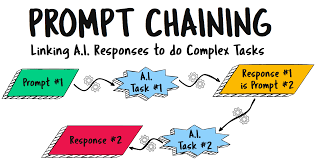
- Break Down Big Tasks: For very complex requests, tackle them in stages.
Frequently Asked Questions About Prompt Engineering
What is the most important part of a prompt?
Clarity is the most important part. If the AI doesn’t understand what you want, it can’t give you the right answer. Being specific about your goal is crucial.
Can I use the same prompt for different AI models?
Sometimes, yes. But different AI models have different strengths and respond best to slightly different prompting styles. It’s often best to test and adapt your prompts for each model.
How do I make AI sound more human?
To make AI sound more human, you can specify a tone (e.g., “friendly,” “conversational”). You can also ask it to include personal anecdotes or specific examples, though it will be generating these based on patterns, not true experience.
What if the AI gives me wrong information?
This is called “hallucination.” It’s important to always fact-check AI-generated information, especially for critical topics. You can try to refine your prompt by asking it to be more factual or to cite its sources, but verification is key.
Is prompt engineering a technical skill?
It involves some technical understanding, but it’s largely about communication and logical thinking. Anyone can learn to write better prompts with practice, even without deep coding knowledge.
How can prompt engineering help me save time?
By getting the AI to produce more accurate and relevant results on the first try, you spend less time editing and re-prompting. This speeds up tasks like writing, research, and coding.
Conclusion
Learning prompt engineering is like gaining a superpower for the digital age. It lets you guide AI with precision. It transforms AI from a confusing tool into a powerful assistant.
Keep practicing, keep refining, and you’ll soon be chatting with AI like a pro.








Leave a Reply