
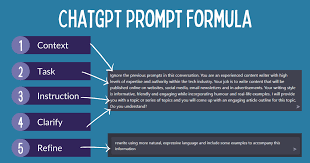
ChatGPT prompts are specific instructions or questions you give to an AI like ChatGPT. They guide the AI to generate desired text, answer questions, or perform tasks. Writing good prompts involves being clear, detailed, and providing context. This helps the AI understand your intent better and produce more accurate and helpful responses.
What Are ChatGPT Prompts?
Think of a prompt as a starting point. It’s the message you type into the chat box. This message tells the AI what you want it to do.
It’s the first step in a conversation with a smart machine. The AI uses your prompt to figure out its next move. It reads your words very carefully.
Then it tries its best to give you what you asked for. It might be a question to answer. It could be a story to write.
Or maybe you need help brainstorming ideas. All these start with a prompt from you.
The AI doesn’t know what’s in your head. It only knows the words you give it. So, the more precise your words, the better the outcome.
A simple prompt might be “Tell me about dogs.” The AI will give a general answer. But if you say, “Tell me about the best dog breeds for small apartments in cold climates,” you get a much more specific answer. This is the power of a good prompt.
It narrows down the AI’s focus. It tells the AI what details are important to you.
Why does this matter so much? Because AI is becoming a big part of our lives. We use it for writing emails, learning new things, and even for fun.
If you can’t get the AI to do what you want, it’s not as helpful. Mastering prompts helps you save time. It also helps you get more creative results.
You can use AI for complex tasks if you know how to ask the right way. It’s like having a super-smart assistant. But you need to be a good boss.
My First AI Chat Experience
I remember the first time I really tried to push ChatGPT. I was working on a blog post about gardening. I wanted some creative ideas for catchy headlines.
So, I typed in, “Give me headlines for a gardening blog.” It gave me some okay ones. But they felt a bit bland. They were generic.
I felt a little let down. I thought, “Is this all it can do?”
Then I remembered someone telling me to be more specific. So, I tried again. This time I typed, “Write 10 catchy headlines for a blog post about growing tomatoes in your backyard.
Focus on ease for beginners and overcoming common problems like pests. Use a friendly, encouraging tone.” Wow. The difference was amazing.
The new headlines were so much better. They spoke directly to the audience I wanted. They mentioned specific benefits.
I felt a rush of excitement. I realized I hadn’t been telling the AI enough. I was asking it to read my mind.
But with more details, it became a powerful tool.
That moment taught me a lot. It showed me that the AI isn’t magic on its own. It’s a tool.
And you need to learn how to use the tool effectively. The quality of the output directly depends on the quality of the input. It’s a simple truth, but so important.
Now, I always try to give ChatGPT as much information as I can upfront. It saves me time editing later. And the results are always more useful.
It’s like the difference between a rough sketch and a finished painting.
Key Elements of a Good Prompt
Clarity: Use simple, direct language. Avoid jargon.
Detail: Provide specific information. What exactly do you want?
Context: Give background. Who is the audience? What is the purpose?
Format: Specify how you want the answer. A list? A paragraph?
A table?
Tone: Describe the desired style. Friendly? Formal?
Humorous?
Why Prompting Matters So Much
Think about the AI as a brilliant student. This student has read a vast library of books. It knows a lot about many things.
But if you ask this student to “write something,” it won’t know where to start. It needs a subject. It needs a purpose.
That’s where your prompt comes in. Your prompt is the assignment given to the student.
A vague prompt is like giving a student a blank piece of paper and saying, “Write.” They might write anything. A specific prompt is like saying, “Write a short story about a brave knight who saves a dragon from a wicked witch.” Now the student has clear instructions. They know the characters, the plot, and the tone.
The AI works the same way. The more direction you give, the more focused and useful its answer will be.
This is especially true for complex tasks. If you want the AI to write code, you need to tell it the programming language. You need to explain what the code should do.
You might even need to give it examples of input and output. For creative writing, you might specify the genre, the characters’ traits, and the setting. For summarizing a document, you might tell it the key points to focus on or the target length of the summary.
When you get good at writing prompts, you unlock the true power of AI. You can use it to speed up your work. You can use it to get new ideas.
You can use it to understand difficult topics better. It becomes a partner in your thinking process. It’s not just a search engine.
It’s a tool that can create, explain, and transform information based on your specific needs. This is why learning to prompt well is so important in today’s world.
Prompting Best Practices
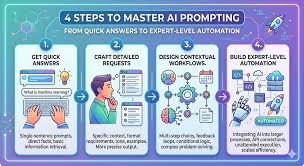
- Start Simple: For a new task, begin with a basic prompt.
- Iterate: If the first answer isn’t right, refine your prompt. Add more detail.
- Be Specific: Avoid words like “good” or “interesting.” Say what you mean.
- Ask for Examples: If you need ideas, ask for a list or examples.
- Define the Output: Tell the AI how you want the answer presented.
Understanding Different Prompting Techniques
There are many ways to ask things of an AI. Some methods work better for certain tasks. Let’s look at a few common ways to structure your prompts.
1. Role-Playing Prompts
You can tell the AI to act as someone. This helps set the tone and perspective. For example, “Act as a seasoned travel agent.
Plan a 7-day itinerary for a family of four visiting Rome in the summer. Include kid-friendly activities and budget-friendly dining.”
This tells the AI to adopt a specific persona. It should think like a travel agent. It should consider the needs of a family with children.
It should also think about the season and cost. The AI will then generate advice from that expert viewpoint. It’s more than just facts; it’s advice framed by a role.
2. Question-Based Prompts
These are straightforward. You ask a direct question. “What are the main causes of climate change?” or “How does photosynthesis work in simple terms?”
While simple, you can make them stronger. You can add context. “Explain the main causes of climate change as if you were talking to a 10-year-old, focusing on the most important factors.” This adds the audience and complexity level.
It guides the AI to simplify its language.
3. Instruction-Based Prompts
Here, you give a direct command. “Write a poem about a rainy day.” or “Summarize this article.”
To improve these, add constraints. “Write a haiku about a rainy day, focusing on the sound of the drops.” Or, “Summarize this article in three bullet points, focusing on the economic impact.” Instructions become much more useful with clear limits and focus points.
4. Few-Shot Prompts
This technique involves giving the AI examples of what you want. It’s like showing it a few finished tasks so it can learn the pattern. For instance, if you want to classify sentences by sentiment (positive/negative):
Input: “The weather is beautiful today.” Sentiment: Positive
Input: “I’m feeling really sad.” Sentiment: Negative
Input: “This movie was okay, not great.” Sentiment: Neutral
Input: “I love this new song!” Sentiment: ?
The AI, seeing the pattern, will likely output “Positive.”
This is very powerful for tasks where the AI needs to understand a specific style or format. It shows the AI the desired output structure. It helps it mimic the examples you provide.
Prompting Style Quick Guide
Role-Play: “Act as a.” (For specific perspectives)
Question: “What is.?” “How does.?” (For information retrieval)
Instruction: “Write a.”, “Summarize.”, “Create.” (For generating content)
Example-Driven: Show it input/output pairs (For pattern recognition)
Crafting Clear and Detailed Prompts
The biggest hurdle for many users is not being detailed enough. They think they’ve explained it well. But the AI needs more.
Imagine asking a chef to “make dinner.” That’s not helpful. You need to say, “Make a vegetarian pasta dish with broccoli and mushrooms, ready in 30 minutes.”
When you write a prompt, ask yourself: What does the AI not know? What assumptions am I making? Assume the AI knows nothing about your specific situation.
Then, fill in the gaps.
Consider these points:
- Audience: Who is the AI writing for? Kids? Experts? General public?
- Purpose: Why are you asking for this? To inform? To entertain? To persuade?
- Key Information: What are the absolute must-have pieces of data or concepts?
- Exclusions: What should the AI not include?
- Format Details: Do you need bullet points? A numbered list? A paragraph? How long should it be?
Let’s take an example. Suppose you want an AI to help you write a thank-you note to a colleague. A bad prompt would be: “Write a thank-you note.” A better prompt: “Write a short thank-you note to my colleague, Sarah.
She helped me finish a big project on time by staying late to help. I want to express my gratitude and acknowledge her effort. Keep it professional but warm.”
This improved prompt gives Sarah’s name, the reason for thanks, the specific action (staying late), the desired tone (professional but warm), and the length (short). This makes it much easier for the AI to generate a relevant and fitting response. It’s the difference between a generic message and a heartfelt one.
Detail Checklist for Prompts
What to Include:
- Topic: The main subject.
- Goal: What should the AI achieve?
- Audience: Who is the output for?
- Tone: How should it sound?
- Key Points: Essential information to cover.
- Length: How long should it be?
What to Avoid:
- Vague Language: “Good,” “nice,” “interesting.”
- Assumptions: Things the AI wouldn’t know.
- Ambiguity: Phrases with double meanings.
Specifying Tone and Style
Tone is how something sounds. Style is the way it’s written. Both are crucial for getting the right output from an AI.
If you’re writing a blog post for teenagers, you don’t want it to sound like a formal academic paper. Similarly, if you’re writing a legal disclaimer, you want it to be very precise and formal.
You can tell the AI exactly what tone and style you want. Use descriptive words. Here are some examples:
- Tone: Friendly, formal, casual, humorous, serious, enthusiastic, empathetic, professional, sarcastic, urgent, calm.
- Style: Simple, complex, poetic, technical, conversational, narrative, persuasive, informative, concise, detailed.
For instance, instead of saying “Write about coffee,” try: “Write a short, enthusiastic blog post about the joy of drinking morning coffee. Use a casual, conversational style. Make it sound like you’re talking to a friend who also loves coffee.”
The AI will then try to match these descriptors. It will use words and sentence structures that fit the requested tone and style. This helps ensure the output resonates with your intended audience.
It makes the content feel more human and less robotic.
Sometimes, the AI might not quite nail the tone. That’s okay! You can then refine your prompt.
You can say, “Make it sound even more excited,” or “Use simpler words.” This back-and-forth refining is a key part of effective prompting. It’s a dialogue. You guide the AI until it produces exactly what you need.
Don’t be afraid to experiment with different descriptive words for tone and style.
Tone & Style Examples
For a Children’s Book:
Tone: Whimsical, playful, encouraging.
Style: Simple sentences, clear narrative, descriptive language.
For a Business Proposal:
Tone: Professional, confident, persuasive.
Style: Formal language, data-driven, structured arguments.
For a Social Media Post:
Tone: Trendy, engaging, concise.
Style: Short sentences, emojis, hashtags, conversational.
Using Formatting Instructions
How you want the information presented matters. The AI can create lists, tables, code blocks, and more. You just need to tell it.
Here are some formatting requests you can make:
- “Provide the answer as a bulleted list.”
- “Create a table with columns for ‘Feature’ and ‘Benefit’.”
- “Write the response in short paragraphs, no more than two sentences each.”
- “Format the key steps as numbered items.”
- “Use bold text for all important terms.”
- “Separate the pros and cons into two distinct sections.”
Let’s say you’re asking for plant care tips. A simple prompt might be: “Tell me how to care for a peace lily.” The AI might give you a block of text. If you change it to: “Give me care tips for a peace lily.
Present the information as a bulleted list. Include sections for watering, sunlight, and humidity. Use bold for each section heading.” You’ll get a much more organized and easy-to-read response.
This is incredibly useful for making information digestible. If you need to compare items, ask for a table. If you need to outline steps, ask for a numbered list.
These simple formatting instructions can transform raw AI output into something much more practical and user-friendly. It shows the AI you’ve thought about how the information will be used.
Formatting Request Examples
Task: List pros and cons of electric cars.
Good Prompt: “List the pros and cons of electric cars. Use a table with two columns: ‘Pros’ and ‘Cons’.”
Task: Explain the steps to bake a cake.
Good Prompt: “Explain the steps to bake a basic chocolate cake. Use a numbered list. Make sure each step is clear and easy to follow.”
Task: Get a summary of a historical event.
Good Prompt: “Summarize the key events of the American Revolution. Present the summary in three short paragraphs.”
Putting It All Together: Advanced Prompting Strategies
Once you’re comfortable with the basics, you can try more advanced techniques. These can help you get even better results.
1. Chain-of-Thought Prompting
This technique encourages the AI to “think step-by-step.” You ask it to show its reasoning. This is great for math problems or logical puzzles. You might add “Let’s think step by step” to your prompt.
For example, “If a train leaves Station A at 2 PM traveling at 60 mph, and another train leaves Station B at 3 PM traveling at 70 mph towards Station A, and the stations are 300 miles apart, when will they meet? Let’s think step by step.”
By asking for the reasoning, you can often spot errors if the AI gets the answer wrong. It also helps the AI break down complex problems. This often leads to more accurate conclusions.
It’s a way to guide the AI’s thought process, not just its final answer.
2. Few-Shot vs. Zero-Shot Prompting
We discussed few-shot prompting earlier. That’s when you give examples. Zero-shot prompting is when you don’t give any examples.
You just ask the AI to perform the task. Most of our earlier examples were zero-shot.
Few-shot is better when the task is novel or needs a specific style. Zero-shot works well for common tasks that the AI is already trained on. Knowing when to use each can save you time.
If a zero-shot prompt doesn’t work, try adding a few examples. That’s when you switch to few-shot.
3. Negative Constraints
Sometimes, what you don’t want is as important as what you do want. You can tell the AI what to avoid. For example, “Write a story about a friendly alien visiting Earth.
Do not include any violence or scary scenes. Keep the language simple and suitable for children aged 5-7.”
These negative constraints help the AI steer clear of unwanted topics or styles. They act as guardrails. They ensure the output stays within your desired boundaries.
This is crucial when you have very specific requirements or are concerned about certain themes.
Another way to use negative constraints is to ask it to avoid certain words or phrases. “Describe a busy city street, but do not use the word ‘noisy’.” This forces more creative language. It helps the AI find alternative ways to express an idea.
Advanced Prompting Checklist
- Chain-of-Thought: Add “Let’s think step by step.”
- Few-Shot: Provide 2-3 clear examples of input/output.
- Negative Constraints: Specify what the AI should not do or include.
- Refine: Don’t be afraid to ask the AI to “try again” with modifications.
What This Means for You
Learning to prompt effectively isn’t just a technical skill. It’s about better communication. It’s about getting the most out of powerful tools.
It means you can be more creative. You can be more productive. You can learn faster.
When you can write good prompts, you are in control. You guide the AI. You shape its output.
This is empowering. You’re not just passively receiving information. You’re actively co-creating content and solutions.
Think about the time you save. Instead of spending hours writing a first draft, you can ask the AI to generate one in minutes. Then, you can spend your time refining it.
Or imagine struggling to understand a complex topic. A well-crafted prompt can break it down into simple terms for you. It’s like having a personal tutor available 24/7.
The key takeaway is that the AI is a tool. And like any tool, its effectiveness depends on the user. You are the architect of the AI’s response.
By investing a little time in learning how to prompt well, you unlock a vast potential. You make the AI a much more valuable asset in your daily life, whether for work, study, or personal projects.
Your Prompting Power-Up
Be a Director: Tell the AI what you want, not just ask a question.
Be a Teacher: Show the AI examples if needed.
Be a Navigator: Guide the AI with clear steps and boundaries.
Be Patient: Refine your prompts as you go.
Quick Tips for Better ChatGPT Prompts
Here are some final, easy-to-remember tips to improve your prompts:
- Use Action Verbs: Start prompts with verbs like “Write,” “Explain,” “Summarize,” “Create,” “Compare.”
- Be Specific About Length: Use terms like “short paragraph,” “one sentence,” “500 words,” “a brief list.”
- Define the Audience Clearly: “For a beginner,” “for experts,” “for a marketing team.”
- Request Examples: “Give me three examples of.”
- Ask for Alternatives: “What are other ways to say this?”
- Don’t Be Afraid to Edit: If the answer isn’t perfect, tell the AI what to change. “Make that sound more formal,” or “Add more details about X.”
Frequently Asked Questions
What is the most important part of a ChatGPT prompt?
The most important part of a ChatGPT prompt is clarity. You need to be very clear about what you want the AI to do. This includes details about the topic, the desired outcome, and any specific requirements like tone or format.
If your prompt is vague, the AI’s answer will likely be vague too.
How do I make ChatGPT sound more human?
To make ChatGPT sound more human, specify a conversational or natural tone in your prompt. You can ask it to write like a friend, use everyday language, or include common phrases. Also, asking it to avoid overly formal or robotic phrasing helps a lot.
You can even ask it to inject a specific emotion, like enthusiasm or empathy.
Can I ask ChatGPT to summarize long articles?
Yes, you absolutely can ask ChatGPT to summarize long articles. To get the best results, specify how long you want the summary to be (e.g., a few sentences, a paragraph, or bullet points). You can also tell it what key information to focus on in the summary.
For very long articles, you might need to paste the text in sections.
What if ChatGPT gives me the wrong information?
If ChatGPT gives you incorrect information, it’s important to fact-check it with reliable sources. AI models can sometimes make mistakes or “hallucinate” information. You can also refine your prompt to be more specific or ask the AI to double-check its answer.
If you used a step-by-step prompt, you can review its reasoning to see where it went wrong.
How do I get ChatGPT to write creative stories?
To get ChatGPT to write creative stories, be detailed in your prompt. Include the genre, characters, setting, plot points, and desired tone. You can even provide a story starter or ask it to write in the style of a famous author.
Experiment with different levels of detail to see what works best for your creative vision.
Is there a limit to how detailed a prompt can be?
While you can be very detailed, extremely long prompts can sometimes be harder for the AI to process effectively. It’s usually better to be clear and concise, focusing on the most important details. If you have a very complex task, you might break it down into multiple prompts or use a series of follow-up questions to guide the AI.
The goal is useful detail, not just a lot of words.
Conclusion
Mastering ChatGPT prompts is a journey, not a destination. It involves practice and a little bit of playful experimentation. By focusing on clarity, detail, and tone, you can transform how you interact with AI.
You’ll get better answers, save time, and unlock new levels of creativity. So go forth and prompt with confidence!









Leave a Reply